> ## Documentation Index
> Fetch the complete documentation index at: https://devdocs.xbox.com/llms.txt
> Use this file to discover all available pages before exploring further.
# 세그먼트의 플레이어 수 계산 자습서
> 사용 중단된 GetPlayersInSegment 엔드포인트를 대체하는 새로운 GetSegmentPlayerCount API(미리 보기)를 사용하여 PlayFab 세그먼트의 플레이어 수를 검색합니다.
# 세그먼트의 플레이어 수 계산(미리 보기)
GetSegmentPlayerCount API는 미리 보기 상태입니다. 피드백을 계속 수집하고 고객 사용에 맞게 최적화함에 따라 지속적인 변경 사항이 있을 것으로 예상됩니다.
이 자습서는 새로운 GetSegmentPlayerCount API(현재 미리 보기)를 사용하여 지정된 세그먼트의 플레이어 수를 가져오는 방법을 안내합니다. 이 API는 ExportPlayersInSegment API 및 GetSegmentExport API와 함께, 사용 중단된 GetPlayersInSegment API의 기능을 완전히 대체합니다. 내보내기 API를 시작하려면 다음 자습서를 참조하세요: [세그먼트의 플레이어 내보내기 자습서 - PlayFab | Microsoft Learn.](/services/playfab/live-service-management/game-configuration/segmentation/segmentation-export-players-in-a-segment)
세그먼트 ID를 페이로드로 사용하여 GetSegmentPlayerCount API에 POST 요청을 보냅니다. 응답의 'ProfilesInSegment'가 해당 세그먼트의 플레이어 수입니다.
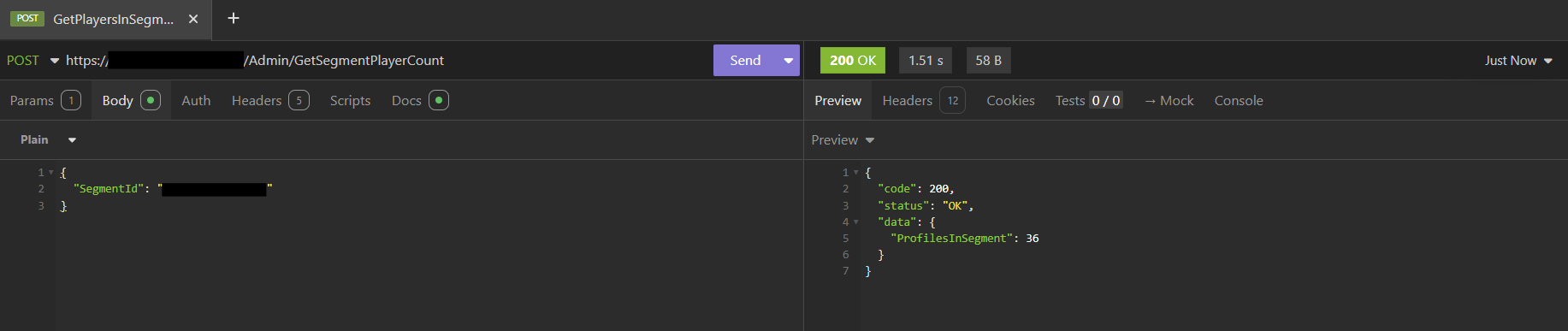 이 API에는 값이 타이틀 비밀 키인 ‘X-SecretKey’ 헤더가 필요합니다. ‘Content-Type’ 헤더는 ‘application/json’으로 설정되어야 합니다.
## Related topics
- [세그먼트의 플레이어 내보내기 자습서](/ko/services/playfab/live-service-management/game-configuration/segmentation/segmentation-export-players-in-a-segment.md)
- [플레이어 세그먼트](/ko/services/playfab/player-progression/player-data/player-segments.md)
- [플레이어 세그먼트 구성](/ko/services/playfab/player-progression/player-data/player-segment-configuration.md)
- [세그먼트 구성](/ko/services/playfab/live-service-management/game-configuration/segmentation/segmentation-configuration.md)
- [Economy(레거시)에서의 플레이어 세그먼트용 사용자 지정 스토어](/ko/services/playfab/economy-monetization/economy/tutorials/custom-stores-for-player-segments.md)
이 API에는 값이 타이틀 비밀 키인 ‘X-SecretKey’ 헤더가 필요합니다. ‘Content-Type’ 헤더는 ‘application/json’으로 설정되어야 합니다.
## Related topics
- [세그먼트의 플레이어 내보내기 자습서](/ko/services/playfab/live-service-management/game-configuration/segmentation/segmentation-export-players-in-a-segment.md)
- [플레이어 세그먼트](/ko/services/playfab/player-progression/player-data/player-segments.md)
- [플레이어 세그먼트 구성](/ko/services/playfab/player-progression/player-data/player-segment-configuration.md)
- [세그먼트 구성](/ko/services/playfab/live-service-management/game-configuration/segmentation/segmentation-configuration.md)
- [Economy(레거시)에서의 플레이어 세그먼트용 사용자 지정 스토어](/ko/services/playfab/economy-monetization/economy/tutorials/custom-stores-for-player-segments.md)