> ## Documentation Index
> Fetch the complete documentation index at: https://devdocs.xbox.com/llms.txt
> Use this file to discover all available pages before exploring further.
# 엔터티 빠른 시작
> Unity C#에서 PlayFab 엔터티를 시작하세요. 인증을 통해 EntityKey를 얻은 다음 SDK 샘플을 사용하여 엔터티 개체 및 엔터티 파일을 읽고 씁니다.
이 엔터티 빠른 시작에서는 엔터티 개체와 엔터티 파일을 다루는 방법을 보여줍니다.
레거시 계정 및 데이터 시스템에서 PlayFab 엔터티로 마이그레이션하는 방법에 대한 자세한 내용은 [엔터티 마이그레이션 정보](/services/playfab/live-service-management/game-configuration/entities/migration-information)를 참조하세요.
## 요구 사항
* [PlayFab 개발자 계정](https://developer.playfab.com).
* Unity Editor 설치본. Unity Editor 설치에 대한 자세한 내용은 Unity 설명서의 [Unity 설치](https://docs.unity3d.com/Manual/GettingStartedInstallingUnity.html)를 참조하세요. Visual Studio 기능 설치 관리자를 사용하여 Unity 버전을 설치할 수도 있습니다.
PlayFab Unity3D SDK는 Unity Editor 버전 5.3 이상을 지원합니다.
* Unity 프로젝트. Unity 프로젝트 생성에 대한 자세한 내용은 [빠른 시작 가이드](https://docs.unity3d.com/Manual/Quickstart3D.html)를 참조하세요.
Unity에 익숙하지 않은 경우, 최신 설치 패키지에서는 게임 제작 안내를 설치할 수 있는 옵션을 제공합니다. 이러한 안내 중 하나를 사용하여 다음 빠른 시작에서 사용할 샘플 게임을 만들 수 있습니다.
* PlayFab Unity3D SDK.
이 문서의 C# 샘플은 Unity SDK용으로 작성되었습니다. Unity SDK는 비동기 작업을 처리하기 위해 이벤트 기반 모델을 사용합니다. C# SDK를 사용하여 샘플 코드를 실행하려면 async Task 모델을 사용하도록 코드를 수정해야 합니다. 수정해야 하는 메서드에는 시그니처의 메서드 이름에 Async가 추가됩니다. 예를 들어 Unity SDK의 SetObject는 C# SDK에서 SetObjectAsync가 됩니다. 자세한 내용은 [async 및 await를 사용한 비동기 프로그래밍](https://learn.microsoft.com/en-us/dotnet/csharp/programming-guide/concepts/async/)을 참조하세요.
## 용어
엔터티는 데이터를 포함할 수 있는 모든 PlayFab 개념입니다. 기본 제공 엔터티 유형은 다음과 같습니다.
* **title** - 타이틀은 모든 플레이어가 사용할 수 있는 전역 정보를 포함합니다. 이는 [TitleData](xref:titleid.playfabapi.com.client.title-widedatamanagement.gettitledata)와 유사합니다. 게임/애플리케이션의 타이틀 ID(`TitleId`)로 식별됩니다.
* **master\_player\_account** - 이 엔터티 유형을 사용하면 네임스페이스 내 여러 게임에 걸쳐 플레이어에 대한 정보를 공유할 수 있습니다. 이는 플레이어의 플레이어 ID(`PlayFabId`)로 식별되며, 로그인 또는 플레이어 계정에 대한 계정 정보를 검색하는 모든 호출(예: PlayFab Client API [GetAccountInfo](xref:titleid.playfabapi.com.client.accountmanagement.getaccountinfo))의 일부로 반환됩니다.
* **title\_player\_account** - 현재 타이틀에 대한 일부 정보를 포함하는 플레이어 계정을 식별합니다. 이는 모든 로그인 시 [EntityKey](xref:titleid.playfabapi.com.authentication.authentication.getentitytoken#entitykey) 개체에서 반환되는 엔터티 ID(`EntityKey.Id`)로 식별됩니다.
* **character** - 플레이어가 소유한 캐릭터를 식별하며, 검색할 수 있는 정보를 포함합니다. 이는 캐릭터의 캐릭터 ID(`CharacterId`)로 식별됩니다.
기본 제공 엔터티 유형에 대한 자세한 내용은 [사용 가능한 기본 제공 엔터티 유형](/services/playfab/live-service-management/game-configuration/entities/available-built-in-entity-types)을 참조하세요.
## 엔터티 초기화
Entity API를 호출하려면 엔터티 `ID`와 엔터티 `Type`을 얻어야 합니다. `ID`와 `Type`을 사용하여 다른 Entity API 메서드를 호출합니다. 이들은 [EntityKey](xref:titleid.playfabapi.com.authentication.authentication.getentitytoken#entitykey) 개체의 멤버입니다.
`LoginWithCustomID`와 같은 로그인 메서드 중 하나를 호출하여 이 작업을 수행합니다.
```csharp theme={null}
void Login()
{
var request = new PlayFab.ClientModels.LoginWithCustomIDRequest
{
CustomId = SystemInfo.deviceUniqueIdentifier,
CreateAccount = true,
};
PlayFabClientAPI.LoginWithCustomID(request, OnLogin, OnSharedFailure);
}
void OnLogin(PlayFab.ClientModels.LoginResult result)
{
entityId = result.EntityToken.Entity.Id;
// The expected entity type is title_player_account.
entityType = result.EntityToken.Entity.Type;
}
```
[GetEntityToken](xref:titleid.playfabapi.com.authentication.authentication.getentitytoken) 메서드를 호출하여 엔터티 `ID`와 엔터티 `Type`을 얻을 수도 있습니다.
```csharp theme={null}
PlayFabAuthenticationAPI.GetEntityToken(new GetEntityTokenRequest(),
(entityResult) =>
{
var entityId = entityResult.Entity.Id;
var entityType = entityResult.Entity.Type;
}, OnPlayFabError); // Define your own OnPlayFabError function to report errors
```
클라이언트에서 호출할 경우 일반적으로 로그인한 플레이어를 나타냅니다. 게임 서버에서 호출할 경우 타이틀을 나타냅니다.
## 엔터티 개체
엔터티 개체를 사용하면 엔터티에 연결된 작은 JSON 직렬화 가능한 개체를 읽고 쓸 수 있습니다. 모든 엔터티 유형은 `GetObjects` 및 `SetObjects` 메서드를 지원합니다.
다음 코드 조각은 `title_player_account` 엔터티에서 `Object`를 설정하고 읽는 방법을 보여줍니다.
플레이어 또는 타이틀에 엔터티 개체를 설정하려면 [SetObjects](xref:titleid.playfabapi.com.data.object.setobjects) 메서드를 사용하세요.
```csharp theme={null}
var data = new Dictionary()
{
{"Health", 100},
{"Mana", 10000}
};
var dataList = new List()
{
new SetObject()
{
ObjectName = "PlayerData",
DataObject = data
},
// A free-tier customer may store up to 3 objects on each entity
};
PlayFabDataAPI.SetObjects(new SetObjectsRequest()
{
Entity = new EntityKey {Id = entityId, Type = entityType}, // Saved from GetEntityToken, or a specified key created from a titlePlayerId, CharacterId, etc
Objects = dataList,
}, (setResult) => {
Debug.Log(setResult.ProfileVersion);
}, OnPlayFabError);
```
플레이어 또는 타이틀의 엔터티 개체를 검색하려면 [GetObjects](xref:titleid.playfabapi.com.data.object.getobjects) 메서드를 사용하세요.
```csharp theme={null}
var getRequest = new GetObjectsRequest {Entity = new EntityKey {Id = entityId, Type = entityType}};
PlayFabDataAPI.GetObjects(getRequest,
result => { var objs = result.Objects; },
OnPlayFabError
);
```
## 엔터티 파일
엔터티 파일을 사용하면 어떤 형식으로든 엔터티에 첨부된 파일을 읽고 쓸 수 있습니다.
엔터티 파일을 검색하려면 [GetFiles](xref:titleid.playfabapi.com.data.file.getfiles) 메서드를 사용하세요.
```csharp theme={null}
void LoadAllFiles()
{
if (GlobalFileLock != 0)
throw new Exception("This example overly restricts file operations for safety. Careful consideration must be made when doing multiple file operations in parallel to avoid conflict.");
GlobalFileLock += 1; // Start GetFiles
var request = new PlayFab.DataModels.GetFilesRequest { Entity = new PlayFab.DataModels.EntityKey { Id = entityId, Type = entityType } };
PlayFabDataAPI.GetFiles(request, OnGetFileMeta, OnSharedFailure);
}
```
엔터티 프로필에 파일 업로드를 시작하려면 [initiatefileuploads](xref:titleid.playfabapi.com.data.file.initiatefileuploads) 메서드를 사용하세요.
```csharp theme={null}
void UploadFile(string fileName)
{
if (GlobalFileLock != 0)
throw new Exception("This example overly restricts file operations for safety. Careful consideration must be made when doing multiple file operations in parallel to avoid conflict.");
ActiveUploadFileName = fileName;
GlobalFileLock += 1; // Start InitiateFileUploads
var request = new PlayFab.DataModels.InitiateFileUploadsRequest
{
Entity = new PlayFab.DataModels.EntityKey { Id = entityId, Type = entityType },
FileNames = new List { ActiveUploadFileName },
};
PlayFabDataAPI.InitiateFileUploads(request, OnInitFileUpload, OnInitFailed);
}
```
엔터티 프로필로의 보류 중인 파일 업로드를 중단하려면 [AbortFileUploads](xref:titleid.playfabapi.com.data.file.abortfileuploads) 메서드를 사용하세요.
```csharp theme={null}
void OnInitFailed(PlayFabError error)
{
if (error.Error == PlayFabErrorCode.EntityFileOperationPending)
{
// This is an error you should handle when calling InitiateFileUploads, but your resolution path may vary
GlobalFileLock += 1; // Start AbortFileUploads
var request = new PlayFab.DataModels.AbortFileUploadsRequest
{
Entity = new PlayFab.DataModels.EntityKey { Id = entityId, Type = entityType },
FileNames = new List { ActiveUploadFileName },
};
PlayFabDataAPI.AbortFileUploads(request, (result) => { GlobalFileLock -= 1; UploadFile(ActiveUploadFileName); }, OnSharedFailure); GlobalFileLock -= 1; // Finish AbortFileUploads
GlobalFileLock -= 1; // Failed InitiateFileUploads
}
else
OnSharedFailure(error);
}
```
엔터티 프로필로의 파일 업로드를 완료하려면 [FinalizeFileUploads](xref:titleid.playfabapi.com.data.file.finalizefileuploads) 메서드를 사용하세요. 원자성 업로드 작업이 성공적으로 완료될 때까지 엔터티 시스템은 파일 업로드를 완료된 것으로 간주하지 않으며, 다른 호출자에게 변경 사항을 반영하지도 않습니다.
```csharp theme={null}
void FinalizeUpload(byte[] data)
{
GlobalFileLock += 1; // Start FinalizeFileUploads
var request = new PlayFab.DataModels.FinalizeFileUploadsRequest
{
Entity = new PlayFab.DataModels.EntityKey { Id = entityId, Type = entityType },
FileNames = new List { ActiveUploadFileName },
};
PlayFabDataAPI.FinalizeFileUploads(request, OnUploadSuccess, OnSharedFailure);
GlobalFileLock -= 1; // Finish SimplePutCall
}
```
아래에 표시된 예제는 로그인부터 파일 로드, 새 파일 업로드에 이르는 전체 엔터티-파일 루프를 보여줍니다.
이에 대한 단계는 다음과 같습니다.
* 로그인하고 엔터티 `ID`와 엔터티 `Type`을 검색합니다.
* 원자성 업로드 작업을 초기화합니다.
* 모든 파일을 업로드합니다.
* 원자성 업로드 작업을 완료합니다.
간결하게 하기 위해 이 예제는 한 번에 하나의 파일을 저장하지만, 파일은 세트로 원자적으로 업로드될 수 있습니다.
예제는 Unity 3D 엔진 사용에 익숙하다고 가정합니다.
```csharp theme={null}
#if !DISABLE_PLAYFABENTITY_API && !DISABLE_PLAYFABCLIENT_API
using PlayFab;
using PlayFab.Internal;
using System;
using System.Collections.Generic;
using System.Text;
using UnityEngine;
public class EntityFileExample : MonoBehaviour
{
public string entityId; // Id representing the logged in player
public string entityType; // entityType representing the logged in player
private readonly Dictionary _entityFileJson = new Dictionary();
private readonly Dictionary _tempUpdates = new Dictionary();
public string ActiveUploadFileName;
public string NewFileName;
// GlobalFileLock provides is a simplistic way to avoid file collisions, specifically designed for this example.
public int GlobalFileLock = 0;
void OnSharedFailure(PlayFabError error)
{
Debug.LogError(error.GenerateErrorReport());
GlobalFileLock -= 1;
}
// OnGUI provides a way to build a Unity GUI entirely within script.
// Your GUI will be game-specific.
void OnGUI()
{
if (!PlayFabClientAPI.IsClientLoggedIn() && GUI.Button(new Rect(0, 0, 100, 30), "Login"))
Login();
if (PlayFabClientAPI.IsClientLoggedIn() && GUI.Button(new Rect(0, 0, 100, 30), "LogOut"))
PlayFabClientAPI.ForgetAllCredentials();
if (PlayFabClientAPI.IsClientLoggedIn() && GUI.Button(new Rect(100, 0, 100, 30), "(re)Load Files"))
LoadAllFiles();
if (PlayFabClientAPI.IsClientLoggedIn())
{
// Display existing files
_tempUpdates.Clear();
var index = 0;
foreach (var each in _entityFileJson)
{
GUI.Label(new Rect(100 * index, 60, 100, 30), each.Key);
var tempInput = _entityFileJson[each.Key];
var tempOutput = GUI.TextField(new Rect(100 * index, 90, 100, 30), tempInput);
if (tempInput != tempOutput)
_tempUpdates[each.Key] = tempOutput;
if (GUI.Button(new Rect(100 * index, 120, 100, 30), "Save " + each.Key))
UploadFile(each.Key);
index++;
}
// Apply any changes
foreach (var each in _tempUpdates)
_entityFileJson[each.Key] = each.Value;
// Add a new file
NewFileName = GUI.TextField(new Rect(100 * index, 60, 100, 30), NewFileName);
if (GUI.Button(new Rect(100 * index, 90, 100, 60), "Create " + NewFileName))
UploadFile(NewFileName);
}
}
void Login()
{
var request = new PlayFab.ClientModels.LoginWithCustomIDRequest
{
CustomId = SystemInfo.deviceUniqueIdentifier,
CreateAccount = true,
};
PlayFabClientAPI.LoginWithCustomID(request, OnLogin, OnSharedFailure);
}
void OnLogin(PlayFab.ClientModels.LoginResult result)
{
entityId = result.EntityToken.Entity.Id;
entityType = result.EntityToken.Entity.Type;
}
void LoadAllFiles()
{
if (GlobalFileLock != 0)
throw new Exception("This example overly restricts file operations for safety. Careful consideration must be made when doing multiple file operations in parallel to avoid conflict.");
GlobalFileLock += 1; // Start GetFiles
var request = new PlayFab.DataModels.GetFilesRequest { Entity = new PlayFab.DataModels.EntityKey { Id = entityId, Type = entityType } };
PlayFabDataAPI.GetFiles(request, OnGetFileMeta, OnSharedFailure);
}
void OnGetFileMeta(PlayFab.DataModels.GetFilesResponse result)
{
Debug.Log("Loading " + result.Metadata.Count + " files");
_entityFileJson.Clear();
foreach (var eachFilePair in result.Metadata)
{
_entityFileJson.Add(eachFilePair.Key, null);
GetActualFile(eachFilePair.Value);
}
GlobalFileLock -= 1; // Finish GetFiles
}
void GetActualFile(PlayFab.DataModels.GetFileMetadata fileData)
{
GlobalFileLock += 1; // Start Each SimpleGetCall
PlayFabHttp.SimpleGetCall(fileData.DownloadUrl,
result => { _entityFileJson[fileData.FileName] = Encoding.UTF8.GetString(result); GlobalFileLock -= 1; }, // Finish Each SimpleGetCall
error => { Debug.Log(error); }
);
}
void UploadFile(string fileName)
{
if (GlobalFileLock != 0)
throw new Exception("This example overly restricts file operations for safety. Careful consideration must be made when doing multiple file operations in parallel to avoid conflict.");
ActiveUploadFileName = fileName;
GlobalFileLock += 1; // Start InitiateFileUploads
var request = new PlayFab.DataModels.InitiateFileUploadsRequest
{
Entity = new PlayFab.DataModels.EntityKey { Id = entityId, Type = entityType },
FileNames = new List { ActiveUploadFileName },
};
PlayFabDataAPI.InitiateFileUploads(request, OnInitFileUpload, OnInitFailed);
}
void OnInitFailed(PlayFabError error)
{
if (error.Error == PlayFabErrorCode.EntityFileOperationPending)
{
// This is an error you should handle when calling InitiateFileUploads, but your resolution path may vary
GlobalFileLock += 1; // Start AbortFileUploads
var request = new PlayFab.DataModels.AbortFileUploadsRequest
{
Entity = new PlayFab.DataModels.EntityKey { Id = entityId, Type = entityType },
FileNames = new List { ActiveUploadFileName },
};
PlayFabDataAPI.AbortFileUploads(request, (result) => { GlobalFileLock -= 1; UploadFile(ActiveUploadFileName); }, OnSharedFailure); GlobalFileLock -= 1; // Finish AbortFileUploads
GlobalFileLock -= 1; // Failed InitiateFileUploads
}
else
OnSharedFailure(error);
}
void OnInitFileUpload(PlayFab.DataModels.InitiateFileUploadsResponse response)
{
string payloadStr;
if (!_entityFileJson.TryGetValue(ActiveUploadFileName, out payloadStr))
payloadStr = "{}";
var payload = Encoding.UTF8.GetBytes(payloadStr);
GlobalFileLock += 1; // Start SimplePutCall
PlayFabHttp.SimplePutCall(response.UploadDetails[0].UploadUrl,
payload,
FinalizeUpload,
error => { Debug.Log(error); }
);
GlobalFileLock -= 1; // Finish InitiateFileUploads
}
void FinalizeUpload(byte[] data)
{
GlobalFileLock += 1; // Start FinalizeFileUploads
var request = new PlayFab.DataModels.FinalizeFileUploadsRequest
{
Entity = new PlayFab.DataModels.EntityKey { Id = entityId, Type = entityType },
FileNames = new List { ActiveUploadFileName },
};
PlayFabDataAPI.FinalizeFileUploads(request, OnUploadSuccess, OnSharedFailure);
GlobalFileLock -= 1; // Finish SimplePutCall
}
void OnUploadSuccess(PlayFab.DataModels.FinalizeFileUploadsResponse result)
{
Debug.Log("File upload success: " + ActiveUploadFileName);
GlobalFileLock -= 1; // Finish FinalizeFileUploads
}
}
#endif
```
각 파일 작업에는 많은 단계와 여러 API 호출이 필요하므로, 동일한 파일에 여러 가지 방식으로 동시에 접근하지 마세요. 매우 신중하게 처리한다면 잠금 메커니즘이 필요하지 않을 수도 있습니다. 복잡한 작업을 수행하려는 경우 잠금 메커니즘이 훨씬 더 복잡해질 수 있습니다.
## Game Manager 및 엔터티
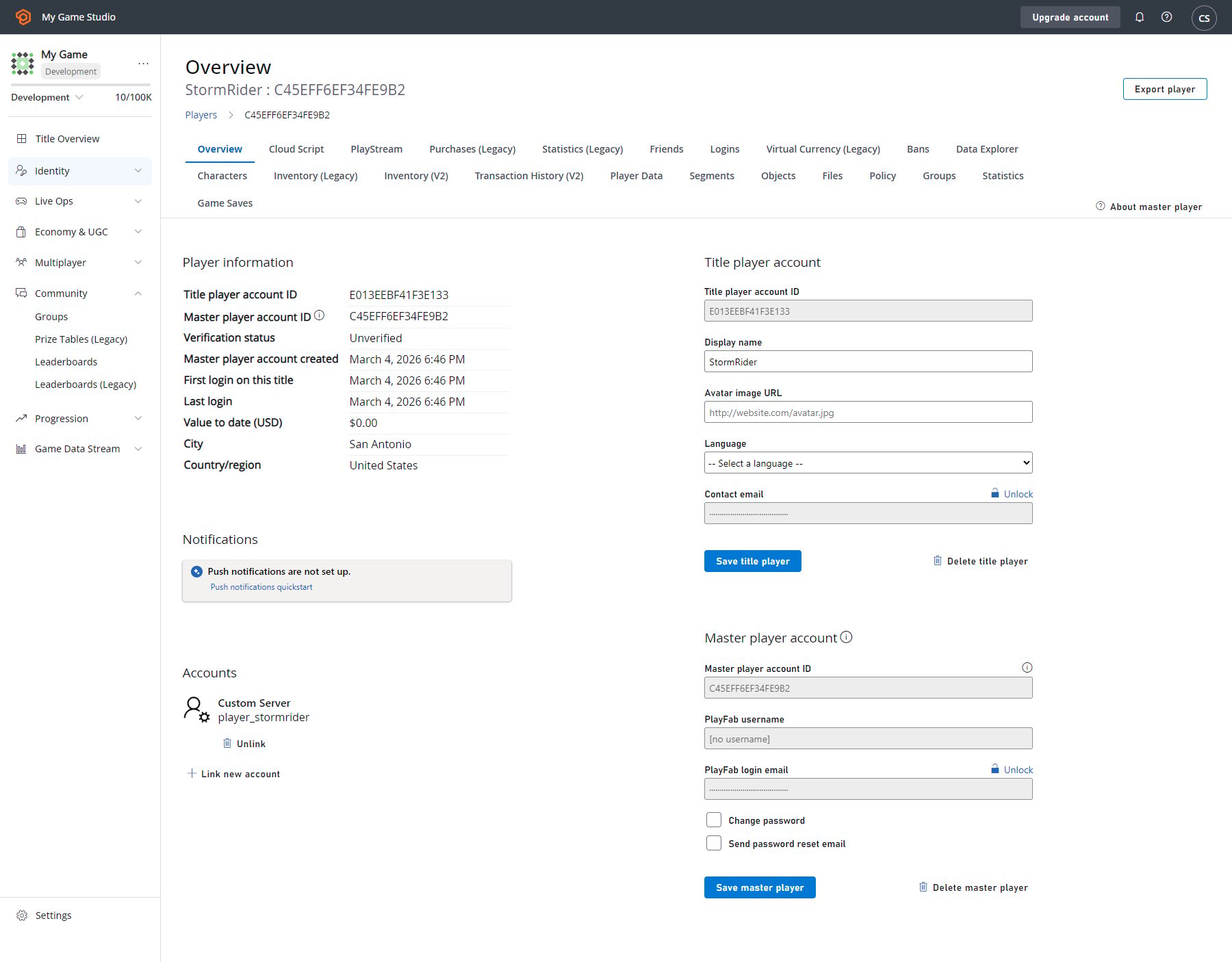
Game Manager를 사용하면 플레이어의 개체와 파일을 조작할 수 있습니다. 플레이어 개요에는 title player와 master player account 정보가 모두 표시됩니다.
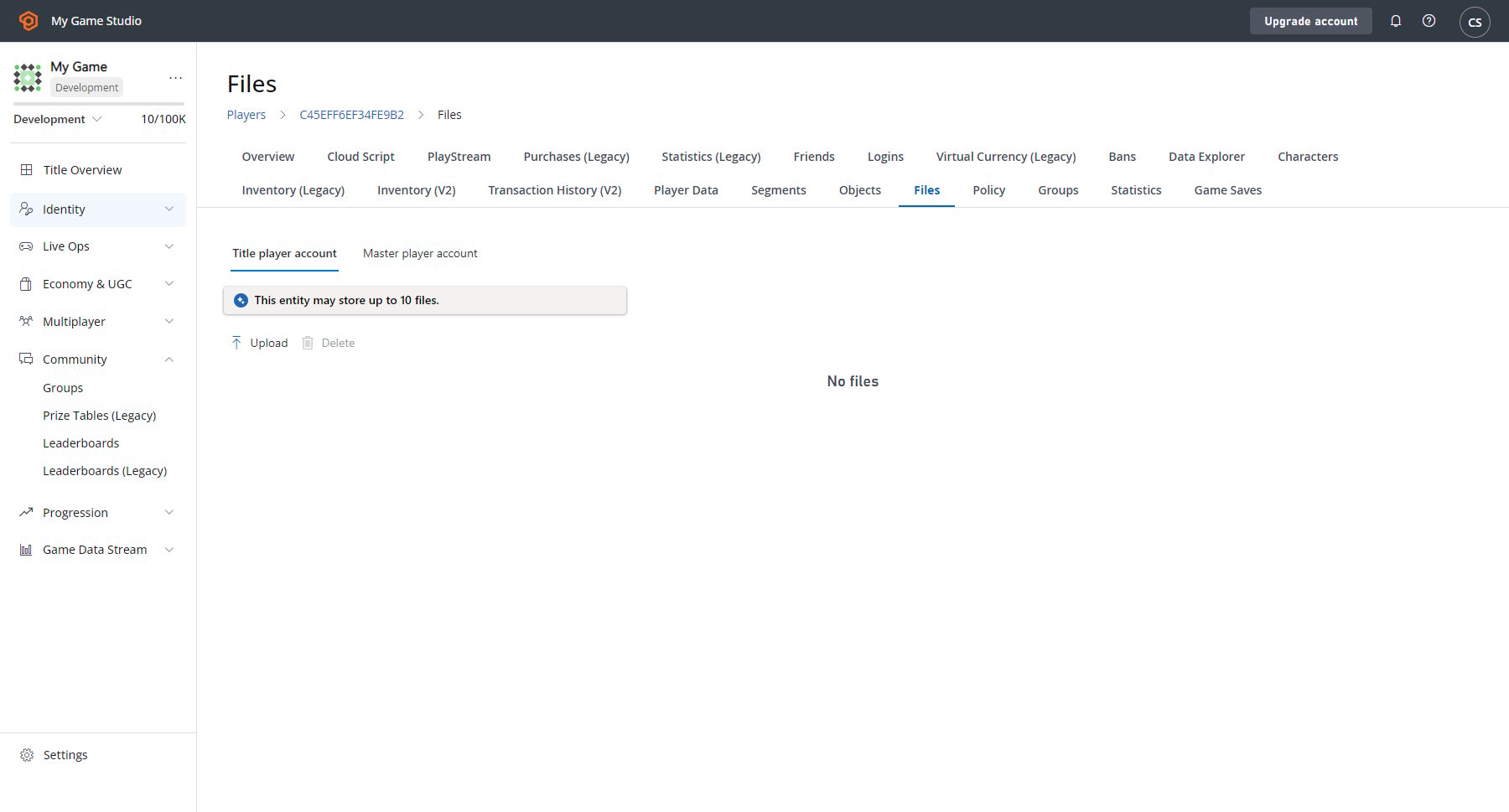
 또한 파일과 개체는 이제 **Players** 탭에 자체 섹션이 있습니다.
 ## 참고 항목
PlayFab 블로그의 [엔터티, 개체 및 파일 소개](https://blog.playfab.com/blog/introducing-entities-objects-and-files).
## Related topics
- [엔터티 마이그레이션 정보](/ko/services/playfab/live-service-management/game-configuration/entities/migration-information.md)
- [빠른 시작](/ko/services/playfab/economy-monetization/economy-v2/quickstart.md)
- [엔터티 핸들](/ko/services/playfab/sdks/c/entity-handles.md)
- [통계 빠른 시작](/ko/services/playfab/player-progression/statistics/quickstart-statistics.md)
- [Economy v2 가상 화폐 빠른 시작](/ko/services/playfab/economy-monetization/economy-v2/tutorials/currencies.md)
## 참고 항목
PlayFab 블로그의 [엔터티, 개체 및 파일 소개](https://blog.playfab.com/blog/introducing-entities-objects-and-files).
## Related topics
- [엔터티 마이그레이션 정보](/ko/services/playfab/live-service-management/game-configuration/entities/migration-information.md)
- [빠른 시작](/ko/services/playfab/economy-monetization/economy-v2/quickstart.md)
- [엔터티 핸들](/ko/services/playfab/sdks/c/entity-handles.md)
- [통계 빠른 시작](/ko/services/playfab/player-progression/statistics/quickstart-statistics.md)
- [Economy v2 가상 화폐 빠른 시작](/ko/services/playfab/economy-monetization/economy-v2/tutorials/currencies.md)