> ## Documentation Index
> Fetch the complete documentation index at: https://devdocs.xbox.com/llms.txt
> Use this file to discover all available pages before exploring further.
# Using the Profile for Advanced Leaderboards
> Configure PlayFab PlayerProfileViewConstraints to fetch richer player profile data such as avatar URLs and display names in leaderboard and ranking results.
PlayFab에서는 일반적으로 다음 API 메서드를 사용하여 리더보드를 구성합니다.
* [**GetFriendLeaderboard**](xref:titleid.playfabapi.com.client.playerdatamanagement.getfriendleaderboard)
* [**GetFriendLeaderboardAroundPlayer**](xref:titleid.playfabapi.com.client.playerdatamanagement.getfriendleaderboardaroundplayer)
* [**GetLeaderboard**](xref:titleid.playfabapi.com.client.playerdatamanagement.getleaderboard)
* [**GetLeaderboardAroundPlayer**](xref:titleid.playfabapi.com.client.playerdatamanagement.getleaderboardaroundplayer)
결과는 플레이어에 대한 기본 정보와 현재 리더보드와의 관계만 포함하는 [**PlayerLeaderboardEntry**](xref:titleid.playfabapi.com.client.playerdatamanagement.getleaderboard#playerleaderboardentry) 개체 목록입니다.
그러나 PlayFab은 [**PlayerProfileViewConstraints**](xref:titleid.playfabapi.com.server.accountmanagement.getplayerprofile#playerprofileviewconstraints)를 사용하여 각 플레이어에 대한 추가 정보를 얻을 수 있게 해줍니다.
이 예시에서는 이미 다뤄볼 수 있는 리더보드 데이터가 있다고 가정합니다. 테스트 데이터를 생성하는 방법은 [보관된 토너먼트 결과 액세스](/services/playfab/community/leaderboards/tournaments-leaderboards/accessing-archived-tournament-results) 튜토리얼을 참조하세요.
## 플레이어 프로필 뷰 제약 조건 구성
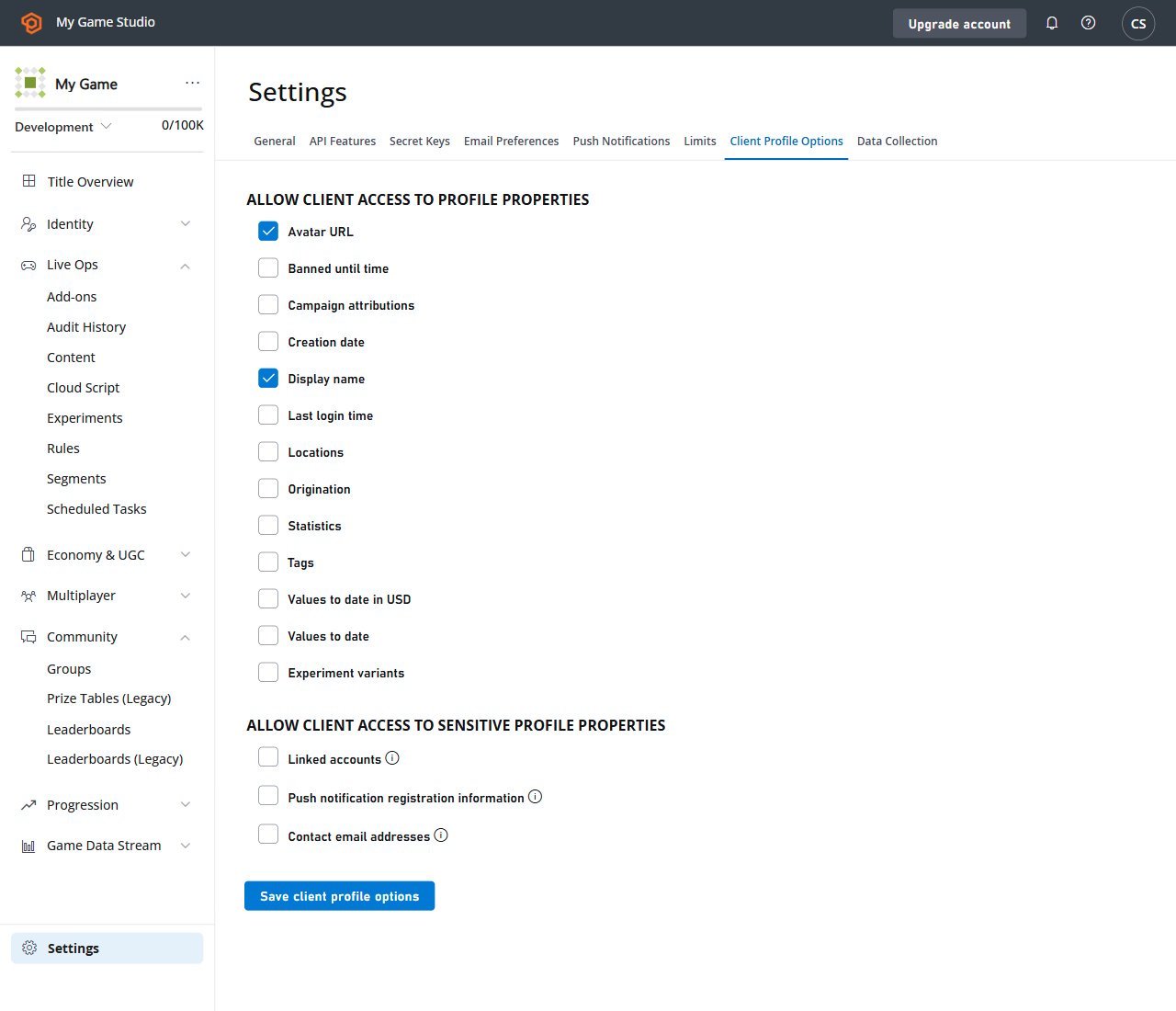
기본적으로 Client API는 다른 플레이어 프로필에서 display name만 가져올 수 있습니다. 이 예시에서는 *모든* 플레이어가 리더보드의 *다른* 플레이어에 대한 추가 정보에 액세스할 수 있도록 허용합니다.
타이틀 Game Manager로 이동합니다.
1. 왼쪽 메뉴에서 **Settings** 아이콘을 선택합니다.
2. **Title settings**를 선택합니다.
3. 그런 다음 **Client Profile Options** 탭을 선택합니다.
4. **DisplayName**이 선택되어 있는지 확인합니다.
5. **Avatar URL**이 선택되어 있는지 확인합니다.
6. **Save Client Profile Options** 버튼을 선택하여 변경 사항을 제출합니다.
 ## 테스트
이전 단계에서 클라이언트 코드가 `DisplayName`과 `AvatarUrl` 프로필 제약 조건을 사용할 수 있게 되었습니다.
다음 샘플은 언급된 프로필 데이터를 사용하여 리더보드를 가져오고 출력하는 방법을 보여줍니다. 자세한 내용은 코드 주석을 참조하세요.
```csharp theme={null}
private static async Task DoReadLeaderboard()
{
// Get Leaderboard Request
var result = await PlayFabClientAPI.GetLeaderboardAsync(new GetLeaderboardRequest()
{
// Specify your statistic name here
StatisticName = "TestScore",
// Override Player Profile View Constraints and fetch player DisplayName and AvatarUrl
ProfileConstraints = new PlayerProfileViewConstraints()
{
ShowDisplayName = true,
ShowAvatarUrl = true
}
});
// Start printing the leaderboard
Console.WriteLine("=== LEADERBOARD ===");
if (result.Error != null)
{
// Handle error if any
Console.WriteLine(result.Error.GenerateErrorReport());
}
else
{
// Traverse the leaderboard list
foreach (var entry in result.Result.Leaderboard)
{
// Print regular leaderboard entry information
Console.WriteLine($"{entry.Position + 1} {entry.PlayFabId} {entry.StatValue}");
// Additionally print display name and avatar url that comes from player profile
Console.WriteLine($" {entry.Profile.DisplayName} | {entry.Profile.AvatarUrl}");
}
}
}
```
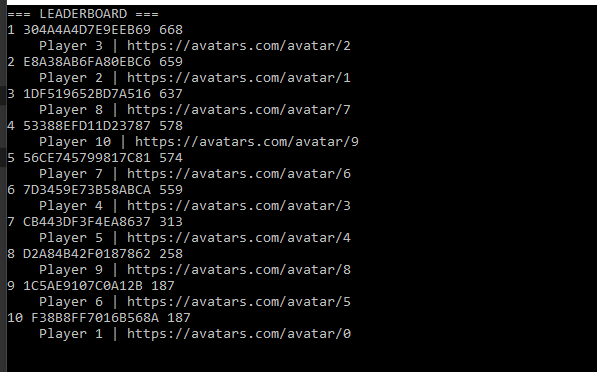
개별 프로필 필드는 클라이언트가 Profile Constraints를 사용하여 명시적으로 요청한 경우에만 사용할 수 *있습니다*. 또한 Game Manager에서 특정 프로필 제약 조건이 허용되지 *않는데* 클라이언트가 이를 요청하는 경우, API 호출은 해당 오류와 함께 실패합니다. 결과는 아래 예시와 유사하게 표시됩니다.
## 테스트
이전 단계에서 클라이언트 코드가 `DisplayName`과 `AvatarUrl` 프로필 제약 조건을 사용할 수 있게 되었습니다.
다음 샘플은 언급된 프로필 데이터를 사용하여 리더보드를 가져오고 출력하는 방법을 보여줍니다. 자세한 내용은 코드 주석을 참조하세요.
```csharp theme={null}
private static async Task DoReadLeaderboard()
{
// Get Leaderboard Request
var result = await PlayFabClientAPI.GetLeaderboardAsync(new GetLeaderboardRequest()
{
// Specify your statistic name here
StatisticName = "TestScore",
// Override Player Profile View Constraints and fetch player DisplayName and AvatarUrl
ProfileConstraints = new PlayerProfileViewConstraints()
{
ShowDisplayName = true,
ShowAvatarUrl = true
}
});
// Start printing the leaderboard
Console.WriteLine("=== LEADERBOARD ===");
if (result.Error != null)
{
// Handle error if any
Console.WriteLine(result.Error.GenerateErrorReport());
}
else
{
// Traverse the leaderboard list
foreach (var entry in result.Result.Leaderboard)
{
// Print regular leaderboard entry information
Console.WriteLine($"{entry.Position + 1} {entry.PlayFabId} {entry.StatValue}");
// Additionally print display name and avatar url that comes from player profile
Console.WriteLine($" {entry.Profile.DisplayName} | {entry.Profile.AvatarUrl}");
}
}
}
```
개별 프로필 필드는 클라이언트가 Profile Constraints를 사용하여 명시적으로 요청한 경우에만 사용할 수 *있습니다*. 또한 Game Manager에서 특정 프로필 제약 조건이 허용되지 *않는데* 클라이언트가 이를 요청하는 경우, API 호출은 해당 오류와 함께 실패합니다. 결과는 아래 예시와 유사하게 표시됩니다.
 이 기법을 사용하여 다른 통계 값을 포함하여 프로필 정보의 일부를 가져올 수 있습니다.
## Related topics
- [XBOX 인증 개요](/ko/publishing/certification/overview.md)
- [Using resettable statistics and leaderboards](/ko/services/playfab/community/leaderboards/tournaments-leaderboards/using-resettable-statistics-and-leaderboards.md)
- [Leaderboards using Azure Functions](/ko/services/playfab/community/leaderboards/leaderboards-cloudscript.md)
- [Doing with more leaderboards](/ko/services/playfab/community/leaderboards/doing-more-with-leaderboards.md)
- [Using Prize Tables](/ko/services/playfab/community/leaderboards/tournaments-leaderboards/using-prize-tables.md)
이 기법을 사용하여 다른 통계 값을 포함하여 프로필 정보의 일부를 가져올 수 있습니다.
## Related topics
- [XBOX 인증 개요](/ko/publishing/certification/overview.md)
- [Using resettable statistics and leaderboards](/ko/services/playfab/community/leaderboards/tournaments-leaderboards/using-resettable-statistics-and-leaderboards.md)
- [Leaderboards using Azure Functions](/ko/services/playfab/community/leaderboards/leaderboards-cloudscript.md)
- [Doing with more leaderboards](/ko/services/playfab/community/leaderboards/doing-more-with-leaderboards.md)
- [Using Prize Tables](/ko/services/playfab/community/leaderboards/tournaments-leaderboards/using-prize-tables.md)