> ## Documentation Index
> Fetch the complete documentation index at: https://devdocs.xbox.com/llms.txt
> Use this file to discover all available pages before exploring further.
# Using player statistics
> Learn how to create, update, and query PlayFab player statistics as key value pairs, and how to configure client and server permissions in Game Manager.
이 튜토리얼에서는 플레이어 통계를 만들고 사용하는 방법을 설명합니다. 플레이어 통계는 Key Value Pair(KVP)로 저장되며, Key는 문자열이고 Value는 32비트 정수(64비트를 지원하지 않는 언어와의 호환성을 위해)입니다.
플레이어 통계는 리더보드에서도 사용되지만, 이 가이드에서는 플레이어 통계만 다룹니다. 플레이어 통계와 리더보드가 *함께* 어떻게 작동하는지 읽고 싶다면 튜토리얼 [재설정 가능한 통계 및 리더보드 사용](/services/playfab/community/leaderboards/tournaments-leaderboards/using-resettable-statistics-and-leaderboards)을 참조하세요.
일부 문서와 API 호출에서 **UserStatistics**라는 용어를 발견할 수 있습니다. 여기서는 *user*와 *player*가 동일하며 서로 바꿔 사용할 수 있습니다. **Game Manager** 페이지에서 **Players** 탭은 타이틀의 **Users/Players**와 그 안의 통계에 접근할 수 있도록 해줍니다. 플레이어 통계는 플레이어에 바인딩된 정보를 구체적으로 의미하며, 플레이어에 대한 분석 정보를 뜻하는 것은 아닙니다.
## 클라이언트 API
클라이언트는 플레이어 통계를 읽을 수 있지만, 부정 행위를 방지하기 위해 기본적으로 통계를 업데이트할 수는 없습니다.
이를 활성화하려면:
* [PlayFab에 로그인](https://developer.playfab.com/en-us/my-games)
* **Title**을 선택합니다.
* 왼쪽 메뉴에서 **Settings**를 선택합니다.
* **API Features** 탭을 선택합니다.
* **Allow client to post player statistics**를 찾아 활성화합니다.
이렇게 하면 타이틀의 보안 계층이 비활성화되어 플레이어가 임의의 점수를 자신의 모든 통계에 게시할 수 있게 됩니다. 게임에 *어떤* 경쟁 요소가 있다면 *절대* 클라이언트에서 통계를 게시하지 않는 것이 좋습니다.
## 통계는 공개 정보입니다
비공개 또는 서버 전용 통계는 없습니다. 플레이어는 [GetPlayerStatistics](xref:titleid.playfabapi.com.client.playerdatamanagement.getplayerstatistics)를 통해 항상 자신의 모든 통계를 읽을 수 있으며, 리더보드 API 호출을 통해 다른 모든 플레이어의 통계도 읽을 수 있습니다. 이는 게임에서 통계를 표시하지 *않거나* 리더보드를 사용하지 않더라도 마찬가지입니다.
이 규칙의 유일한 예외는 [API 액세스 정책](/services/playfab/api-references/api-access-policy)을 통해 클라이언트 기능을 비활성화하는 경우입니다. 타이틀에 대한 정책 설정을 사용하는 방법에 대한 자세한 내용은 해당 링크를 참조하세요. 이는 고급 주제로, 이 튜토리얼에서는 다루지 않습니다.
## 통계 설정
다음 Unity/C# 코드는 플레이어의 *strength 통계* 값을 만들거나(이미 존재하는 경우) 업데이트합니다.
```csharp theme={null}
PlayFabClientAPI.UpdatePlayerStatistics( new UpdatePlayerStatisticsRequest {
// request.Statistics is a list, so multiple StatisticUpdate objects can be defined if required.
Statistics = new List {
new StatisticUpdate { StatisticName = "strength", Value = 18 },
}
},
result => { Debug.Log("User statistics updated"); },
error => { Debug.LogError(error.GenerateErrorReport()); });
```
## 통계 가져오기
다음 Unity/C# 코드는 플레이어의 모든 현재 통계 값을 검색합니다.
```csharp theme={null}
void GetStatistics()
{
PlayFabClientAPI.GetPlayerStatistics(
new GetPlayerStatisticsRequest(),
OnGetStatistics,
error => Debug.LogError(error.GenerateErrorReport())
);
}
void OnGetStatistics(GetPlayerStatisticsResult result)
{
Debug.Log("Received the following Statistics:");
foreach (var eachStat in result.Statistics)
Debug.Log("Statistic (" + eachStat.StatisticName + "): " + eachStat.Value);
}
```
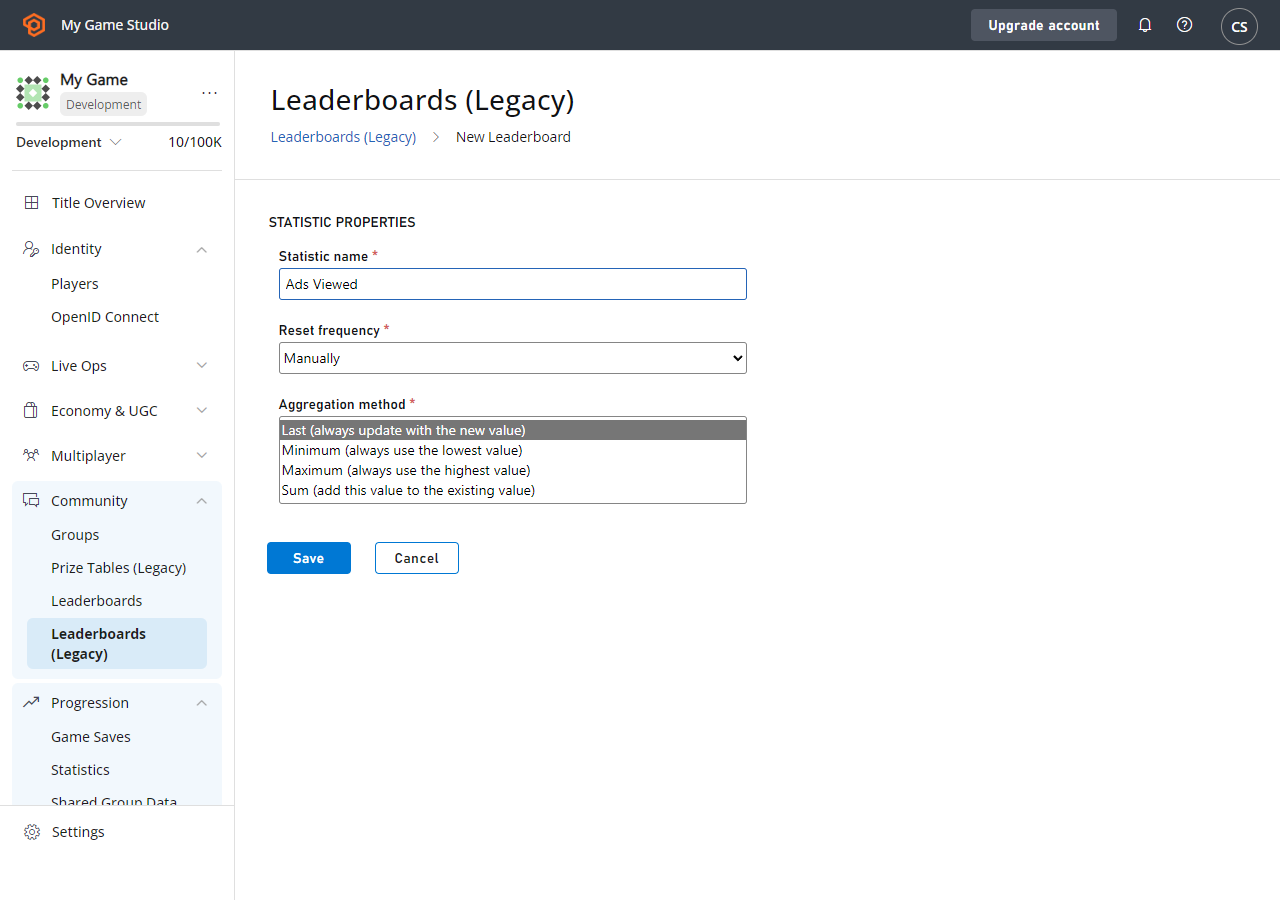
## Aggregation 방식
PlayFab은 통계 집계를 위한 몇 가지 편의 옵션을 지원합니다. 네 가지 옵션은 다음과 같습니다.
* **Last**
* **Min**
* **Max**
* **Sum**
[CreatePlayerStatisticDefinition](xref:titleid.playfabapi.com.admin.playerdatamanagement.createplayerstatisticdefinition) API 호출을 통해 통계 정의를 만들 수 있지만 필수는 아닙니다. 타이틀의 플레이어 통계를 업데이트하는 모든 호출은 Last Aggregation 방식을 사용하여 기본 통계 정의를 *자동으로* 만듭니다.
통계 집계 방식을 변경하려면 Game Manager 또는 [UpdatePlayerStatisticDefinition](xref:titleid.playfabapi.com.admin.playerdatamanagement.updateplayerstatisticdefinition) API 호출을 사용할 수 있습니다.
**Game Manager**에서 통계 정의를 편집하려면:
* [PlayFab](https://developer.playfab.com/en-us/my-games)에 로그인합니다.
* **Title**을 선택합니다.
* 왼쪽 메뉴에서 **Leaderboards**를 선택합니다(**Statistics**와 **Leaderboards**는 밀접한 관련이 있습니다).
* 수정하려는 기존 통계를 선택하거나 -
* **New Leaderboard** 버튼을 선택합니다.
* 기존 통계의 경우 **Edit Leaderboard** 버튼이 있는 별도의 페이지가 표시됩니다.
* 이 시점에서 아래에 표시된 페이지가 보여야 합니다.
 통계 집계를 사용하는 방법의 예시:
* **Max**와 **Min**은 헤드샷이나 명중률 같은 **최고/최저** 점수를 저장하는 데 사용할 수 있습니다.
* 간단히 말해, **이 점수가 기존 점수보다 높거나(또는 낮으면) 점수를 업데이트한다**는 규칙을 적용합니다.
* 세션 종료 시 통계를 게시하면, **Min/Max Aggregation**이 업데이트 여부를 처리합니다.
* 이는 [재설정 가능한 리더보드](/services/playfab/community/leaderboards/tournaments-leaderboards/using-resettable-statistics-and-leaderboards)와 업적을 부여하는 [PlayStream Rule](https://playfab.com/introducing-playstream/)에 매우 유용할 수 있습니다.
* **Sum**은 경험치를 저장하는 데 사용할 수 있습니다.
* 이 전투에서 얻은 경험치를 게시하면 플레이어의 기존 통계 값에 더해집니다.
* **Last**를 사용하면 통계를 직접 관리할 수 있습니다.
* 통계를 게시할 때마다 가장 최근 값이 사용됩니다.
## 리더보드
리더보드는 PlayFab에 저장된 모든 통계에 대해 생성됩니다. 특정 통계에 대한 리더보드에 액세스하는 것은 선택 사항입니다.
재설정 빈도와 집계 방식은 게임의 리더보드가 얼마나 동적인지에 큰 역할을 합니다. **Tournaments** 기능은 자동 재설정 빈도를 가진 리더보드에 초점을 맞추며, 튜토리얼 [재설정 가능한 통계 및 리더보드 사용](/services/playfab/community/leaderboards/tournaments-leaderboards/using-resettable-statistics-and-leaderboards)에 설명되어 있습니다.
게임과 관련된 모든 방식으로 통계를 활용하는 것이 좋습니다. 일일 토너먼트를 진행하기 위한 재설정 가능한 통계와 경험치 같은 장기 통계를 나란히 사용할 수 있습니다.
## Related topics
- [Using resettable statistics and leaderboards](/ko/services/playfab/community/leaderboards/tournaments-leaderboards/using-resettable-statistics-and-leaderboards.md)
- [PlayerStatistic](/ko/services/playfab/api-references/events/data-types/playerstatistic.md)
- [player_statistic_changed](/ko/services/playfab/api-references/events/Leaderboards/player-statistic-changed.md)
- [player_statistic_deleted](/ko/services/playfab/api-references/events/Leaderboards/player-statistic-deleted.md)
- [Ranking players by statistics](/ko/services/playfab/community/leaderboards/leaderboards-linked-to-stats.md)
통계 집계를 사용하는 방법의 예시:
* **Max**와 **Min**은 헤드샷이나 명중률 같은 **최고/최저** 점수를 저장하는 데 사용할 수 있습니다.
* 간단히 말해, **이 점수가 기존 점수보다 높거나(또는 낮으면) 점수를 업데이트한다**는 규칙을 적용합니다.
* 세션 종료 시 통계를 게시하면, **Min/Max Aggregation**이 업데이트 여부를 처리합니다.
* 이는 [재설정 가능한 리더보드](/services/playfab/community/leaderboards/tournaments-leaderboards/using-resettable-statistics-and-leaderboards)와 업적을 부여하는 [PlayStream Rule](https://playfab.com/introducing-playstream/)에 매우 유용할 수 있습니다.
* **Sum**은 경험치를 저장하는 데 사용할 수 있습니다.
* 이 전투에서 얻은 경험치를 게시하면 플레이어의 기존 통계 값에 더해집니다.
* **Last**를 사용하면 통계를 직접 관리할 수 있습니다.
* 통계를 게시할 때마다 가장 최근 값이 사용됩니다.
## 리더보드
리더보드는 PlayFab에 저장된 모든 통계에 대해 생성됩니다. 특정 통계에 대한 리더보드에 액세스하는 것은 선택 사항입니다.
재설정 빈도와 집계 방식은 게임의 리더보드가 얼마나 동적인지에 큰 역할을 합니다. **Tournaments** 기능은 자동 재설정 빈도를 가진 리더보드에 초점을 맞추며, 튜토리얼 [재설정 가능한 통계 및 리더보드 사용](/services/playfab/community/leaderboards/tournaments-leaderboards/using-resettable-statistics-and-leaderboards)에 설명되어 있습니다.
게임과 관련된 모든 방식으로 통계를 활용하는 것이 좋습니다. 일일 토너먼트를 진행하기 위한 재설정 가능한 통계와 경험치 같은 장기 통계를 나란히 사용할 수 있습니다.
## Related topics
- [Using resettable statistics and leaderboards](/ko/services/playfab/community/leaderboards/tournaments-leaderboards/using-resettable-statistics-and-leaderboards.md)
- [PlayerStatistic](/ko/services/playfab/api-references/events/data-types/playerstatistic.md)
- [player_statistic_changed](/ko/services/playfab/api-references/events/Leaderboards/player-statistic-changed.md)
- [player_statistic_deleted](/ko/services/playfab/api-references/events/Leaderboards/player-statistic-deleted.md)
- [Ranking players by statistics](/ko/services/playfab/community/leaderboards/leaderboards-linked-to-stats.md)