> ## Documentation Index
> Fetch the complete documentation index at: https://devdocs.xbox.com/llms.txt
> Use this file to discover all available pages before exploring further.
# API Access Policy
> PlayFab에서 API 액세스 정책을 사용하는 방법을 설명합니다.
API Access Policy는 API 리소스에 대한 접근을 제어합니다. 부정 행위 방지나 기타 보안 목적으로, 타이틀이 게임 클라이언트에서 특정 API를 허용하거나 거부해야 할 때가 있습니다. Policy Statements를 사용하여 특정 상황에서 적용되는 접근 규칙 세트를 지정함으로써 액세스를 제어할 수 있습니다.
이 항목에서는 API 권한 정책을 사용하여 적절한 규칙을 만드는 방법을 설명합니다.
Game Manager에서 직접 타이틀의 API 액세스 정책을 관리할 수도 있습니다. 자세한 내용은 [API Access Policy in Game Manager](/services/playfab/live-service-management/gamemanager/api-access-page-doc)를 참조하세요.
이 가이드에서는 고급 기법을 설명합니다. 잘못 적용하면 이 기능을 사용하여 타이틀에 대한 클라이언트 액세스를 완전히 비활성화할 수 있습니다.
## Policy control and structure
타이틀은 PlayFab Admin API 호출을 사용하여 접근 정책을 검색하고 업데이트합니다. API 액세스 정책을 설정하는 데 사용되는 두 가지 특정 호출은 [GetPolicy](xref:titleid.playfabapi.com.admin.authentication.getpolicy)와 [UpdatePolicy](xref:titleid.playfabapi.com.admin.authentication.updatepolicy)입니다. Admin API 호출에 대한 자세한 내용은 [PlayFab API Reference](https://learn.microsoft.com/en-us/rest/api/services/services/playfab/admin/)를 참조하세요.
Admin API를 사용하려면 타이틀과 연결된 개발자 비밀 키를 제공해야 합니다. 개발자 키는 타이틀이 Admin API 호출을 하도록 승인하는 데 사용됩니다. 비밀 키 검색에 대한 자세한 내용은 [Secret key management](/services/playfab/live-service-management/gamemanager/secret-key-management)를 참조하세요.
각 정책에는 하나 이상의 PlayFab 리소스에 대한 규칙 역할을 하는 문(statement) 목록이 포함되어 있습니다. PlayFab은 모든 정책을 허용하는 기본 정책 문 집합을 정의합니다. 이 정책 문 집합을 대체하지 않고 삭제하면, 타이틀이 Client API를 호출할 수 없게 됩니다.
기본 PlayFab 정책 문:
```json theme={null}
"Statements": [
{
"Resource": "pfrn:api--*",
"Action": "*",
"Effect": "Allow",
"Principal": "*",
"Comment": "The default allow all policy"
}
]
```
각 권한 문 집합은 [Authentication - Update Policy](xref:titleid.playfabapi.com.admin.authentication.updatepolicy#permissionstatement)에 정의된 대로 다음 항목으로 구성됩니다:
* Resource - 하나 이상의 PlayFab 리소스를 고유하게 식별하는 문자열입니다. API 리소스를 설명하려면 아래에 표시된 규칙을 사용하세요. `pfrn:api--/API-GROUP/API-CALL` `API-GROUP`으로 Client API를 지정합니다: `Client`, `Server` 또는 `Admin`. `API-CALL`을 `ConfirmPurchase`, `LoginWithTwitch` 또는 `ReportPlayer`와 같은 API 이름으로 바꿉니다. 리소스 문자열은 와일드카드를 지원합니다. 다음 리소스 문자열은 모든 리소스와 일치합니다. `pfrn:api--*`
* Action - 리소스에서 수행할 작업을 설명하는 문자열입니다. 모든 작업과 일치시키려면 `*`를 사용합니다.
* Effect - 규칙 정의를 지정하는 문자열입니다. 리소스에 대한 작업을 허용하거나 거부하려면 `Allow` 또는 `Deny`를 사용합니다.
* Principal - 사용자의 클래스를 고유하게 식별하는 문자열입니다. 모든 사용자와 일치시키려면 `*`를 사용합니다.
* Comment - 정책 문에 대한 추가 정보를 제공하는 사용자 정의 문자열입니다.
* ApiConditions - 고급 규칙 조건(예: 암호화 및 서명된 헤더)을 정의하는 \_선택적 객체\_입니다.
애플리케이션에서 사용하는 API만 접근할 수 있도록 허용하는 보다 상세한 권한 문을 사용하도록 정책을 수정하여 애플리케이션에 대한 강력한 보안 규칙을 설정할 수 있습니다.
다음 예제는 `DeleteCharacterFromUser` 호출을 제한하는 방법을 보여줍니다:
```json theme={null}
{
"Resource": "pfrn:api--/Server/DeleteCharacterFromUser",
"Action": "",
"Effect": "Deny",
"Principal": "",
"Comment": "Disable server character delete"
}
```
## API access policy example
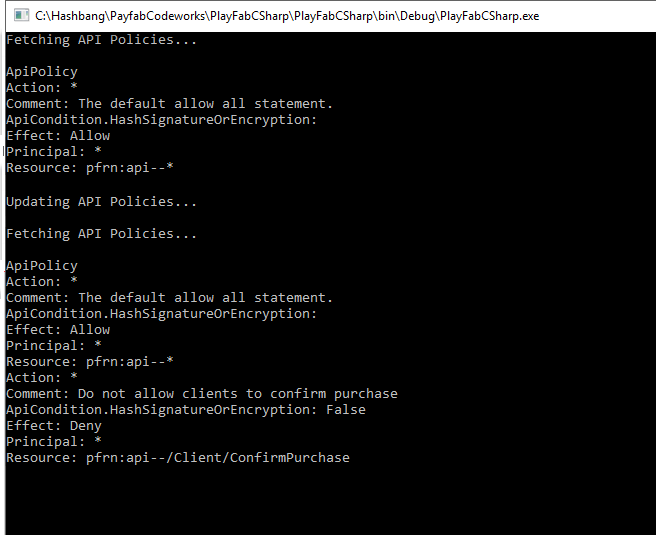
다음 코드 샘플은 정책의 기본 작업을 보여줍니다. 코드는 다음 작업을 수행합니다:
* 기존 **Policy**를 검색하고 로깅합니다.
* 정책을 업데이트합니다.
* 기존 **Policy**를 다시 검색하고 로깅합니다.
```csharp theme={null}
public void Start() {
PlayFabSettings.staticSettings.DeveloperSecretKey = "";
PlayFabSettings.TitleId = "< insert title id here >";
FetchApiPolicy(UpdateApiPolicy);
}
private void FetchApiPolicy(Action nextAction = null) {
PlayFabAdminAPI.GetPolicy(new GetPolicyRequest() {
PolicyName = "ApiPolicy"
}, result => {
Debug.Log(result.PolicyName);
foreach (var statement in result.Statements)
{
Debug.Log("Action: "+ statement.Action);
Debug.Log("Comment: "+ statement.Comment);
if(statement.ApiConditions != null)
Debug.Log("ApiCondition.HashSignatureOrEncryption: "+ statement.ApiConditions.HasSignatureOrEncryption);
Debug.Log("Effect: "+ statement.Effect);
Debug.Log("Principal: "+statement.Principal);
Debug.Log("Resource: "+ statement.Resource);
}
if (nextAction != null) nextAction();
},error=>Debug.LogError(error.GenerateErrorReport()));
}
private void UpdateApiPolicy() {
PlayFabAdminAPI.UpdatePolicy(new UpdatePolicyRequest() {
PolicyName = "ApiPolicy",
OverwritePolicy = false, // Append to existing policy. Set to True, to overwrite.
Statements = new List() {
new PermissionStatement() {
Action = "*", // Statement effects Execute action
ApiConditions = new ApiCondition() {
HasSignatureOrEncryption = Conditionals.False // Require no RSA encrypted payload or signed headers
},
Comment = "Do not allow clients to confirm purchase",
Resource = "pfrn:api--/Client/ConfirmPurchase", // Resource name
Effect = EffectType.Deny, // Do not allow,
Principal = "*"
}
}
}, result => {
FetchApiPolicy();
}, error => Debug.LogError(error.GenerateErrorReport()));
}
```
아래 이미지는 코드를 처음 실행한 후의 출력 예를 보여줍니다. 표시된 것처럼, 정책은 여러 [Permission Statements](xref:titleid.playfabapi.com.admin.authentication.updatepolicy#permissionstatement)로 구성되어 있습니다.
 ## Related topics
- [Game Manager의 API 액세스 정책](/ko/services/playfab/live-service-management/gamemanager/api-access-page-doc.md)
- [PlayFab의 PlayStream 이벤트 모델 참조](/ko/services/playfab/api-references/events/index.md)
- [access_policy_updated](/ko/services/playfab/api-references/events/PlayerProfile/access-policy-updated.md)
- [Lobby.AccessPolicy](/ko/services/playfab/multiplayer/lobby/unity-multiplayer-api-reference/PlayFab.Multiplayer/Lobby/AccessPolicy.md)
- [LobbyAccessPolicy](/ko/services/playfab/multiplayer/lobby/unity-multiplayer-api-reference/PlayFab.Multiplayer/LobbyAccessPolicy.md)
## Related topics
- [Game Manager의 API 액세스 정책](/ko/services/playfab/live-service-management/gamemanager/api-access-page-doc.md)
- [PlayFab의 PlayStream 이벤트 모델 참조](/ko/services/playfab/api-references/events/index.md)
- [access_policy_updated](/ko/services/playfab/api-references/events/PlayerProfile/access-policy-updated.md)
- [Lobby.AccessPolicy](/ko/services/playfab/multiplayer/lobby/unity-multiplayer-api-reference/PlayFab.Multiplayer/Lobby/AccessPolicy.md)
- [LobbyAccessPolicy](/ko/services/playfab/multiplayer/lobby/unity-multiplayer-api-reference/PlayFab.Multiplayer/LobbyAccessPolicy.md)