> ## Documentation Index
> Fetch the complete documentation index at: https://devdocs.xbox.com/llms.txt
> Use this file to discover all available pages before exploring further.
# XStore 개발 및 테스트 활성화
> 사용 권한, 라이선싱, 테스트 계정 요구 사항을 포함하여 샌드박스에서 XStore API 개발 및 테스트용으로 XBOX 제품을 설정합니다.
게임은 [XStore API](/reference/system/xstore/xstore_members)를 사용해 게임 및 관련 제품(예: 추가 기능)과 연결된 라이선스와 사용 권한에 대한 작업을 수행합니다. 많은 `XStore` 작업은 Microsoft Store 서비스가 관리하는 게임 정보를 조작합니다.
이 페이지는 이전 버전에서 상당 부분 업데이트되었습니다.
2023년 6월부터 대부분의[\*](#exceptions) `XStore` API 테스트는 더 이상 빌드를 라이선스 부여 가능하게 설정하거나(예: contentIdOverride) 각 계정이 게임에 대한 사용 권한을 갖도록 요구하지 않습니다.
개발 샌드박스에서 커머스를 테스트할 때는 단일 테스트 계정의 모든 구매가 동일한 샌드박스에서 이루어져야 합니다. 테스트 계정을 다른 샌드박스로 전환하고 더 많은 항목을 구매하면 두 샌드박스 모두에서 해당 계정에 대해 예기치 않은 쿼리 결과가 발생합니다. 이는 구매의 라이선스와 정보가 단일 계정에 대해 항목이 처음 구매된 샌드박스에 연결되기 때문입니다.
PC의 개발 샌드박스에서 커머스를 테스트할 때는 Microsoft Store 앱과 XBOX 앱에 로그인된 계정이 동일한지 확인하세요. 샌드박스에 있을 때 Microsoft Store의 항목에 사용되는 자격 증명은 특정 XBOX 계정에 연결됩니다. 이것은 모든 작업이 활성 샌드박스에 게시된 제품과 상호 작용하도록 하는 데 매우 중요합니다. 자세한 내용은 [PC에서 스토어 계정 불일치 시나리오 처리](/publishing/xstore-commerce/xstore-mismatched-accounts)를 참고하세요.
대부분의[\*](#exceptions) `XStore` API를 테스트하려면 게임 config에 Partner Center에서 파생된 적절한 값이 포함되어 있는지 확인합니다.
* **[XStoreQueryGameLicenseAsync](/reference/system/xstore/xstore_members) 같은 라이선싱 관련 API는 제대로 작동하려면 완전히 라이선스된 컨텍스트가 필요합니다.** 자세한 내용은 [라이선스 테스트 활성화](/publishing/xstore-commerce/xstore-licensing-setup)를 참고하세요.
## MicrosoftGameConfig에 게임 ID 적용
먼저 [Partner Center](/publishing/xstore-commerce/xstore-initial-configuration)에서 게임과 추가 기능을 게시하세요.
그런 다음 게임의 config 파일에서 값이 구성된 타이틀과 일치하는지 확인합니다.
```xml theme={null}
9NTL0QDWZ4FS
000000004C2690C8
62ab3c24
```
### Identity
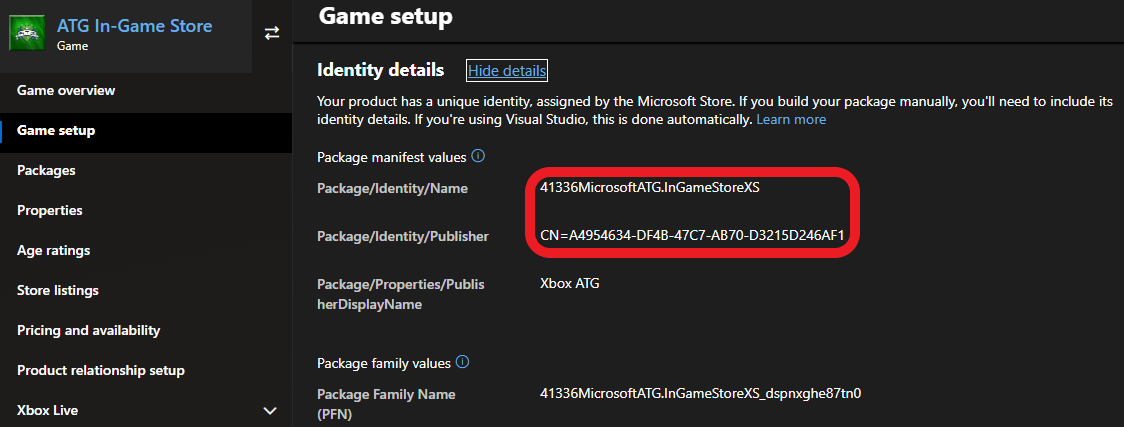
Partner Center의 **Game setup > Identity details**에 있습니다.
PC: Partner Center에서 게임에 할당된 것과 엄격하게 일치해야 합니다.
콘솔에는 필수는 아니지만 Partner Center 제출용 패키지가 생성될 때 확인해야 합니다.
`Identity` 노드의 `Name`은 **Package/Identity/Name**과 일치해야 합니다. `Identity` 노드의 `Publisher`는 **Package/Identity/Publisher**와 일치해야 합니다.
 ### StoreID
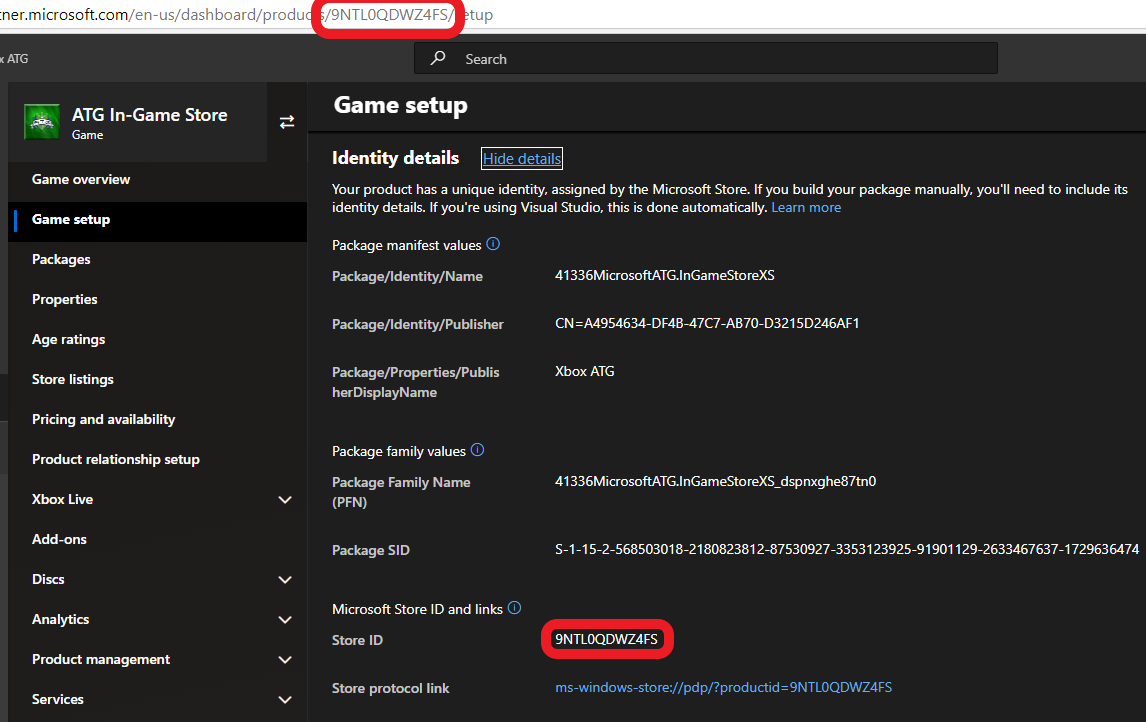
**Game setup > Identity details**에서도 확인할 수 있습니다.
### StoreID
**Game setup > Identity details**에서도 확인할 수 있습니다.
 ## 참조 API 문서
* [XStore (API 내용)](/reference/system/xstore/xstore_members)
* 함수
* [XStoreQueryGameLicenseAsync](/reference/system/xstore/xstore_members)
## 참고
[커머스 개요](/publishing/xstore-commerce/xstore-commerce-overview)
[Partner Center에서 초기 구성](/publishing/xstore-commerce/xstore-initial-configuration)
[라이선스 테스트 활성화](/publishing/xstore-commerce/xstore-licensing-setup)
[스토어 작업에 맞게 샌드박스 제대로 전환](/publishing/xstore-commerce/xstore-switching-sandbox)
[XStore API 참조](/reference/system/xstore/xstore_members)
## Related topics
- [라이선싱 테스트 활성화](/ko/publishing/xstore-commerce/xstore-licensing-setup.md)
- [XStore 개발 문제 해결](/ko/publishing/xstore-commerce/xstore-troubleshooting.md)
- [게임에 트라이얼 구현](/ko/publishing/xstore-commerce/xstore-trials.md)
- [기본 스토어 작업](/ko/publishing/xstore-commerce/xstore-basic-operations.md)
- [업데이트 확인](/ko/publishing/xstore-commerce/xstore-checking-updates.md)
## 참조 API 문서
* [XStore (API 내용)](/reference/system/xstore/xstore_members)
* 함수
* [XStoreQueryGameLicenseAsync](/reference/system/xstore/xstore_members)
## 참고
[커머스 개요](/publishing/xstore-commerce/xstore-commerce-overview)
[Partner Center에서 초기 구성](/publishing/xstore-commerce/xstore-initial-configuration)
[라이선스 테스트 활성화](/publishing/xstore-commerce/xstore-licensing-setup)
[스토어 작업에 맞게 샌드박스 제대로 전환](/publishing/xstore-commerce/xstore-switching-sandbox)
[XStore API 참조](/reference/system/xstore/xstore_members)
## Related topics
- [라이선싱 테스트 활성화](/ko/publishing/xstore-commerce/xstore-licensing-setup.md)
- [XStore 개발 문제 해결](/ko/publishing/xstore-commerce/xstore-troubleshooting.md)
- [게임에 트라이얼 구현](/ko/publishing/xstore-commerce/xstore-trials.md)
- [기본 스토어 작업](/ko/publishing/xstore-commerce/xstore-basic-operations.md)
- [업데이트 확인](/ko/publishing/xstore-commerce/xstore-checking-updates.md)