> ## Documentation Index
> Fetch the complete documentation index at: https://devdocs.xbox.com/llms.txt
> Use this file to discover all available pages before exploring further.
# 터치 컨트롤 레이아웃 배포하기
> 터치 컨트롤 레이아웃 배포하기
## 개요
[터치 레이아웃을 빌드](/build/core-features/common/game-streaming/building-touch-layouts/game-streaming-touch-building-touch-layout)한 후에는, 게임에서 이 레이아웃과 상호작용해 보고 싶을 것입니다.
## 사전 요구 사항
레이아웃을 배포하고 확인하려면 다음이 필요합니다.
* [Touch Adaptation Kit 명령줄 도구(tak.exe)](/build/core-features/common/game-streaming/tak-command-line-tool/game-streaming-tak-command-line)가 설치된 Windows PC.
* [웹 콘텐츠 테스트 애플리케이션](/build/core-features/common/game-streaming/game-streaming-web-content-test-application), [Android 콘텐츠 테스트 애플리케이션(사용되지 않음)](/build/core-features/common/game-streaming/game-streaming-android-content-test-application) 또는 [Windows PC 콘텐츠 테스트 애플리케이션(사용되지 않음)](/build/core-features/common/game-streaming/game-streaming-windows-pc-content-test-application)이 설치된 디바이스.
* 배포하고 확인할 레이아웃 세트.
## 레이아웃 배포하기
### 1. 레이아웃 제공(Serve)
[Touch Adaptation Kit 명령줄 도구(tak.exe)](/build/core-features/common/game-streaming/tak-command-line-tool/game-streaming-tak-command-line)가 설치된 Windows PC에서 [Serve 명령](/build/core-features/common/game-streaming/tak-command-line-tool/game-streaming-tak-command-line-serve-command)을 사용하여 레이아웃을 요청하는 디바이스에서 사용할 수 있도록 만듭니다.
```pwsh theme={null}
C:\Program Files (x86)\Microsoft GDK\bin>tak serve --layout-path C:\MyGameLayouts
Verifying touch adaptation bundle 'C:\MyGameLayouts '.
Now listening on: http://0.0.0.0:9269
Application started. Press Ctrl+C to shut down.
Hosting environment: Production
Content root path: C:\MyGameLayouts
```
### 2. 콘텐츠 테스트 애플리케이션 로드 구성
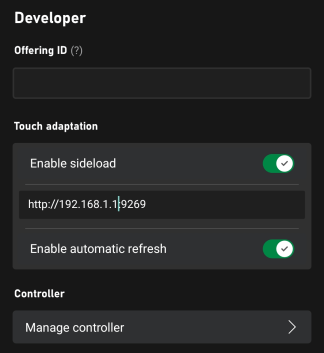
콘텐츠 테스트 애플리케이션의 설정에서 터치 적응 설정(Developer 섹션 내)에 대한 구성을 입력합니다.
* **Enable sideload**가 켜져 있는지 확인합니다.
* 레이아웃을 제공하는 PC의 주소(포트 포함)를 입력합니다.
**Safari**로 [웹 콘텐츠 테스트 애플리케이션](/build/core-features/common/game-streaming/game-streaming-web-content-test-application)을 사용하거나 serve 명령을 실행하는 **원격 PC**에 연결하는 경우, 사이드로드 주소가 `https`로 시작하고 `--certificate-file` 옵션이 사용되었는지 확인하세요. 보안(HTTPS) 사이드로드 서버 시작에 대한 자세한 내용은 [Serve 명령](/build/core-features/common/game-streaming/tak-command-line-tool/game-streaming-tak-command-line-serve-command)을 참조하세요.
* 레이아웃에 대한 변경 사항이 연결된 모든 클라이언트에 즉시 반영되도록 하려면 autorefresh를 활성화하세요(그렇지 않으면 새 스트리밍 연결이 시작될 때만 업데이트가 발생합니다).
 .
### 3. 게임 스트리밍
각 스트리밍 연결 시, CTA는 TAK 서버에 연결하여 최신 레이아웃을 다운로드합니다.
.
### 3. 게임 스트리밍
각 스트리밍 연결 시, CTA는 TAK 서버에 연결하여 최신 레이아웃을 다운로드합니다.
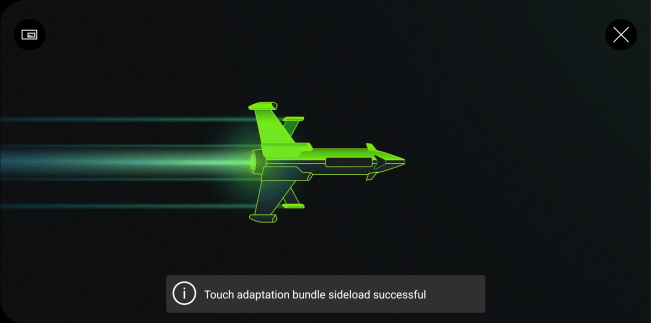 .
레이아웃이 요청되면, `serve` 명령을 호스팅하는 PC에서 요청과 다운로드를 확인할 수 있습니다.
```
C:\Program Files (x86)\Microsoft GDK\bin>tak serve --layout-path C:\MyGame\layouts
Verifying touch adaptation bundle 'C:\MyGame\layouts'.
Now listening on: http://0.0.0.0:9269
Application started. Press Ctrl+C to shut down.
Hosting environment: Production
Content root path: C:\MyGame\layouts
Request starting HTTP/1.1 POST http://192.168.1.1:9269/connection/negotiate?negotiateVersion=1 0
Request finished in 1.6283ms 200 application/json
Request starting HTTP/1.1 GET http://192.168.1.1:9269/connection?id=3u0Xs_Dlwn-J1mREHTcG5w
Request starting HTTP/1.1 GET http://192.168.1.1:9269/v1/tabs/active/download
Request finished in 3.9865ms 200 application/octet-stream
```
### 4. 레이아웃 선택
스트리밍 세션이 시작된 후, 왼쪽 상단 모서리의 `...` 버튼을 선택하여 인스트림 오버레이에서 Developer 및 TAK를 선택하면 사용할 터치 레이아웃을 선택할 수 있습니다.
.
레이아웃이 요청되면, `serve` 명령을 호스팅하는 PC에서 요청과 다운로드를 확인할 수 있습니다.
```
C:\Program Files (x86)\Microsoft GDK\bin>tak serve --layout-path C:\MyGame\layouts
Verifying touch adaptation bundle 'C:\MyGame\layouts'.
Now listening on: http://0.0.0.0:9269
Application started. Press Ctrl+C to shut down.
Hosting environment: Production
Content root path: C:\MyGame\layouts
Request starting HTTP/1.1 POST http://192.168.1.1:9269/connection/negotiate?negotiateVersion=1 0
Request finished in 1.6283ms 200 application/json
Request starting HTTP/1.1 GET http://192.168.1.1:9269/connection?id=3u0Xs_Dlwn-J1mREHTcG5w
Request starting HTTP/1.1 GET http://192.168.1.1:9269/v1/tabs/active/download
Request finished in 3.9865ms 200 application/octet-stream
```
### 4. 레이아웃 선택
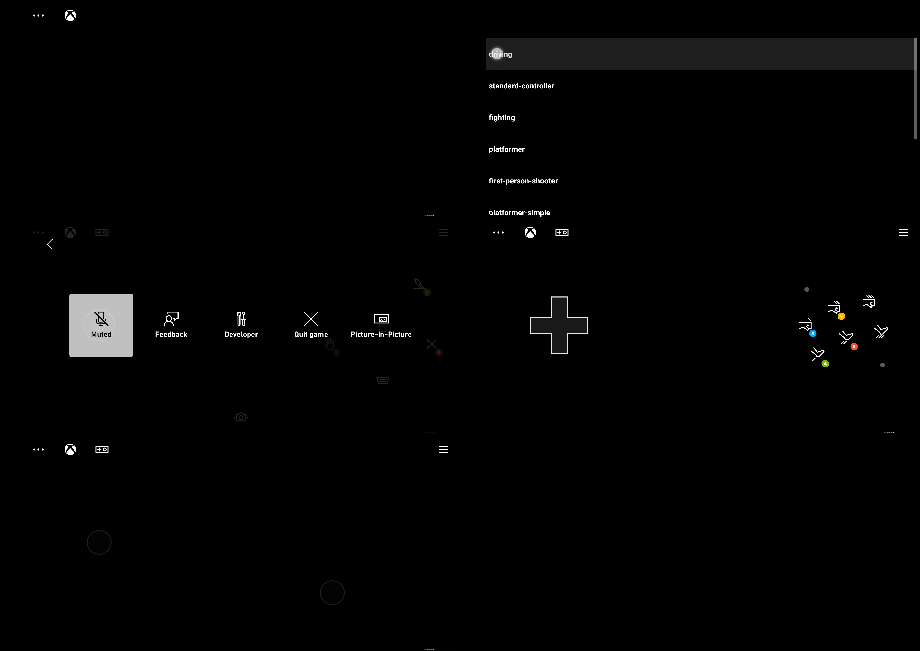
스트리밍 세션이 시작된 후, 왼쪽 상단 모서리의 `...` 버튼을 선택하여 인스트림 오버레이에서 Developer 및 TAK를 선택하면 사용할 터치 레이아웃을 선택할 수 있습니다.
 ## Related topics
- [터치 컨트롤 레이아웃 구축](/ko/build/core-features/common/game-streaming/building-touch-layouts/game-streaming-touch-building-touch-layout.md)
- [XBOX 게임 스트리밍용 터치 컨트롤 레이아웃 구축](/ko/build/core-features/common/game-streaming/building-touch-layouts/index.md)
- [격투 터치 컨트롤 레이아웃](/ko/build/core-features/common/game-streaming/building-touch-layouts/samples/game-streaming-touch-tak-sample-fighter.md)
- [표준 XBOX 컨트롤러 터치 컨트롤 레이아웃](/ko/build/core-features/common/game-streaming/building-touch-layouts/samples/game-streaming-touch-tak-sample-full-layout.md)
- [게임 상태에 따라 터치 컨트롤 레이아웃 변경](/ko/build/core-features/common/game-streaming/building-touch-layouts/game-streaming-touch-changing-layouts-game-state.md)
## Related topics
- [터치 컨트롤 레이아웃 구축](/ko/build/core-features/common/game-streaming/building-touch-layouts/game-streaming-touch-building-touch-layout.md)
- [XBOX 게임 스트리밍용 터치 컨트롤 레이아웃 구축](/ko/build/core-features/common/game-streaming/building-touch-layouts/index.md)
- [격투 터치 컨트롤 레이아웃](/ko/build/core-features/common/game-streaming/building-touch-layouts/samples/game-streaming-touch-tak-sample-fighter.md)
- [표준 XBOX 컨트롤러 터치 컨트롤 레이아웃](/ko/build/core-features/common/game-streaming/building-touch-layouts/samples/game-streaming-touch-tak-sample-full-layout.md)
- [게임 상태에 따라 터치 컨트롤 레이아웃 변경](/ko/build/core-features/common/game-streaming/building-touch-layouts/game-streaming-touch-changing-layouts-game-state.md)