> ## Documentation Index
> Fetch the complete documentation index at: https://devdocs.xbox.com/llms.txt
> Use this file to discover all available pages before exploring further.
# XBOX Manager: コンソール オートメーションの管理
> XBOX Manager: コンソール オートメーションの管理
次のスクリーンショットに示す XBOX Manager の Automation タブは、無人スクリプト用 (および XBOX One X 開発キットとフロント パネル スクリプト用) の [XBOX Device Portal (Windows Device Portal on XBOX)](/tools/tools-console/wdp/wdp) UI をホストしています。フロント パネル ディスプレイを持つ開発キットに接続されている場合、リモート テストと制御のためにディスプレイが Automation ページで使用できます。Automation タブは、コンソールで [XBOX Device Portal](/tools/tools-console/wdp/wdp) が有効な場合にのみ使用できます。
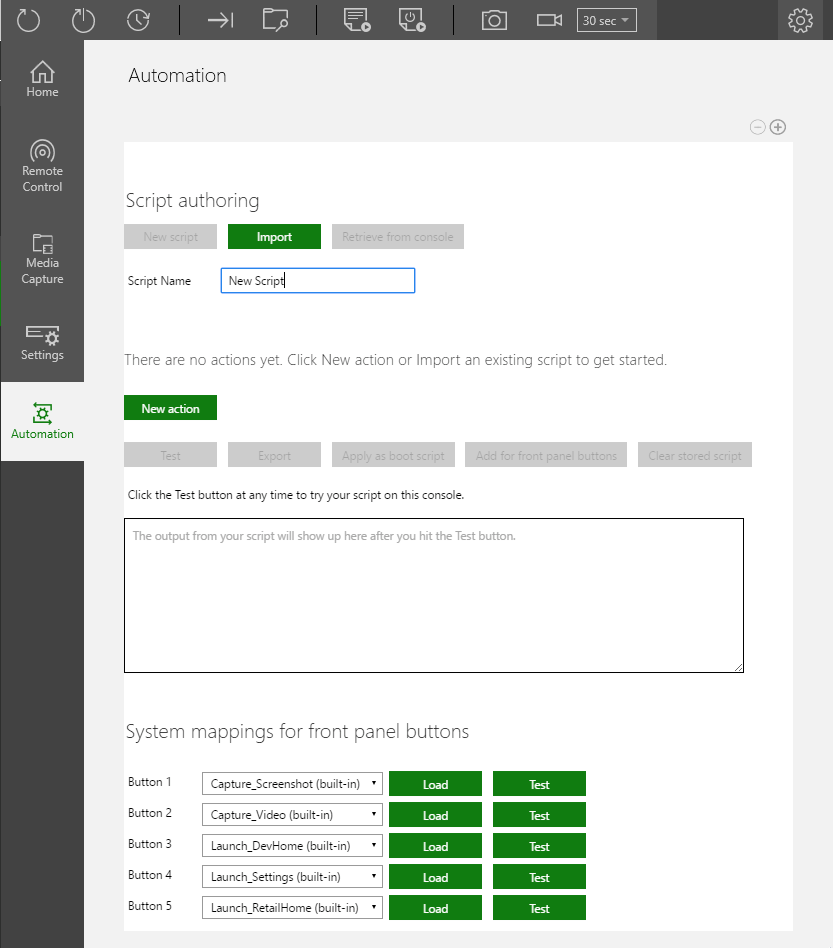 ## 新しいスクリプトの作成
1. **\[New script]** (次に示す) を選択します。
## 新しいスクリプトの作成
1. **\[New script]** (次に示す) を選択します。  2. 新しいスクリプト名を入力します。既定の名前は **New Script** です。
3. スクリプトに新しいアクションを追加します。**\[New action]** (次に示す) を選択します。
2. 新しいスクリプト名を入力します。既定の名前は **New Script** です。
3. スクリプトに新しいアクションを追加します。**\[New action]** (次に示す) を選択します。
 1. 表示される **\[New action]** ウィンドウ (次に示す) からスクリプト用のアクションを選択し、**\[Next]** を選択します。
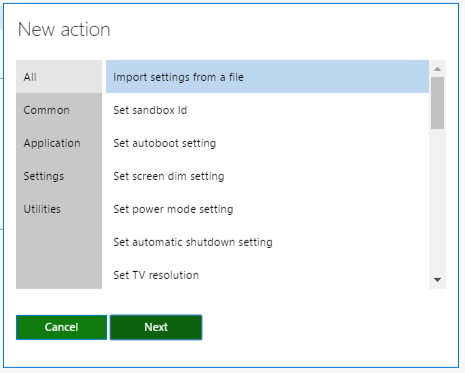 1. アクションのパラメーターを設定します (次に示す)。
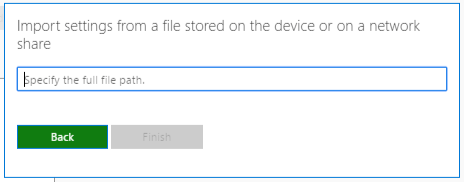 1. 手順 3 から 5 を繰り返して、スクリプトにさらにアクションを追加します。
2. 必要に応じて、スクリプトを起動時に起動するように設定するには、**\[Apply as boot script]** (次に示す) を選択します。
1. 手順 3 から 5 を繰り返して、スクリプトにさらにアクションを追加します。
2. 必要に応じて、スクリプトを起動時に起動するように設定するには、**\[Apply as boot script]** (次に示す) を選択します。
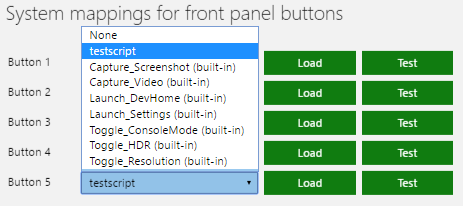
 1. 必要に応じて、フロント パネル ボタンのいずれかにスクリプトを適用するには、**\[Add for front panel buttons]** (次に示す) をクリックし、**\[System mappings for front panel buttons]** セクション (次に示す) でスクリプトを選択します。

 ## Related topics
- [XBOX Manager](/ja-jp/tools/tools-console/xbom/xbom.md)
- [XBOX Manager: コンソールとグループの管理](/ja-jp/tools/tools-console/xbom/manager-tool-groups.md)
- [XUser のヘッドレス オートメーション](/ja-jp/build/core-features/common/user/users-headless-automation.md)
- [XBOX Manager: コンソール設定の管理](/ja-jp/tools/tools-console/xbom/manager-tool-console-settings.md)
- [XBOX Manager: テスト アカウントの管理](/ja-jp/tools/tools-console/xbom/manager-tool-profiles.md)
## Related topics
- [XBOX Manager](/ja-jp/tools/tools-console/xbom/xbom.md)
- [XBOX Manager: コンソールとグループの管理](/ja-jp/tools/tools-console/xbom/manager-tool-groups.md)
- [XUser のヘッドレス オートメーション](/ja-jp/build/core-features/common/user/users-headless-automation.md)
- [XBOX Manager: コンソール設定の管理](/ja-jp/tools/tools-console/xbom/manager-tool-console-settings.md)
- [XBOX Manager: テスト アカウントの管理](/ja-jp/tools/tools-console/xbom/manager-tool-profiles.md)