> ## Documentation Index
> Fetch the complete documentation index at: https://devdocs.xbox.com/llms.txt
> Use this file to discover all available pages before exploring further.
# オーバーレイ フォルダの管理
> オーバーレイ フォルダの管理
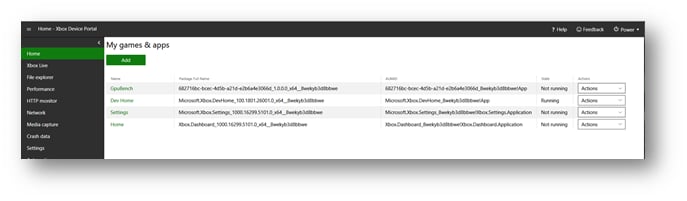
次のスクリーンショットに示すように、XBOX Device Portal の Home ページの My Games & apps ペインは、コンソールにインストールされているゲームとアプリを表示します。このペインを使用して、ゲームのオーバーレイ フォルダを構成します。
 ゲームのオーバーレイ フォルダを構成するには、次の手順に従います。
1. **\[My games & apps]** ペインで、ゲームの名前を選択します。ゲームの **\[View Details]** ダイアログ ボックスが表示されます。
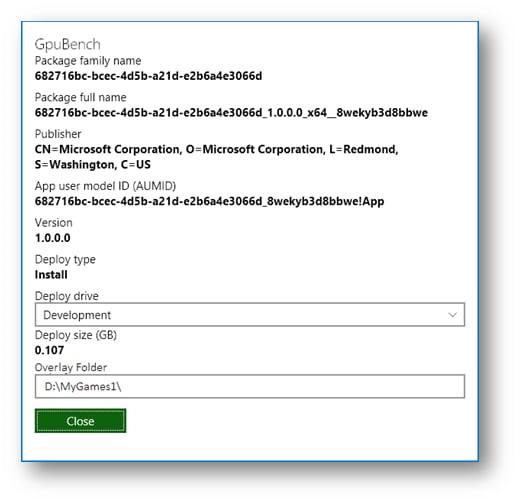
2. **\[Overlay Folder]** ボックスに、次のスクリーンショットに示すように、ゲームに使用したいオーバーレイ フォルダのパスを入力します。
ゲームのオーバーレイ フォルダを構成するには、次の手順に従います。
1. **\[My games & apps]** ペインで、ゲームの名前を選択します。ゲームの **\[View Details]** ダイアログ ボックスが表示されます。
2. **\[Overlay Folder]** ボックスに、次のスクリーンショットに示すように、ゲームに使用したいオーバーレイ フォルダのパスを入力します。
 1. **\[Close]** を選択します。
## Related topics
- [Home ページ](/ja-jp/tools/tools-console/wdp/windows-device-portal-on-xbox-home.md)
- [オーバーレイ フォルダーの管理](/ja-jp/tools/tools-console/devhome/devhome-overlay-folders.md)
- [XtfSetOverlayFolder](/ja-jp/reference/tools/xtf/xtfapi/functions/xtfsetoverlayfolder-xtfapi-xbox-windows-m.md)
- [XtfClearAllOverlayFolders](/ja-jp/reference/tools/xtf/xtfapi/functions/xtfclearalloverlayfolders-xtfapi-xbox-windows-m.md)
- [XtfGetOverlayFolder](/ja-jp/reference/tools/xtf/xtfapi/functions/xtfgetoverlayfolder-xtfapi-xbox-windows-m.md)
1. **\[Close]** を選択します。
## Related topics
- [Home ページ](/ja-jp/tools/tools-console/wdp/windows-device-portal-on-xbox-home.md)
- [オーバーレイ フォルダーの管理](/ja-jp/tools/tools-console/devhome/devhome-overlay-folders.md)
- [XtfSetOverlayFolder](/ja-jp/reference/tools/xtf/xtfapi/functions/xtfsetoverlayfolder-xtfapi-xbox-windows-m.md)
- [XtfClearAllOverlayFolders](/ja-jp/reference/tools/xtf/xtfapi/functions/xtfclearalloverlayfolders-xtfapi-xbox-windows-m.md)
- [XtfGetOverlayFolder](/ja-jp/reference/tools/xtf/xtfapi/functions/xtfgetoverlayfolder-xtfapi-xbox-windows-m.md)