> ## Documentation Index
> Fetch the complete documentation index at: https://devdocs.xbox.com/llms.txt
> Use this file to discover all available pages before exploring further.
# プレイヤーインベントリの使用
> サーバー権威型のクライアントおよびサーバー API を使用して PlayFab のプレイヤーインベントリを操作し、アイテムの購入、通貨の付与、カタログベースのコンテンツの管理を行います。
# プレイヤーインベントリ
## 要件
プレイヤーインベントリを使用するには、タイトルにカタログを定義しておく必要があります。詳しくは [Catalogs](/services/playfab/economy-monetization/economy/items/catalogs) チュートリアルをご覧ください。
必要に応じて、カタログにストアを定義することもできます。
カタログはゲーム内で利用可能なすべてのアイテムのリストであるのに対し、ストアはカタログの中から独自の価格を設定できるアイテムのサブセットです。
1 つのカタログに対して複数のストアを定義できるため、ユーザーセグメンテーションやその他の要因に基づいて、プレイヤーに提示するアイテムセットを使い分けることができます。
[**Game Manager**](https://developer.playfab.com/) を使用するか、管理者向け API の **[SetCatalogItems](xref:titleid.playfabapi.com.admin.title-widedatamanagement.setcatalogitems)** または **[UpdateCatalogItems](xref:titleid.playfabapi.com.admin.title-widedatamanagement.updatecatalogitems)** 呼び出しによってカタログを定義すると、クライアントおよびサーバーからさまざまなインベントリ API 呼び出しを利用できるようになります。
## API の概要
すべてのインベントリ API 呼び出しは *サーバー権威型* かつ安全になるよう設計されています。適切に使用することで、プレイヤーがチートしたり、獲得していないアイテムを取得したりできないようになっています。
**クライアント**:
* 仮想通貨でアイテムを購入: **[PurchaseItem](xref:titleid.playfabapi.com.client.playeritemmanagement.purchaseitem)**
* 実際の通貨での購入: **[StartPurchase](xref:titleid.playfabapi.com.client.playeritemmanagement.startpurchase), [PayForPurchase](xref:titleid.playfabapi.com.client.playeritemmanagement.payforpurchase), [ConfirmPurchase](xref:titleid.playfabapi.com.client.playeritemmanagement.confirmpurchase)**
* プレイヤーが所持するアイテムの表示: **[GetUserInventory](xref:titleid.playfabapi.com.client.playeritemmanagement.getuserinventory)**
* アイテムの削除: **[ConsumeItem](xref:titleid.playfabapi.com.client.playeritemmanagement.consumeitem), [UnlockContainerInstance](xref:titleid.playfabapi.com.client.playeritemmanagement.unlockcontainerinstance)**
* アイテムのトレード: **[OpenTrade](xref:titleid.playfabapi.com.client.trading.opentrade), [GetPlayerTrades](xref:titleid.playfabapi.com.client.trading.getplayertrades), [AcceptTrade](xref:titleid.playfabapi.com.client.trading.accepttrade), [CancelTrade](xref:titleid.playfabapi.com.client.trading.canceltrade)**
**サーバー**:
* アイテムの贈与 / 付与: **[GrantItemsToUser](xref:titleid.playfabapi.com.server.playeritemmanagement.grantitemstouser)**
* アイテムの表示: **[GetUserInventory](xref:titleid.playfabapi.com.server.playeritemmanagement.getuserinventory)**
* アイテムの変更: **[ModifyItemUses](xref:titleid.playfabapi.com.server.playeritemmanagement.modifyitemuses), [UpdateUserInventoryItemCustomData](xref:titleid.playfabapi.com.server.playeritemmanagement.updateuserinventoryitemcustomdata)**
* アイテムの削除: **[RevokeInventoryItem](xref:titleid.playfabapi.com.server.playeritemmanagement.revokeinventoryitem), [ConsumeItem](xref:titleid.playfabapi.com.server.playeritemmanagement.consumeitem), [UnlockContainerInstance](xref:titleid.playfabapi.com.server.playeritemmanagement.unlockcontainerinstance)**
以下の例は、これらの API メソッドを呼び出すコードブロックを示し、プレイヤーインベントリの基本的なユースケースをセットアップします。
参考までに、これらの例は PlayFab の機能をデモするために作られたゲーム **Unicorn Battle** から引用しています。
以下で使用する仮想通貨 **AU** は **Gold** で、モンスターと戦うことで獲得できる無料の通貨です ([Currencies](/services/playfab/economy-monetization/economy-v2/tutorials/currencies) チュートリアルを参照)。
始める前に、本ガイドの多くの例で繰り返し使用するユーティリティ関数をいくつか定義しておきます。
```csharp theme={null}
// **** Shared example utility functions ****
// This is typically NOT how you handle success
// You will want to receive a specific result-type for your API, and utilize the result parameters
void LogSuccess(PlayFabResultCommon result) {
var requestName = result.Request.GetType().Name;
Debug.Log(requestName + " successful");
}
// Error handling can be very advanced, such as retry mechanisms, logging, or other options
// The simplest possible choice is just to log it
void LogFailure(PlayFabError error) {
Debug.LogError(error.GenerateErrorReport());
}
```
## クライアントのみの例: ヘルスポーションの購入と消費
クライアント API の呼び出し順: [PurchaseItem](xref:titleid.playfabapi.com.client.playeritemmanagement.purchaseitem)、[GetUserInventory](xref:titleid.playfabapi.com.client.playeritemmanagement.getuserinventory)、[ConsumeItem](xref:titleid.playfabapi.com.server.playeritemmanagement.consumeitem)
まず、カタログにアイテムを定義することから始めます。
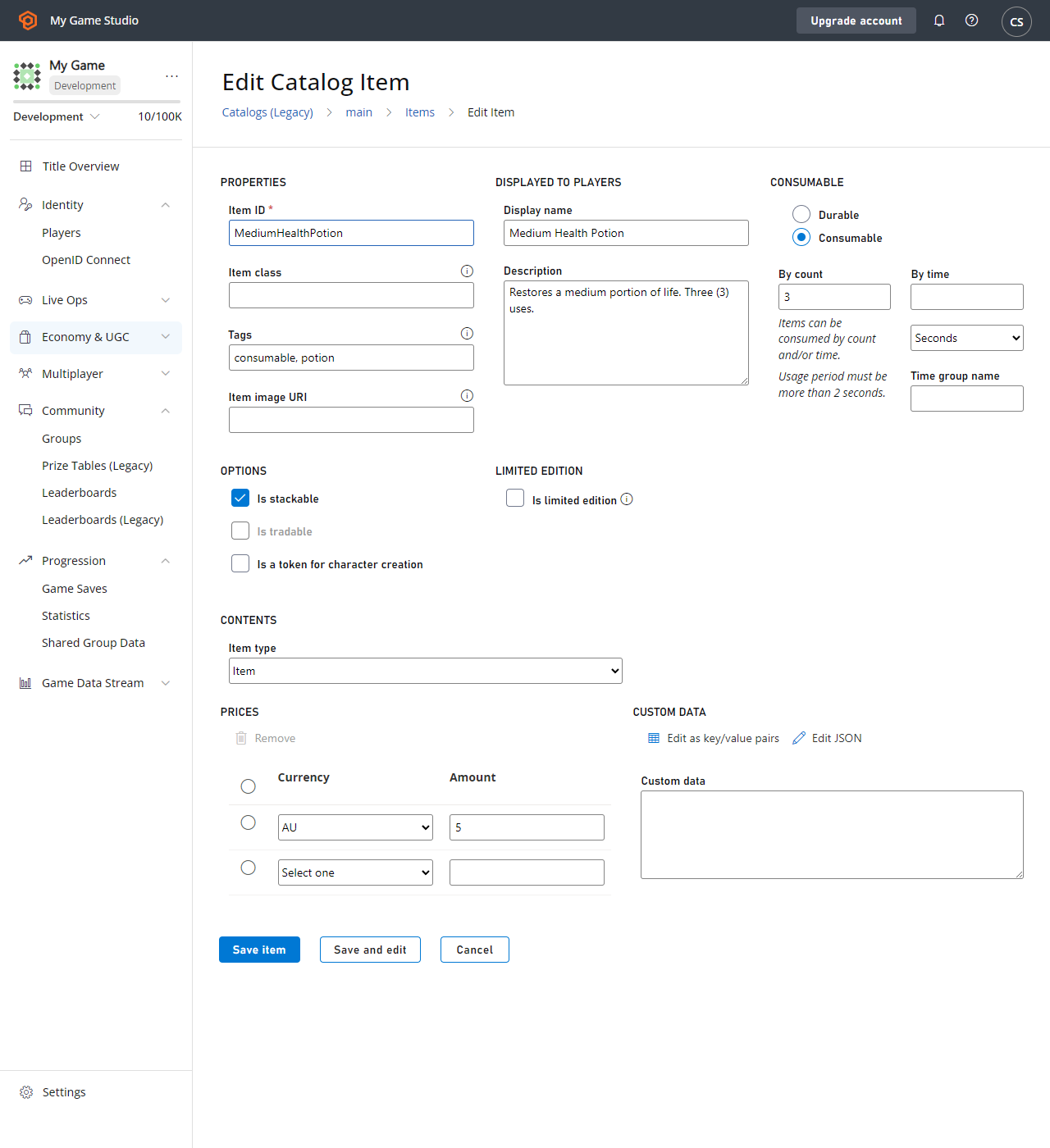 **Health Potion** の `CatalogItem` の要件は次のとおりです。
* `PurchaseItem` にはアイテムの正の価格 (`5 AU`) が必要です。
* `ConsumeItem` には、アイテムが `Consumable` であること、および正の使用回数 (`3`) が必要です。
* 購入するプレイヤーは、仮想通貨残高に 5 AU 以上を保有している必要があります。
各呼び出しのコードを以下に示します。
```csharp theme={null}
void MakePurchase() {
PlayFabClientAPI.PurchaseItem(new PurchaseItemRequest {
// In your game, this should just be a constant matching your primary catalog
CatalogVersion = "CharacterClasses",
ItemId = "MediumHealthPotion",
Price = 5,
VirtualCurrency = "AU"
}, LogSuccess, LogFailure);
}
void GetInventory() {
PlayFabClientAPI.GetUserInventory(new GetUserInventoryRequest(), LogSuccess, LogFailure);
}
void ConsumePotion() {
PlayFabClientAPI.ConsumeItem(new ConsumeItemRequest {
ConsumeCount = 1,
// This is a hex-string value from the GetUserInventory result
ItemInstanceId = "potionInstanceId"
}, LogSuccess, LogFailure);
}
```
## 例: プレイヤーがコンテナーを付与され、それを開ける
API の呼び出し順:
* PlayFab Server API [GrantItemsToUser](xref:titleid.playfabapi.com.server.playeritemmanagement.grantitemstouser)
* PlayFab Client API [UnlockContainerInstance](xref:titleid.playfabapi.com.client.playeritemmanagement.unlockcontainerinstance)
まず、カタログでコンテナーを定義する必要があります。この例では、コンテナーとして **CrystalContainer** を選択します。
この例では、鍵を使ってコンテナーを開ける処理も示します。鍵は *任意* のアイテムで、`UnlockContainerInstance` の呼び出しを成功させるためには、これもプレイヤーインベントリに含まれている必要があります。
**Health Potion** の `CatalogItem` の要件は次のとおりです。
* `PurchaseItem` にはアイテムの正の価格 (`5 AU`) が必要です。
* `ConsumeItem` には、アイテムが `Consumable` であること、および正の使用回数 (`3`) が必要です。
* 購入するプレイヤーは、仮想通貨残高に 5 AU 以上を保有している必要があります。
各呼び出しのコードを以下に示します。
```csharp theme={null}
void MakePurchase() {
PlayFabClientAPI.PurchaseItem(new PurchaseItemRequest {
// In your game, this should just be a constant matching your primary catalog
CatalogVersion = "CharacterClasses",
ItemId = "MediumHealthPotion",
Price = 5,
VirtualCurrency = "AU"
}, LogSuccess, LogFailure);
}
void GetInventory() {
PlayFabClientAPI.GetUserInventory(new GetUserInventoryRequest(), LogSuccess, LogFailure);
}
void ConsumePotion() {
PlayFabClientAPI.ConsumeItem(new ConsumeItemRequest {
ConsumeCount = 1,
// This is a hex-string value from the GetUserInventory result
ItemInstanceId = "potionInstanceId"
}, LogSuccess, LogFailure);
}
```
## 例: プレイヤーがコンテナーを付与され、それを開ける
API の呼び出し順:
* PlayFab Server API [GrantItemsToUser](xref:titleid.playfabapi.com.server.playeritemmanagement.grantitemstouser)
* PlayFab Client API [UnlockContainerInstance](xref:titleid.playfabapi.com.client.playeritemmanagement.unlockcontainerinstance)
まず、カタログでコンテナーを定義する必要があります。この例では、コンテナーとして **CrystalContainer** を選択します。
この例では、鍵を使ってコンテナーを開ける処理も示します。鍵は *任意* のアイテムで、`UnlockContainerInstance` の呼び出しを成功させるためには、これもプレイヤーインベントリに含まれている必要があります。
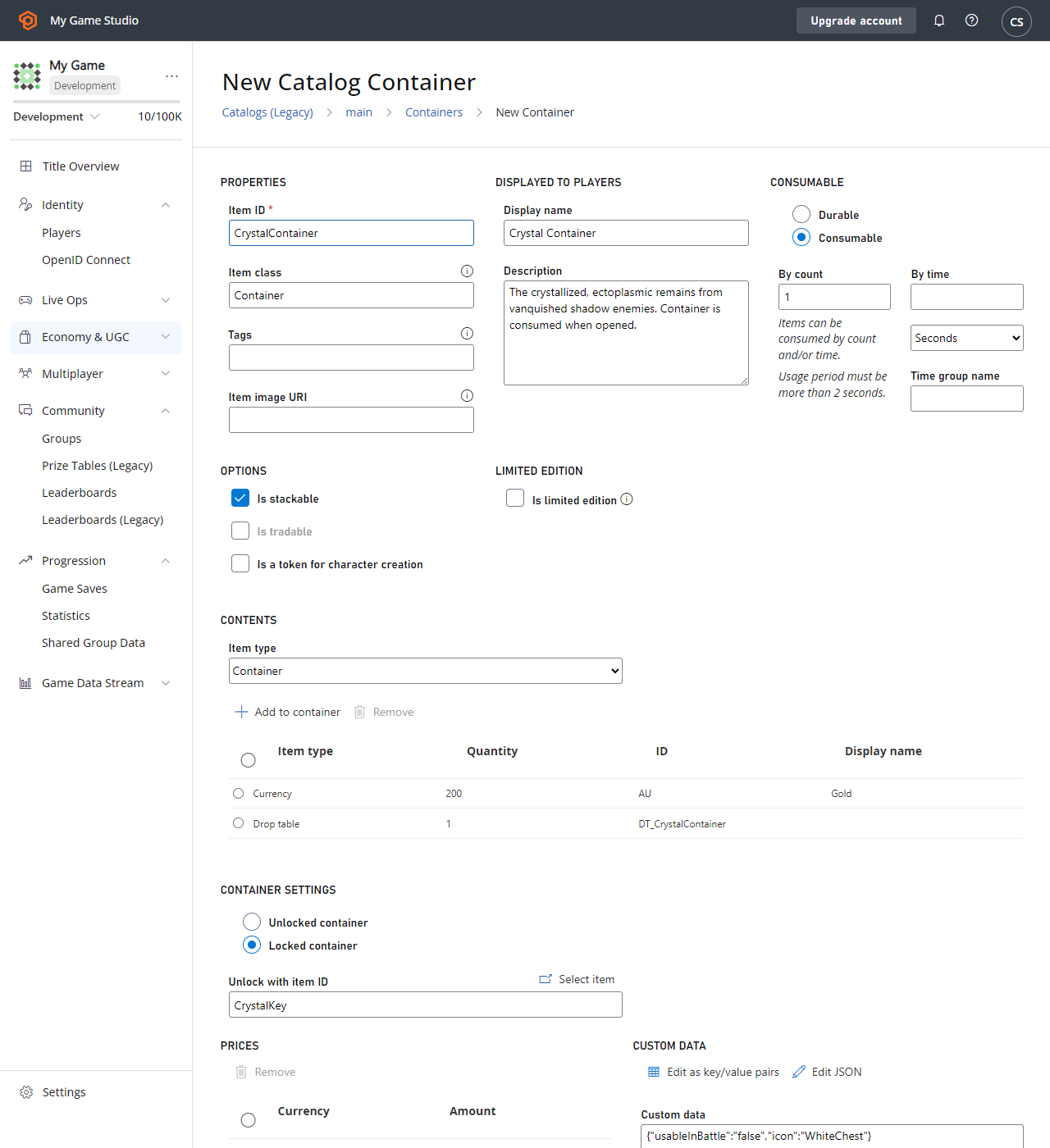 この例における **CrystalContainer** の `CatalogItem` 要件は次のとおりです。
* **CrystalContainer** が **Container** として定義されていること。
* **Container** には任意で **Key Item** を定義できます。これは **Container** をアンロックするために必要となり、この例では **CrystalKey** です。
* **Container** および **Key** は *両方とも* 、正の使用回数を持つ **Consumable** にすることを強く推奨します。これにより、使用後にプレイヤーインベントリから削除されます。
### サーバーコード
```csharp theme={null}
void GrantItem() {
PlayFabServerAPI.GrantItemsToUser(new GrantItemsToUserRequest {
// In your game, this should just be a constant
CatalogVersion = "CharacterClasses",
// Servers must define which character they're modifying in every API call
PlayFabId = "playFabId",
ItemIds = new List { "CrystalContainer" }
}, LogSuccess, LogFailure);
}
```
### クライアントコード
```csharp theme={null}
void OpenContainer() {
PlayFabClientAPI.UnlockContainerInstance(new UnlockContainerInstanceRequest {
// In your game, this should just be a constant matching your primary catalog
CatalogVersion = "CharacterClasses",
ContainerItemInstanceId = "containerInstanceId",
KeyItemInstanceId = "keyInstanceId"
}, LogSuccess, LogFailure);
}
```
### 鍵とコンテナーの消費
前述の例では、鍵やコンテナーを *consumable* にすることが提案されていますが、これはあくまで推奨事項です。
しかし、コンテナーとその鍵 (存在する場合) の両方が *非 consumable* であると、コンテナーを *無限に* 開き直すことができ、そのたびに中身がプレイヤーに付与されてしまいます。
プレイヤーインベントリの容量は *無限ではない* ため、このパターンは強く非推奨とされます。consumable なコンテナーがアンロックされると、コンテナーと使用された consumable の鍵の両方の使用回数が自動的に *減少* し、使用回数がゼロになるとプレイヤーインベントリから削除されます。
### 実用的な選択肢
**Consumable Container**、**Key** なし: 最も基本的なパターンで、開けるとコンテナーが消費され、鍵は存在しません。
**Consumable Container、consumable Key**: シンプルな鍵付きコンテナーのケースで、プレイヤーは鍵でコンテナーを開けることができます。 *両方* が消費され、プレイヤーは残り使用回数のあるコンテナーを、残り使用回数のある鍵でしか開けられません。
**Durable Container、consumable Key**: プレイヤーが鍵を見つけるたびにコンテナーを開けられるパターンです。鍵は消費され、鍵に残り使用回数がある間だけコンテナーが開かれます。
**Consumable Container、durable Key**: プレイヤーが、そのキーアイテムに対応する *すべての* コンテナーを開けられる鍵を持ち続けられるパターンです。コンテナーは消費されますが、プレイヤーはその後もその鍵でコンテナーを開ける能力を維持します。
## 例: プレイヤーからインベントリアイテムを買い取る
インベントリアイテムをプレイヤーから買い戻すための組み込み API はありません。このプロセスはゲーム固有だからです。ただし、 *既存の* API メソッドを使って独自の **SellItem** 体験を構築できます。
* PlayFab Server API [RevokeInventoryItem](xref:titleid.playfabapi.com.server.playeritemmanagement.revokeinventoryitem)\*\* を使用すると、インベントリアイテムを削除できます。
* PlayFab Server API [AddUserVirtualCurrency](xref:titleid.playfabapi.com.server.playeritemmanagement.adduservirtualcurrency)\*\* で、適切な量の仮想通貨を返却できます。現時点で PlayFab API メソッドから実際の通貨を返すことはできません。
アイテムと仮想通貨は密接な関係にあります。詳しくは [Currencies](/services/playfab/economy-monetization/economy-v2/tutorials/currencies) チュートリアルをご覧ください。
以下の CloudScript 関数は、これら 2 つのサーバー呼び出しを 1 つのクライアントからアクセス可能な呼び出しにまとめています。
```javascript theme={null}
var SELL_PRICE_RATIO = 0.75;
function SellItem_internal(soldItemInstanceId, requestedVcType) {
var inventory = server.GetUserInventory({ PlayFabId: currentPlayerId });
var itemInstance = null;
for (var i = 0; i < inventory.Inventory.length; i++) {
if (inventory.Inventory[i].ItemInstanceId === soldItemInstanceId)
itemInstance = inventory.Inventory[i];
}
if (!itemInstance)
throw "Item instance not found"; // Protection against client providing incorrect data
var catalog = server.GetCatalogItems({ CatalogVersion: itemInstance.CatalogVersion });
var catalogItem = null;
for (var c = 0; c < catalog.Catalog.length; c++) {
if (itemInstance.ItemId === catalog.Catalog[c].ItemId)
catalogItem = catalog.Catalog[c];
}
if (!catalogItem)
throw "Catalog Item not found"; // Title catalog consistency check (You should never remove a catalog/catalogItem if any player owns that item
var buyPrice = 0;
if (catalogItem.VirtualCurrencyPrices.hasOwnProperty(requestedVcType))
buyPrice = catalogItem.VirtualCurrencyPrices[requestedVcType];
if (buyPrice <= 0)
throw "Cannot redeem this item for: " + requestedVcType; // The client requested a virtual currency which doesn't apply to this item
// Once we get here all safety checks are passed - Perform the sell
var sellPrice = Math.floor(buyPrice * SELL_PRICE_RATIO);
server.AddUserVirtualCurrency({ PlayFabId: currentPlayerId, Amount: sellPrice, VirtualCurrency: requestedVcType });
server.RevokeInventoryItem({ PlayFabId: currentPlayerId, ItemInstanceId: soldItemInstanceId });
}
handlers.SellItem = function (args) {
if (!args || !args.soldItemInstanceId || !args.requestedVcType)
throw "Invalid input parameters, expected soldItemInstanceId and requestedVcType";
SellItem_internal(args.soldItemInstanceId, args.requestedVcType);
};
```
### ベストプラクティス
* 変更を行う前に、すべてのクライアント入力情報が *有効* であることを必ず検証してください。
* CloudScript はアトミックではないため、呼び出し順序が重要です。 **AddUserVirtualCurrency** が成功し、 **RevokeInventoryItem** が失敗する可能性があります。
一般的に、このプロセスにおいては、補償なしに何かを取り上げるよりも、プレイヤーが *獲得していないもの* を与えるほうが望ましいです。
この CloudScript 関数は、クライアントから呼び出すことができます。
```csharp theme={null}
void SellItem()
{
PlayFabClientAPI.ExecuteCloudScript(new ExecuteCloudScriptRequest
{
// This must match "SellItem" from the "handlers.SellItem = ..." line in the CloudScript file
FunctionName = "SellItem",
FunctionParameter = new Dictionary{
// This is a hex-string value from the GetUserInventory result
{ "soldItemInstanceId", "sellItemInstanceId" },
// Which redeemable virtual currency should be used in your game
{ "requestedVcType", "AU" },
}
}, LogSuccess, LogFailure);
}
```
## Related topics
- [プレイヤー インベントリのクイックスタート](/ja-jp/services/playfab/economy-monetization/economy-v2/inventory/quickstart.md)
- [PlayFab Inventory API](/ja-jp/services/playfab/economy-monetization/economy-v2/inventory/index.md)
- [PlayFab Economy v2 ドキュメント](/ja-jp/services/playfab/economy-monetization/index.md)
- [Economy (レガシー) のクイックスタート](/ja-jp/services/playfab/economy-monetization/economy/quickstart.md)
- [アイテムとインベントリの概要](/ja-jp/services/playfab/economy-monetization/economy-v2/inventory/items-and-inventory-overview.md)
この例における **CrystalContainer** の `CatalogItem` 要件は次のとおりです。
* **CrystalContainer** が **Container** として定義されていること。
* **Container** には任意で **Key Item** を定義できます。これは **Container** をアンロックするために必要となり、この例では **CrystalKey** です。
* **Container** および **Key** は *両方とも* 、正の使用回数を持つ **Consumable** にすることを強く推奨します。これにより、使用後にプレイヤーインベントリから削除されます。
### サーバーコード
```csharp theme={null}
void GrantItem() {
PlayFabServerAPI.GrantItemsToUser(new GrantItemsToUserRequest {
// In your game, this should just be a constant
CatalogVersion = "CharacterClasses",
// Servers must define which character they're modifying in every API call
PlayFabId = "playFabId",
ItemIds = new List { "CrystalContainer" }
}, LogSuccess, LogFailure);
}
```
### クライアントコード
```csharp theme={null}
void OpenContainer() {
PlayFabClientAPI.UnlockContainerInstance(new UnlockContainerInstanceRequest {
// In your game, this should just be a constant matching your primary catalog
CatalogVersion = "CharacterClasses",
ContainerItemInstanceId = "containerInstanceId",
KeyItemInstanceId = "keyInstanceId"
}, LogSuccess, LogFailure);
}
```
### 鍵とコンテナーの消費
前述の例では、鍵やコンテナーを *consumable* にすることが提案されていますが、これはあくまで推奨事項です。
しかし、コンテナーとその鍵 (存在する場合) の両方が *非 consumable* であると、コンテナーを *無限に* 開き直すことができ、そのたびに中身がプレイヤーに付与されてしまいます。
プレイヤーインベントリの容量は *無限ではない* ため、このパターンは強く非推奨とされます。consumable なコンテナーがアンロックされると、コンテナーと使用された consumable の鍵の両方の使用回数が自動的に *減少* し、使用回数がゼロになるとプレイヤーインベントリから削除されます。
### 実用的な選択肢
**Consumable Container**、**Key** なし: 最も基本的なパターンで、開けるとコンテナーが消費され、鍵は存在しません。
**Consumable Container、consumable Key**: シンプルな鍵付きコンテナーのケースで、プレイヤーは鍵でコンテナーを開けることができます。 *両方* が消費され、プレイヤーは残り使用回数のあるコンテナーを、残り使用回数のある鍵でしか開けられません。
**Durable Container、consumable Key**: プレイヤーが鍵を見つけるたびにコンテナーを開けられるパターンです。鍵は消費され、鍵に残り使用回数がある間だけコンテナーが開かれます。
**Consumable Container、durable Key**: プレイヤーが、そのキーアイテムに対応する *すべての* コンテナーを開けられる鍵を持ち続けられるパターンです。コンテナーは消費されますが、プレイヤーはその後もその鍵でコンテナーを開ける能力を維持します。
## 例: プレイヤーからインベントリアイテムを買い取る
インベントリアイテムをプレイヤーから買い戻すための組み込み API はありません。このプロセスはゲーム固有だからです。ただし、 *既存の* API メソッドを使って独自の **SellItem** 体験を構築できます。
* PlayFab Server API [RevokeInventoryItem](xref:titleid.playfabapi.com.server.playeritemmanagement.revokeinventoryitem)\*\* を使用すると、インベントリアイテムを削除できます。
* PlayFab Server API [AddUserVirtualCurrency](xref:titleid.playfabapi.com.server.playeritemmanagement.adduservirtualcurrency)\*\* で、適切な量の仮想通貨を返却できます。現時点で PlayFab API メソッドから実際の通貨を返すことはできません。
アイテムと仮想通貨は密接な関係にあります。詳しくは [Currencies](/services/playfab/economy-monetization/economy-v2/tutorials/currencies) チュートリアルをご覧ください。
以下の CloudScript 関数は、これら 2 つのサーバー呼び出しを 1 つのクライアントからアクセス可能な呼び出しにまとめています。
```javascript theme={null}
var SELL_PRICE_RATIO = 0.75;
function SellItem_internal(soldItemInstanceId, requestedVcType) {
var inventory = server.GetUserInventory({ PlayFabId: currentPlayerId });
var itemInstance = null;
for (var i = 0; i < inventory.Inventory.length; i++) {
if (inventory.Inventory[i].ItemInstanceId === soldItemInstanceId)
itemInstance = inventory.Inventory[i];
}
if (!itemInstance)
throw "Item instance not found"; // Protection against client providing incorrect data
var catalog = server.GetCatalogItems({ CatalogVersion: itemInstance.CatalogVersion });
var catalogItem = null;
for (var c = 0; c < catalog.Catalog.length; c++) {
if (itemInstance.ItemId === catalog.Catalog[c].ItemId)
catalogItem = catalog.Catalog[c];
}
if (!catalogItem)
throw "Catalog Item not found"; // Title catalog consistency check (You should never remove a catalog/catalogItem if any player owns that item
var buyPrice = 0;
if (catalogItem.VirtualCurrencyPrices.hasOwnProperty(requestedVcType))
buyPrice = catalogItem.VirtualCurrencyPrices[requestedVcType];
if (buyPrice <= 0)
throw "Cannot redeem this item for: " + requestedVcType; // The client requested a virtual currency which doesn't apply to this item
// Once we get here all safety checks are passed - Perform the sell
var sellPrice = Math.floor(buyPrice * SELL_PRICE_RATIO);
server.AddUserVirtualCurrency({ PlayFabId: currentPlayerId, Amount: sellPrice, VirtualCurrency: requestedVcType });
server.RevokeInventoryItem({ PlayFabId: currentPlayerId, ItemInstanceId: soldItemInstanceId });
}
handlers.SellItem = function (args) {
if (!args || !args.soldItemInstanceId || !args.requestedVcType)
throw "Invalid input parameters, expected soldItemInstanceId and requestedVcType";
SellItem_internal(args.soldItemInstanceId, args.requestedVcType);
};
```
### ベストプラクティス
* 変更を行う前に、すべてのクライアント入力情報が *有効* であることを必ず検証してください。
* CloudScript はアトミックではないため、呼び出し順序が重要です。 **AddUserVirtualCurrency** が成功し、 **RevokeInventoryItem** が失敗する可能性があります。
一般的に、このプロセスにおいては、補償なしに何かを取り上げるよりも、プレイヤーが *獲得していないもの* を与えるほうが望ましいです。
この CloudScript 関数は、クライアントから呼び出すことができます。
```csharp theme={null}
void SellItem()
{
PlayFabClientAPI.ExecuteCloudScript(new ExecuteCloudScriptRequest
{
// This must match "SellItem" from the "handlers.SellItem = ..." line in the CloudScript file
FunctionName = "SellItem",
FunctionParameter = new Dictionary{
// This is a hex-string value from the GetUserInventory result
{ "soldItemInstanceId", "sellItemInstanceId" },
// Which redeemable virtual currency should be used in your game
{ "requestedVcType", "AU" },
}
}, LogSuccess, LogFailure);
}
```
## Related topics
- [プレイヤー インベントリのクイックスタート](/ja-jp/services/playfab/economy-monetization/economy-v2/inventory/quickstart.md)
- [PlayFab Inventory API](/ja-jp/services/playfab/economy-monetization/economy-v2/inventory/index.md)
- [PlayFab Economy v2 ドキュメント](/ja-jp/services/playfab/economy-monetization/index.md)
- [Economy (レガシー) のクイックスタート](/ja-jp/services/playfab/economy-monetization/economy/quickstart.md)
- [アイテムとインベントリの概要](/ja-jp/services/playfab/economy-monetization/economy-v2/inventory/items-and-inventory-overview.md)