> ## Documentation Index
> Fetch the complete documentation index at: https://devdocs.xbox.com/llms.txt
> Use this file to discover all available pages before exploring further.
# サーバー匿名ログイン認証
> CustomID 認証を使用したサーバー側でのプレイヤー作成による PlayFab 匿名ログインをセットアップし、HTML5 および JavaScript タイトルを不正なサインアップから保護します。
# 匿名ログインを使用した PlayFab 認証のセットアップ
このガイドでは、サーバー側の保護を備えた匿名ログイン API を使用して PlayFab 認証を実装する方法を紹介します。HTML5/JavaScript を用いた CustomID 認証のみに焦点を当てます。
## 概要
2025 年 6 月 30 日以降、新しく作成されたすべてのタイトルでは、匿名 API 経由でのプレイヤー作成が無効になります。
匿名ログインのセキュリティを強化するため、PlayFab はクライアント側とサーバー側の API 間でプレイヤー作成機能を分離する重要なセキュリティ機能を実装しました。
1. **クライアント側でのプレイヤー作成の無効化**:
* 新しく作成されたタイトルでは、クライアント側のすべての匿名ログイン API (`LoginWithCustomID`、`LoginWithAndroidDeviceID`、`LoginWithIOSDeviceID`、`LoginWithNintendoSwitchDeviceId`) で新しいプレイヤー アカウントが自動的に作成されなくなりました。2025 年 6 月 30 日以前に作成されたタイトルでは、[Game Manager の構成](/services/playfab/identity/player-identity/platform-specific-authentication/anonymous-login#configuring-player-creation-settings) を通じて匿名ログインを無効にできます。
* クライアント側でのプレイヤー作成を無効にすると、不正なクライアントから直接アカウントが不正に作成されるのを防ぐことができます。
* 既存のプレイヤーのみがクライアント側 API を通じてログインできます。
2. **サーバー側でのプレイヤー作成の有効化**:
* プレイヤー アカウントの作成は、サーバー側 API (`LoginWithCustomID`、`LoginWithAndroidDeviceID`、`LoginWithIOSDeviceID`、`LoginWithNintendoDeviceId`) を通じて処理されるようになりました。
* これにより、すべてのアカウント作成が安全で管理された環境で行われることが保証されます。
## 前提条件
* プレイヤーの一意識別子 (CustomID)
* 登録済みの [PlayFab](https://developer.playfab.com/) タイトル
* PlayFab タイトルのシークレット キー
* [サインインの基本とベスト プラクティス](/services/playfab/identity/player-identity/login/login-basics-best-practices) に精通していること
* 静的 HTML ファイルを提供する有効なドメイン名を持つサーバー
サーバーのセットアップに関するヘルプが必要な場合は、[テスト用の HTTP サーバーの実行](/services/playfab/identity/player-identity/platform-specific-authentication/running-an-http-server-for-testing) チュートリアルをご覧ください。このガイド全体を通じて、ドメインは `http://playfab.example` であると想定しています。
## 認証フロー
1. **サーバー側でのアカウント作成**:
* サーバー API で `Server/LoginWithCustomID` を使用して新しいプレイヤーを作成します
* タイトル シークレット キーが必要です
* リファレンス: [Server API - Login With Custom ID](xref:titleid.playfabapi.com.server.authentication.loginwithcustomid)
2. **クライアント側のログイン**:
* クライアント API で `Client/LoginWithCustomID` を使用して既存のプレイヤーをログインさせます
* リファレンス: [Client API - Login With Custom ID](xref:titleid.playfabapi.com.client.authentication.loginwithcustomid)
## 実装手順
### 1. 開発環境をセットアップする
1. [JavaScript SDK のドキュメント](/services/playfab/sdks/javascript/) から JavaScript SDK をダウンロードします
2. 必要な Node.js パッケージをインストールします:
```bash theme={null}
npm install playfab-sdk
```
### 2. サーバー側の実装 (Node.js)
タイトル シークレット キーは安全に保管し、クライアント側のコードで公開しないでください。シークレット キーはセキュアなサーバー環境でのみ使用してください。
```javascript theme={null}
const { create } = require('domain');
const http = require('http');
const PlayFab = require('playfab-sdk');
const PlayFabServer = require('playfab-sdk/Scripts/PlayFab/PlayFabServer');
// Initialize PlayFab settings
PlayFab.settings.titleId = "YOUR_TITLE_ID"; // Replace with your actual PlayFab Title ID
PlayFab.settings.developerSecretKey = "YOUR_SECRET_KEY"; // Replace with your actual secret key
// Callback function for PlayFab API responses
function onPlayFabResponse(error, result) {
if (error) {
console.error("PlayFab Error:", error);
return;
}
console.log("PlayFab Success:", result);
}
// Function to create user with custom ID
function createUserWithCustomId(customId, callback) {
PlayFab.PlayFabServer.LoginWithCustomID({
CreateAccount: true,
CustomId: customId,
}, (error, result) => {
if (error) {
console.error("PlayFab Error:", error);
callback(error);
return;
}
console.log("PlayFab Success:", result);
callback(null, result.data);
});
}
const customId = "YOUR_CUSTOM_ID"; // Replace with your actual custom ID
const server = http.createServer((req, res) => {
res.writeHead(200, {'Content-Type': 'application/json'});
createUserWithCustomId(customId, (error, result) => {
if (error) {
res.end(JSON.stringify({ error: error }));
return;
}
res.end(JSON.stringify({ success: result }));
});
});
const port = 3000;
server.listen(port, () => {
console.log(`Server running at http://localhost:${port}/`);
});
```
### 3. クライアント側の実装 (HTML)
```html theme={null}
Server LoginWithCustomId Auth Example
```
## プレイヤー作成設定の構成
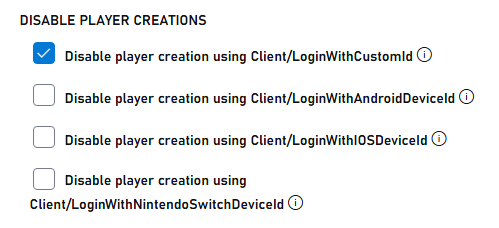
### 既存のタイトルの場合
1. PlayFab 開発者ポータルに移動し、タイトルを選択します
2. **Settings** に移動します。
3. **API Features** タブを選択します。
4. 匿名ログイン API 経由で新しいプレイヤー アカウントが作成されないようにするチェックボックスをオンにします
 ### 新しいタイトルの場合
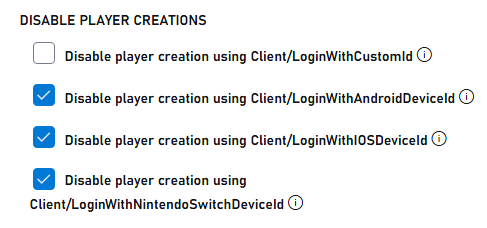
匿名ログイン API での自動プレイヤー作成を有効にすると、セキュリティが損なわれる可能性があります。この機能は、開発中またはテスト中にのみ一時的に有効化し、本番環境に移行する前に必ず無効化してください。
新しいタイトルでは、匿名 API 経由でのプレイヤー作成が既定で無効になっています。テストのために有効にするには、次の操作を行います:
1. PlayFab 開発者ポータルに移動し、タイトルを選択します
2. **Settings** に移動します。
3. **API Features** タブを選択します。
4. 匿名ログイン API 経由で新しいプレイヤー アカウントの作成を許可するチェックボックスをオフにします
### 新しいタイトルの場合
匿名ログイン API での自動プレイヤー作成を有効にすると、セキュリティが損なわれる可能性があります。この機能は、開発中またはテスト中にのみ一時的に有効化し、本番環境に移行する前に必ず無効化してください。
新しいタイトルでは、匿名 API 経由でのプレイヤー作成が既定で無効になっています。テストのために有効にするには、次の操作を行います:
1. PlayFab 開発者ポータルに移動し、タイトルを選択します
2. **Settings** に移動します。
3. **API Features** タブを選択します。
4. 匿名ログイン API 経由で新しいプレイヤー アカウントの作成を許可するチェックボックスをオフにします
 ## テストと応答の例
### サーバー応答の例
サーバー API 経由でユーザーの作成に成功した場合、次のような応答が返されます:
```json theme={null}
{
"code": 200,
"status": "OK",
"data": {
"PlayFabId": "PLAYFAB_ID",
"SessionTicket": "SESSION_TICKET",
"NewlyCreated": true
}
}
```
### クライアント応答の例
クライアント API から新しいアカウントを作成しようとした場合 (現在は無効化されています)、次のようなエラーが返されます:
```json theme={null}
{
"code": 400,
"status": "BadRequest",
"error": "PlayerCreationDisabled"
}
```
クライアント API 経由で既存のユーザーのログインに成功した場合:
```json theme={null}
{
"code": 200,
"status": "OK",
"data": {
"PlayFabId": "PLAYFAB_ID",
"SessionTicket": "SESSION_TICKET",
"NewlyCreated": false
}
}
```
## 関連情報
* [PlayFab 認証の概要](/services/playfab/identity/player-identity/authentication)
* [ログインの基本とベスト プラクティス](/services/playfab/identity/player-identity/login/login-basics-best-practices)
* [テスト用の HTTP サーバーの実行](/services/playfab/identity/player-identity/platform-specific-authentication/running-an-http-server-for-testing)
## Related topics
- [複数の PlayFab ログインの処理](/ja-jp/services/playfab/identity/player-identity/login/multiple-logins.md)
- [ログインの基本とベスト プラクティス](/ja-jp/services/playfab/identity/player-identity/login/login-basics-best-practices.md)
- [プレイヤー ログイン](/ja-jp/services/playfab/identity/player-identity/login/index.md)
- [認証](/ja-jp/services/playfab/identity/player-identity/authentication/index.md)
- [Twitch と HTML5 を使用した PlayFab 認証のセットアップ](/ja-jp/services/playfab/identity/player-identity/platform-specific-authentication/twitch-html5.md)
## テストと応答の例
### サーバー応答の例
サーバー API 経由でユーザーの作成に成功した場合、次のような応答が返されます:
```json theme={null}
{
"code": 200,
"status": "OK",
"data": {
"PlayFabId": "PLAYFAB_ID",
"SessionTicket": "SESSION_TICKET",
"NewlyCreated": true
}
}
```
### クライアント応答の例
クライアント API から新しいアカウントを作成しようとした場合 (現在は無効化されています)、次のようなエラーが返されます:
```json theme={null}
{
"code": 400,
"status": "BadRequest",
"error": "PlayerCreationDisabled"
}
```
クライアント API 経由で既存のユーザーのログインに成功した場合:
```json theme={null}
{
"code": 200,
"status": "OK",
"data": {
"PlayFabId": "PLAYFAB_ID",
"SessionTicket": "SESSION_TICKET",
"NewlyCreated": false
}
}
```
## 関連情報
* [PlayFab 認証の概要](/services/playfab/identity/player-identity/authentication)
* [ログインの基本とベスト プラクティス](/services/playfab/identity/player-identity/login/login-basics-best-practices)
* [テスト用の HTTP サーバーの実行](/services/playfab/identity/player-identity/platform-specific-authentication/running-an-http-server-for-testing)
## Related topics
- [複数の PlayFab ログインの処理](/ja-jp/services/playfab/identity/player-identity/login/multiple-logins.md)
- [ログインの基本とベスト プラクティス](/ja-jp/services/playfab/identity/player-identity/login/login-basics-best-practices.md)
- [プレイヤー ログイン](/ja-jp/services/playfab/identity/player-identity/login/index.md)
- [認証](/ja-jp/services/playfab/identity/player-identity/authentication/index.md)
- [Twitch と HTML5 を使用した PlayFab 認証のセットアップ](/ja-jp/services/playfab/identity/player-identity/platform-specific-authentication/twitch-html5.md)