> ## Documentation Index
> Fetch the complete documentation index at: https://devdocs.xbox.com/llms.txt
> Use this file to discover all available pages before exploring further.
# トーナメントとリーダーボードのクイックスタート
> レガシー PlayFab トーナメントのクイックスタート: Game Manager で HighScore 統計とリーダーボードを作成し、C# を使ってクライアントからプレイヤーのスコアを送信します。
# トーナメントとリーダーボードのクイックスタート
このクイックスタートでは、プレイヤーのハイスコアを追跡する統計を用意する方法と、上位のハイスコアのリーダーボードを取得する方法について説明します。これはグローバル リーダーボードで利用したり、[リセット可能な統計](/services/playfab/community/leaderboards/tournaments-leaderboards/using-resettable-statistics-and-leaderboards) と組み合わせて、特定のイベントやトーナメントのためにリセットしたりできます。
## 前提条件
プレイヤーが既に PlayFab にログインしていること。
## ステップ 1 - 統計と関連するリーダーボードを作成する
Game Manager で:
* 左側のメニューから **Leaderboards** に移動します。
* **NEW LEADERBOARD** を選択します。
* **Statistic name** フィールドに **HighScore** という **Leaderboard** を追加します。
* 提供されているドロップダウン メニューを使用して、**Reset frequency** フィールドを **Manually** に設定します。
* **Aggregation method** フィールドに移動し、提供されているドロップダウン メニューから **Maximum** (常に最高値を使用) を選択します。
## ステップ 2 - プレイヤーのハイスコアで統計を更新する
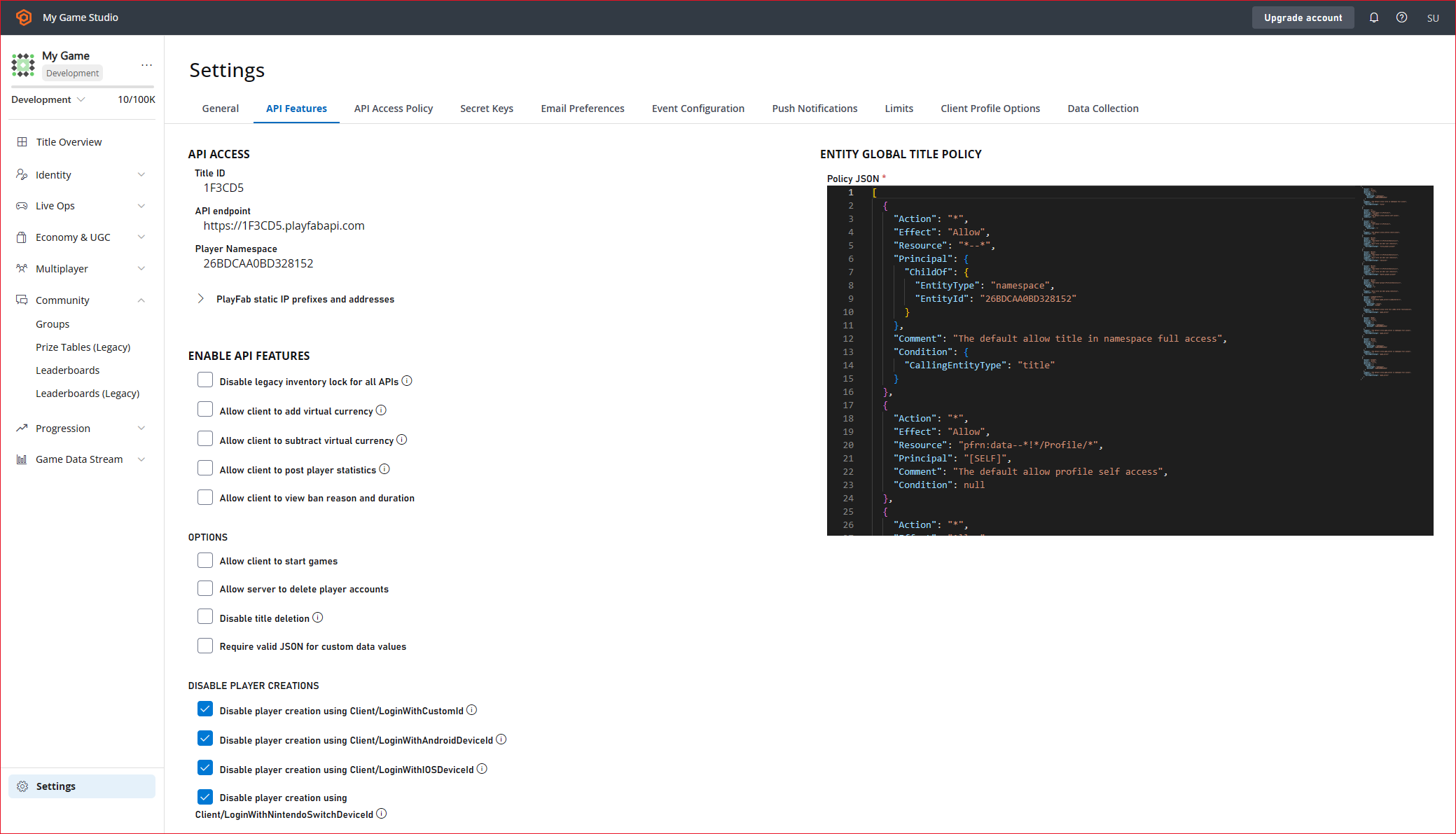
クライアントから [UpdatePlayerStatistics](xref:titleid.playfabapi.com.client.playerdatamanagement.updateplayerstatistics) を使用する前に、**API Features** で有効にする必要があります。
1. タイトルの Settings メニューから **Title settings** を選択します。
2. **API Features** タブを選択します。
3. **Allow client to post player statistics** のチェック ボックスをオンにします。
注: 一般に、このオプションはライブ ゲームでは使用しないでください。送信される値に対する権限がクライアントに与えられるためです。これは、プレイヤーが統計を不正操作する懸念がない場合にのみ有効です。統計をセキュアに保つ必要がある場合は、Cloud Script やカスタム ゲーム サーバーなど、サーバー主導の操作でのみ更新する必要があります。
4. 画面下部にある **SAVE** を選択します。
 ### C# コード例 - SubmitScore
このコード例では、ゲーム終了時に呼び出される `SubmitScore` 関数を用意します。
```csharp theme={null}
public void SubmitScore(int playerScore) {
PlayFabClientAPI.UpdatePlayerStatistics(new UpdatePlayerStatisticsRequest {
Statistics = new List {
new StatisticUpdate {
StatisticName = "HighScore",
Value = playerScore
}
}
}, result=> OnStatisticsUpdated(result), FailureCallback);
}
private void OnStatisticsUpdated(UpdatePlayerStatisticsResult updateResult) {
Debug.Log("Successfully submitted high score");
}
private void FailureCallback(PlayFabError error){
Debug.LogWarning("Something went wrong with your API call. Here's some debug information:");
Debug.LogError(error.GenerateErrorReport());
}
```
### ステップ 3 - ハイスコアのリーダーボードをリクエストする
ゲームをプレイしたすべてのプレイヤーの上位ハイスコアのリーダーボードを取得するには、[GetLeaderboard](xref:titleid.playfabapi.com.client.playerdatamanagement.getleaderboard) を呼び出します。
### C# コード例 - RequestLeaderboard
このコード例では、リーダーボードを取得するために呼び出される `RequestLeaderboard` 関数を用意し、その結果を `DisplayLeaderboard` 関数に渡します。この関数は、ゲーム内でハイスコアを表示する体験を構築します。
```csharp theme={null}
//Get the players with the top 10 high scores in the game
public void RequestLeaderboard() {
PlayFabClientAPI.GetLeaderboard(new GetLeaderboardRequest {
StatisticName = "HighScore",
StartPosition = 0,
MaxResultsCount = 10
}, result=> DisplayLeaderboard(result), FailureCallback);
}
private void FailureCallback(PlayFabError error){
Debug.LogWarning("Something went wrong with your API call. Here's some debug information:");
Debug.LogError(error.GenerateErrorReport());
}
```
## Related topics
- [リーダーボードのクイックスタート](/ja-jp/services/playfab/community/leaderboards/quickstart-leaderboards.md)
- [トーナメントとリーダーボード](/ja-jp/services/playfab/community/leaderboards/tournaments-leaderboards/index.md)
- [プッシュ通知クイックスタート](/ja-jp/services/playfab/live-service-management/game-configuration/title-communications/push-notifications/quickstart.md)
- [PlayFab Community ドキュメント](/ja-jp/services/playfab/community/index.md)
- [PlayStream および Telemetry を使用したリーダーボード](/ja-jp/services/playfab/community/leaderboards/leaderboards-with-playstream-and-telemetry.md)
### C# コード例 - SubmitScore
このコード例では、ゲーム終了時に呼び出される `SubmitScore` 関数を用意します。
```csharp theme={null}
public void SubmitScore(int playerScore) {
PlayFabClientAPI.UpdatePlayerStatistics(new UpdatePlayerStatisticsRequest {
Statistics = new List {
new StatisticUpdate {
StatisticName = "HighScore",
Value = playerScore
}
}
}, result=> OnStatisticsUpdated(result), FailureCallback);
}
private void OnStatisticsUpdated(UpdatePlayerStatisticsResult updateResult) {
Debug.Log("Successfully submitted high score");
}
private void FailureCallback(PlayFabError error){
Debug.LogWarning("Something went wrong with your API call. Here's some debug information:");
Debug.LogError(error.GenerateErrorReport());
}
```
### ステップ 3 - ハイスコアのリーダーボードをリクエストする
ゲームをプレイしたすべてのプレイヤーの上位ハイスコアのリーダーボードを取得するには、[GetLeaderboard](xref:titleid.playfabapi.com.client.playerdatamanagement.getleaderboard) を呼び出します。
### C# コード例 - RequestLeaderboard
このコード例では、リーダーボードを取得するために呼び出される `RequestLeaderboard` 関数を用意し、その結果を `DisplayLeaderboard` 関数に渡します。この関数は、ゲーム内でハイスコアを表示する体験を構築します。
```csharp theme={null}
//Get the players with the top 10 high scores in the game
public void RequestLeaderboard() {
PlayFabClientAPI.GetLeaderboard(new GetLeaderboardRequest {
StatisticName = "HighScore",
StartPosition = 0,
MaxResultsCount = 10
}, result=> DisplayLeaderboard(result), FailureCallback);
}
private void FailureCallback(PlayFabError error){
Debug.LogWarning("Something went wrong with your API call. Here's some debug information:");
Debug.LogError(error.GenerateErrorReport());
}
```
## Related topics
- [リーダーボードのクイックスタート](/ja-jp/services/playfab/community/leaderboards/quickstart-leaderboards.md)
- [トーナメントとリーダーボード](/ja-jp/services/playfab/community/leaderboards/tournaments-leaderboards/index.md)
- [プッシュ通知クイックスタート](/ja-jp/services/playfab/live-service-management/game-configuration/title-communications/push-notifications/quickstart.md)
- [PlayFab Community ドキュメント](/ja-jp/services/playfab/community/index.md)
- [PlayStream および Telemetry を使用したリーダーボード](/ja-jp/services/playfab/community/leaderboards/leaderboards-with-playstream-and-telemetry.md)