> ## Documentation Index
> Fetch the complete documentation index at: https://devdocs.xbox.com/llms.txt
> Use this file to discover all available pages before exploring further.
# 基本的な Store 操作
> ユーザーが購入できるものの決定、エンタイトルメントの確認、購入の完了など、XStore API を使用してゲーム内 Store を実装します。
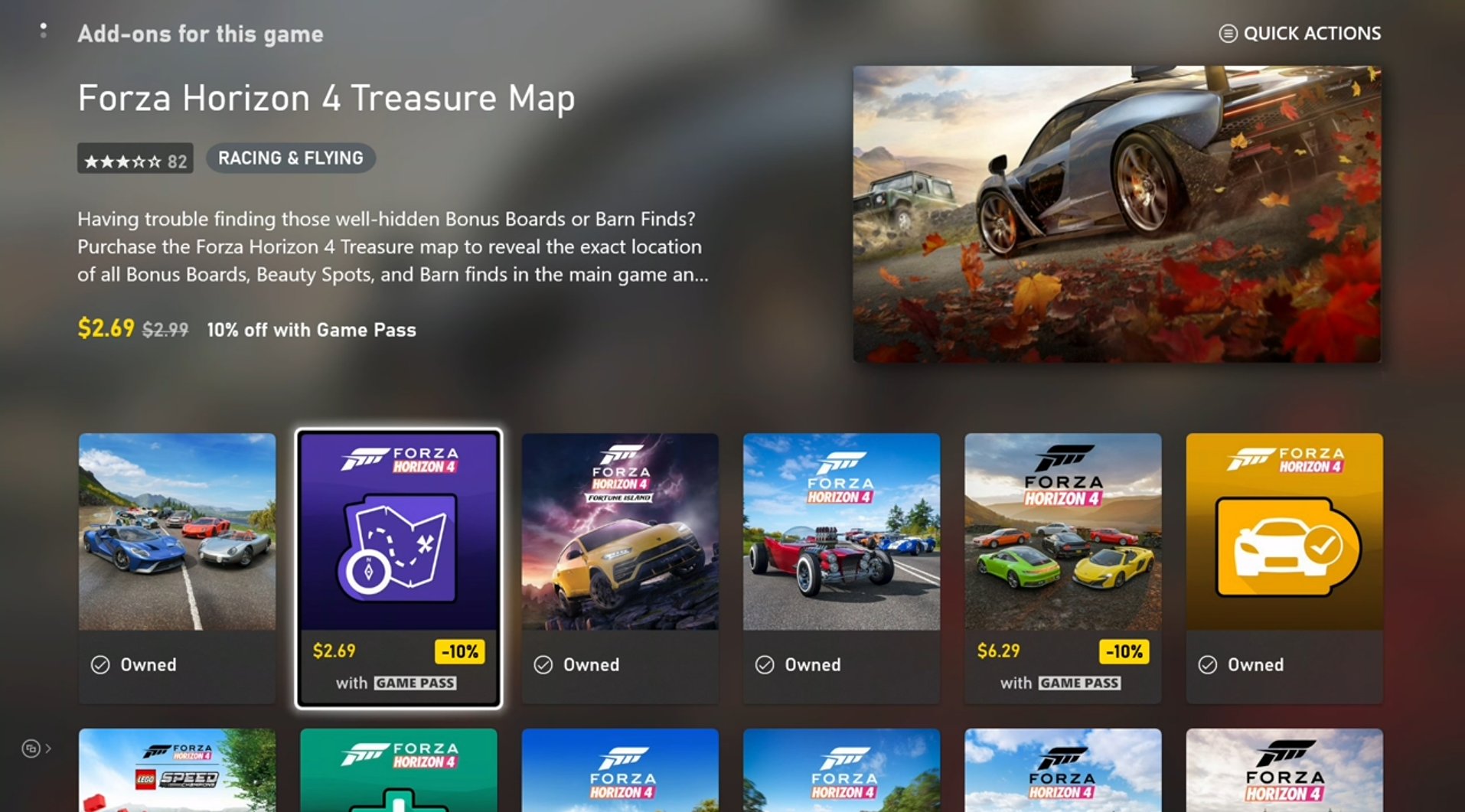
ゲーム内 Store には、通常、次の 3 つの基本操作が含まれます。
1. [ユーザーが購入できるものの決定](#1-determining-what-users-can-purchase)
2. [ユーザーが所有または権利を持つ製品の評価](#2-evaluating-what-products-the-user-owns-or-is-entitled-to)
3. [対象製品の購入](#3-purchasing-eligible-products)
この記事では、ベスト プラクティスを反映するために継続的に更新されている InGameStore サンプルから派生した、各操作のサンプル コードを示します。
## XStore API 呼び出しの準備
すべての `XStore` API は、[XStoreCreateContext](/reference/system/xstore/xstore_members) を使用して作成された `XStoreContextHandle` を介して動作します。
このコンテキストにより、コンソールでは指定したユーザー、PC では利用可能な既定のユーザーのコンテキストで Store 操作を実行できます。コンソールでは、Suspend または Quick Resume イベントによってコンテキストが無効になります。これらの状況を安全に処理するには、`XStoreContextHandle` を閉じ、ゲームが中断状態から再開するたびに再作成してください。
## 1. ユーザーが購入できるものの決定
ゲームが購入用に提供するのは、通常はアドオンです。次のコードは、ゲームが利用可能な製品を把握するために必要な基本的な [XStoreQueryAssociatedProductsAsync](/reference/system/xstore/xstore_members) API 呼び出しを示しています。
このクエリは自動的に、ゲームに関連付けられている **購入可能な** アドオンのみを返します。同じ発行元 (つまり、同じパートナー センター アカウントで構成されている) に関連付けられている無関係な製品も、パートナー センターの **\[製品関係のセットアップ]** セクションで、ゲームがその製品に「販売可能」の関係で設定されていれば、この呼び出しで返すことができます。
製品関係の構成について詳しくは、[ゲームの製品関係を構成する](/publishing/game-publishing/tutorial-xbox-managed/how-to-create-product-relationships)を参照してください。
```cpp theme={null}
bool CALLBACK ProductEnumerationCallback(const XStoreProduct* product, void* context)
{
// Handle adding the product to the game
printf("%s %s %u\n", product->title, product->storeId, product->productKind);
return true;
}
void QueryCatalog()
{
auto async = new XAsyncBlock{};
async->queue = m_asyncQueue;
async->callback = [](XAsyncBlock* async)
{
XStoreProductQueryHandle queryHandle = nullptr;
HRESULT hr = XStoreQueryAssociatedProductsResult(async, &queryHandle);
if (SUCCEEDED(hr))
{
hr = XStoreEnumerateProductsQuery(queryHandle, async->context, ProductEnumerationCallback);
if (SUCCEEDED(hr))
{
// TODO: Check for more pages to process
printf("Enumeration complete\n");
}
XStoreCloseProductsQueryHandle(queryHandle);
delete async;
}
};
XStoreProductKind typeFilter =
XStoreProductKind::Consumable |
XStoreProductKind::Durable |
XStoreProductKind::Game;
HRESULT hr = XStoreQueryAssociatedProductsAsync(
m_xStoreContext,
typeFilter,
UINT8_MAX, // placeholder maximum, see Paging
async)
if (FAILED(hr))
{
delete async;
}
}
```
### 注意事項
* `XStoreQueryAssociatedProductsAsync` では、購入可能な製品のみが返されます。バンドルでのみ付与される製品や、独立して購入できるように設定されていない製品は返されません。後者については、`XStoreQueryProductsAsync` を使用してください。
* 返される製品の数は事前にわかっていないため、カウントを蓄積する必要があります。
### ページング
関連製品またはエンタイトルメントを照会するときは、ページングの処理はオプションではありません。サービスから返されるページ数と、1 ページあたりに返される項目数は、環境やサービスの負荷によって異なる場合があります。ページングを処理する方法の例については、[XStoreQueryAssociatedProductsAsync](/reference/system/xstore/xstore_members) を参照してください。
### その他のオプション
[XStoreQueryProductsAsync](/reference/system/xstore/xstore_members) は、`storeId` がわかっている場合や、他の `actionFilters` が必要な場合に、特定の製品を照会するために使用できます。「アクション」とは、`Purchase`、`License`、`Gift`、`Redeem` などの動詞を含む、製品に適用される使用シナリオです。
[XStoreQueryAssociatedProductsForStoreIdAsync](/reference/system/xstore/xstore_members) は、他のゲームの関連製品を照会するために使用でき、別のタイトルのアドオンをクロスセルするのに便利です。
[XStoreQueryProductForCurrentGameAsync](/reference/system/xstore/xstore_members) は、現在実行中のゲームの製品のみを照会するためのものです。
[XStoreShowAssociatedProductsUIAsync](/reference/system/xstore/xstore_members) は、ユーザーを Microsoft Store アプリに遷移させ、製品の種類でフィルターされた関連製品のビューに移動します。この API は、ゲーム内のインターフェイスで提示する利用可能な製品を列挙する代替手段です。
 ## 2. ユーザーが所有または権利を持つ製品の評価
この手順では前述のコードとほぼ同じものを使用しますが、次の置き換えを行います。
* [XStoreQueryAssociatedProductsAsync](/reference/system/xstore/xstore_members) → [XStoreQueryEntitledProductsAsync](/reference/system/xstore/xstore_members)
* [XStoreQueryAssociatedProductsResult](/reference/system/xstore/xstore_members) → [XStoreQueryEntitledProductsResult](/reference/system/xstore/xstore_members)
`QueryEntitledProducts` API は、ユーザーに権利がある製品を返します。エンタイトルメント (権利があること) とは、ユーザーが製品を直接所有している、他の製品 (バンドルやサブスクリプションなど) を通じてエンタイトルメントを満たしている、または別のユーザーからの共有エンタイトルメントを通じて権利を得ていることを意味します。
さらに、[XStoreQueryAssociatedProductsAsync](/reference/system/xstore/xstore_members) (および関連関数) の結果によってエンタイトルメントが決まります。[XStoreProduct](/reference/system/xstore/xstore_members) 構造体には、ユーザーが権利を持つ場合に true に設定される `isInUserCollection` フィールドが含まれます。
### 消費型の所有権
消費型の数量は `XStoreProduct.skus[i].collectionData.quantity` に記載されています。通常、消費型製品には SKU が 1 つしかありません。
数量を照会するために [XStoreQueryConsumableBalanceRemainingAsync](/reference/system/xstore/xstore_members) を使用することもできますが、各呼び出しがサービス呼び出しを発生させるため、多数の消費型に対して個別に使用しないでください。
消費型ベースのエコシステムの整合性を維持するには、消費型のサービス側検証と引き換えを使用してください。詳細については、[消費型ベースのエコシステム](/publishing/xstore-commerce/xstore-consumables)を参照してください。
### 耐久型の所有権
アカウントが製品を所有しているかを確認するだけでは、ゲーム内でその製品を使用する権利があると判断するには不十分です。耐久型製品は、[ゲームの製品共有モデル](/publishing/xstore-commerce/xstore-product-sharing)で説明されているコンテンツ共有ポリシーに従う必要があります。
コンテンツ共有のルールに従ってライセンス供与可能かを判定するには、**パッケージを含む耐久型** に対して [XStoreAcquireLicenseForPackageAsync](/reference/system/xstore/xstore_members) を使用します。
**パッケージのない耐久型** に対して同じことを行うには、[XStoreAcquireLicenseForDurablesAsync](/reference/system/xstore/xstore_members) を使用します。
**デジタル** ライセンス供与されたゲームに対して、ライセンス供与可能なパッケージのない耐久型製品の一覧を返すには、[XStoreQueryAddOnLicensesAsync](/reference/system/xstore/xstore_members) を使用します。
詳細については、[ダウンロード可能なコンテンツの管理とライセンス供与](/publishing/xstore-commerce/xstore-dlc)および[パッケージのない耐久型の使用方法](/publishing/xstore-commerce/xstore-dwob)を参照してください。
## 3. 対象製品の購入
購入可能な製品の購入フローを表示するには、`storeId` を [XStoreShowPurchaseUIAsync](/reference/system/xstore/xstore_members) API に渡します。
```cpp theme={null}
void MakePurchase(const char* storeId)
{
auto async = new XAsyncBlock{};
async->context = &storeId;
async->queue = m_asyncQueue;
async->callback = [](XAsyncBlock *async)
{
const char* = reinterpret_cast(async->context);
HRESULT hr = XStoreShowPurchaseUIResult(async);
if (SUCCEEDED(hr))
{
printf("Purchase succeeded (%s)\n", storeId);
// Refresh ownership and update game
}
else
{
printf("Purchase failed (%s) 0x%x\n", storeId, hr);
if (hr == E_GAMESTORE_ALREADY_PURCHASED)
{
printf("Already own this\n");
}
}
delete async;
};
HRESULT hr = XStoreShowPurchaseUIAsync(
m_xStoreContext,
storeId,
nullptr, // Can be used to override the title bar text
nullptr, // Can be used to provide extra details to purchase
async);
if (FAILED(hr))
{
delete async;
printf("Error calling XStoreShowPurchaseUIAsync : 0x%x\n", hr);
return;
}
}
```
プレーヤーはゲームの外部でも、Microsoft Store、Xbox.com、PC、モバイル アプリ、その他のアウトレットに明示的に切り替えて購入を行うことができます。したがって、ゲーム内に、オンデマンドで確実に製品所有権を更新する場所を用意してください。最初のサインイン フローは最適な場所ですが、ゲーム内 Store への移行の一部として、または設定内のどこかにも更新処理を追加してください。
## リファレンス API ドキュメント
* [XStore (API の内容)](/reference/system/xstore/xstore_members)
* 関数
* [XStoreCreateContext](/reference/system/xstore/xstore_members)
* [XStoreQueryAssociatedProductsAsync](/reference/system/xstore/xstore_members)
* [XStoreQueryProductsAsync](/reference/system/xstore/xstore_members)
* [XStoreQueryAssociatedProductsForStoreIdAsync](/reference/system/xstore/xstore_members)
* [XStoreQueryProductForCurrentGameAsync](/reference/system/xstore/xstore_members)
* [XStoreShowAssociatedProductsUIAsync](/reference/system/xstore/xstore_members)
* [XStoreQueryEntitledProductsAsync](/reference/system/xstore/xstore_members)
* [XStoreQueryAssociatedProductsResult](/reference/system/xstore/xstore_members)
* [XStoreQueryEntitledProductsResult](/reference/system/xstore/xstore_members)
* [XStoreQueryConsumableBalanceRemainingAsync](/reference/system/xstore/xstore_members)
* [XStoreAcquireLicenseForPackageAsync](/reference/system/xstore/xstore_members)
* [XStoreAcquireLicenseForDurablesAsync](/reference/system/xstore/xstore_members)
* [XStoreQueryAddOnLicensesAsync](/reference/system/xstore/xstore_members)
* [XStoreShowPurchaseUIAsync](/reference/system/xstore/xstore_members)
* 構造体
* [XStoreProduct](/reference/system/xstore/xstore_members)
## 関連項目
[コマースの概要](/publishing/xstore-commerce/xstore-commerce-overview)
[XStore 開発とテストの有効化](/publishing/xstore-commerce/xstore-product-testing-setup)
[XStore API リファレンス](/reference/system/xstore/xstore_members)
## Related topics
- [GDK コマース システムの概要](/ja-jp/publishing/xstore-commerce/xstore-overview.md)
- [XStore コマースの概要](/ja-jp/publishing/xstore-commerce/xstore-commerce-overview.md)
- [基本的な DRM とライセンス チェック](/ja-jp/publishing/xstore-commerce/xstore-basic-drm.md)
- [基本的な統計情報を作成する](/ja-jp/services/playfab/player-progression/statistics/create-basic-statistics.md)
- [基本的なリーダーボードを作成する](/ja-jp/services/playfab/community/leaderboards/create-basic-leaderboard.md)
## 2. ユーザーが所有または権利を持つ製品の評価
この手順では前述のコードとほぼ同じものを使用しますが、次の置き換えを行います。
* [XStoreQueryAssociatedProductsAsync](/reference/system/xstore/xstore_members) → [XStoreQueryEntitledProductsAsync](/reference/system/xstore/xstore_members)
* [XStoreQueryAssociatedProductsResult](/reference/system/xstore/xstore_members) → [XStoreQueryEntitledProductsResult](/reference/system/xstore/xstore_members)
`QueryEntitledProducts` API は、ユーザーに権利がある製品を返します。エンタイトルメント (権利があること) とは、ユーザーが製品を直接所有している、他の製品 (バンドルやサブスクリプションなど) を通じてエンタイトルメントを満たしている、または別のユーザーからの共有エンタイトルメントを通じて権利を得ていることを意味します。
さらに、[XStoreQueryAssociatedProductsAsync](/reference/system/xstore/xstore_members) (および関連関数) の結果によってエンタイトルメントが決まります。[XStoreProduct](/reference/system/xstore/xstore_members) 構造体には、ユーザーが権利を持つ場合に true に設定される `isInUserCollection` フィールドが含まれます。
### 消費型の所有権
消費型の数量は `XStoreProduct.skus[i].collectionData.quantity` に記載されています。通常、消費型製品には SKU が 1 つしかありません。
数量を照会するために [XStoreQueryConsumableBalanceRemainingAsync](/reference/system/xstore/xstore_members) を使用することもできますが、各呼び出しがサービス呼び出しを発生させるため、多数の消費型に対して個別に使用しないでください。
消費型ベースのエコシステムの整合性を維持するには、消費型のサービス側検証と引き換えを使用してください。詳細については、[消費型ベースのエコシステム](/publishing/xstore-commerce/xstore-consumables)を参照してください。
### 耐久型の所有権
アカウントが製品を所有しているかを確認するだけでは、ゲーム内でその製品を使用する権利があると判断するには不十分です。耐久型製品は、[ゲームの製品共有モデル](/publishing/xstore-commerce/xstore-product-sharing)で説明されているコンテンツ共有ポリシーに従う必要があります。
コンテンツ共有のルールに従ってライセンス供与可能かを判定するには、**パッケージを含む耐久型** に対して [XStoreAcquireLicenseForPackageAsync](/reference/system/xstore/xstore_members) を使用します。
**パッケージのない耐久型** に対して同じことを行うには、[XStoreAcquireLicenseForDurablesAsync](/reference/system/xstore/xstore_members) を使用します。
**デジタル** ライセンス供与されたゲームに対して、ライセンス供与可能なパッケージのない耐久型製品の一覧を返すには、[XStoreQueryAddOnLicensesAsync](/reference/system/xstore/xstore_members) を使用します。
詳細については、[ダウンロード可能なコンテンツの管理とライセンス供与](/publishing/xstore-commerce/xstore-dlc)および[パッケージのない耐久型の使用方法](/publishing/xstore-commerce/xstore-dwob)を参照してください。
## 3. 対象製品の購入
購入可能な製品の購入フローを表示するには、`storeId` を [XStoreShowPurchaseUIAsync](/reference/system/xstore/xstore_members) API に渡します。
```cpp theme={null}
void MakePurchase(const char* storeId)
{
auto async = new XAsyncBlock{};
async->context = &storeId;
async->queue = m_asyncQueue;
async->callback = [](XAsyncBlock *async)
{
const char* = reinterpret_cast(async->context);
HRESULT hr = XStoreShowPurchaseUIResult(async);
if (SUCCEEDED(hr))
{
printf("Purchase succeeded (%s)\n", storeId);
// Refresh ownership and update game
}
else
{
printf("Purchase failed (%s) 0x%x\n", storeId, hr);
if (hr == E_GAMESTORE_ALREADY_PURCHASED)
{
printf("Already own this\n");
}
}
delete async;
};
HRESULT hr = XStoreShowPurchaseUIAsync(
m_xStoreContext,
storeId,
nullptr, // Can be used to override the title bar text
nullptr, // Can be used to provide extra details to purchase
async);
if (FAILED(hr))
{
delete async;
printf("Error calling XStoreShowPurchaseUIAsync : 0x%x\n", hr);
return;
}
}
```
プレーヤーはゲームの外部でも、Microsoft Store、Xbox.com、PC、モバイル アプリ、その他のアウトレットに明示的に切り替えて購入を行うことができます。したがって、ゲーム内に、オンデマンドで確実に製品所有権を更新する場所を用意してください。最初のサインイン フローは最適な場所ですが、ゲーム内 Store への移行の一部として、または設定内のどこかにも更新処理を追加してください。
## リファレンス API ドキュメント
* [XStore (API の内容)](/reference/system/xstore/xstore_members)
* 関数
* [XStoreCreateContext](/reference/system/xstore/xstore_members)
* [XStoreQueryAssociatedProductsAsync](/reference/system/xstore/xstore_members)
* [XStoreQueryProductsAsync](/reference/system/xstore/xstore_members)
* [XStoreQueryAssociatedProductsForStoreIdAsync](/reference/system/xstore/xstore_members)
* [XStoreQueryProductForCurrentGameAsync](/reference/system/xstore/xstore_members)
* [XStoreShowAssociatedProductsUIAsync](/reference/system/xstore/xstore_members)
* [XStoreQueryEntitledProductsAsync](/reference/system/xstore/xstore_members)
* [XStoreQueryAssociatedProductsResult](/reference/system/xstore/xstore_members)
* [XStoreQueryEntitledProductsResult](/reference/system/xstore/xstore_members)
* [XStoreQueryConsumableBalanceRemainingAsync](/reference/system/xstore/xstore_members)
* [XStoreAcquireLicenseForPackageAsync](/reference/system/xstore/xstore_members)
* [XStoreAcquireLicenseForDurablesAsync](/reference/system/xstore/xstore_members)
* [XStoreQueryAddOnLicensesAsync](/reference/system/xstore/xstore_members)
* [XStoreShowPurchaseUIAsync](/reference/system/xstore/xstore_members)
* 構造体
* [XStoreProduct](/reference/system/xstore/xstore_members)
## 関連項目
[コマースの概要](/publishing/xstore-commerce/xstore-commerce-overview)
[XStore 開発とテストの有効化](/publishing/xstore-commerce/xstore-product-testing-setup)
[XStore API リファレンス](/reference/system/xstore/xstore_members)
## Related topics
- [GDK コマース システムの概要](/ja-jp/publishing/xstore-commerce/xstore-overview.md)
- [XStore コマースの概要](/ja-jp/publishing/xstore-commerce/xstore-commerce-overview.md)
- [基本的な DRM とライセンス チェック](/ja-jp/publishing/xstore-commerce/xstore-basic-drm.md)
- [基本的な統計情報を作成する](/ja-jp/services/playfab/player-progression/statistics/create-basic-statistics.md)
- [基本的なリーダーボードを作成する](/ja-jp/services/playfab/community/leaderboards/create-basic-leaderboard.md)