> ## Documentation Index
> Fetch the complete documentation index at: https://devdocs.xbox.com/llms.txt
> Use this file to discover all available pages before exploring further.
# タッチ操作プレビューのカスタマイズ
> タッチ操作プレビューのカスタマイズ
この記事では、TAK Editor を使用してタッチ アダプテーション レイアウトのプレビューをカスタマイズするために利用できるさまざまなオプションの概要を提供します。プレビューは、さまざまなゲーム シーンをシミュレートし、異なる文脈でタッチ操作がどのように見えるかをテストするためにカスタマイズできます。これは、プレビューに背景色または画像を割り当てることで実行できます。
## 背景
背景を色または画像でカスタマイズする方法は 2 通りあります: プレビュー設定を介する方法、またはコマンド パレットでコマンドを実行する方法です。
### プレビュー設定を介する
1. エディターでバンドルのレイアウト ファイルを開き、プレビューを起動します。
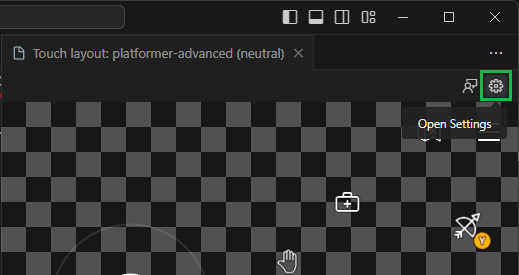
2. プレビュー パネルの右上隅にある「Open Settings」をクリックします:
 3. 背景をカスタマイズするオプションを含むモーダルが表示されます。色または画像を割り当てられます:
1. **色:** 色を選択するには、カラー ピッカーをクリックします。あるいは、入力フィールドに色を入力できます。色は CSS でサポートされている任意のフォーマット (例: `#0000ffff`、`rgba(0, 0, 255, 1)`、`hsl(240, 100%, 50%)`、または `blue`) で指定できます。
3. 背景をカスタマイズするオプションを含むモーダルが表示されます。色または画像を割り当てられます:
1. **色:** 色を選択するには、カラー ピッカーをクリックします。あるいは、入力フィールドに色を入力できます。色は CSS でサポートされている任意のフォーマット (例: `#0000ffff`、`rgba(0, 0, 255, 1)`、`hsl(240, 100%, 50%)`、または `blue`) で指定できます。
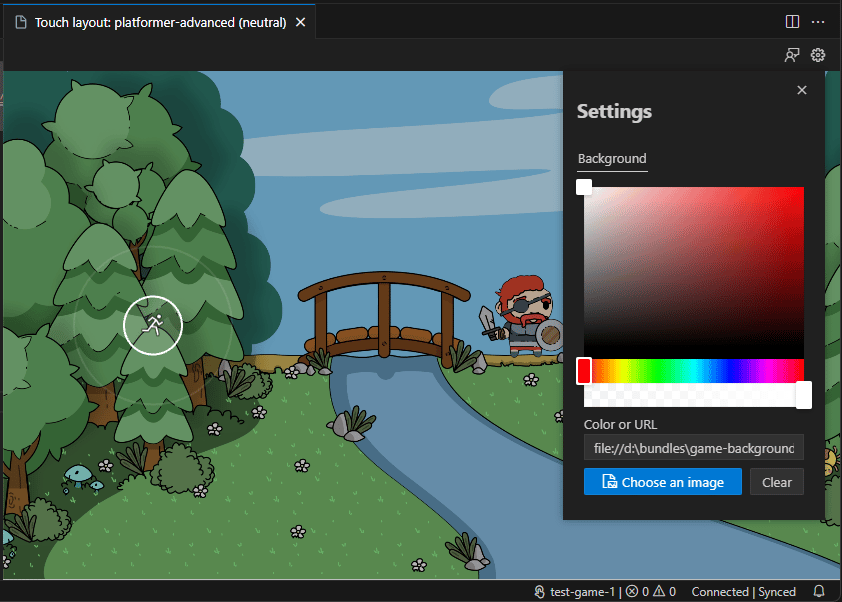
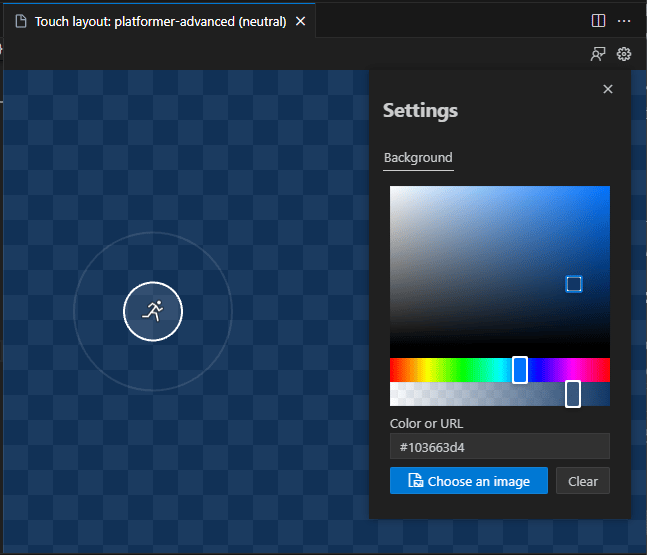 2. **画像:** 「Choose an image」をクリックしてファイル ピッカーを開きます。画像の場所に移動し、それを選択します。あるいは、画像の URL を入力フィールドに入力することもできます。
 ### コマンド パレットを介する
1. エディターでバンドルのレイアウト ファイルを開き、プレビューを起動します。**このコマンドは、プレビューが開いているときにのみ利用可能です。**
2. コマンド パレットを起動します (Windows の場合は `Ctrl+Shift+P`、macOS の場合は `Cmd+Shift+P`)。
3. 「Background」を検索し、「Touch Adaptation Kit: Set preview background」を選択します:
### コマンド パレットを介する
1. エディターでバンドルのレイアウト ファイルを開き、プレビューを起動します。**このコマンドは、プレビューが開いているときにのみ利用可能です。**
2. コマンド パレットを起動します (Windows の場合は `Ctrl+Shift+P`、macOS の場合は `Cmd+Shift+P`)。
3. 「Background」を検索し、「Touch Adaptation Kit: Set preview background」を選択します:
 4. 利用可能なオプションのいずれかを選択します:
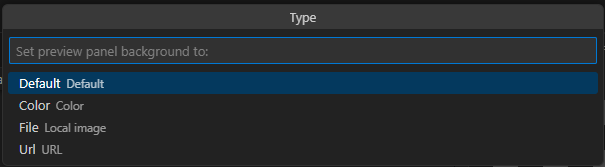 1. `Default`: 背景をデフォルトの透明なチェッカーボード パターンにリセットします。
2. `Color`: 背景に色を割り当てます。CSS の色値のフォーマットでテキストとして入力する必要があります。
3. `Image`: 背景に画像を割り当てます。画像を選択するためのファイル ピッカーが開きます。
4. `URL`: URL を使用して背景に画像を割り当てます。URL を入力するためのテキスト入力が表示されます。
## 次のステップ
> \[!div class="nextstepaction"]
> [XBOX への提出のためにバンドルをパッケージ化する](/build/core-features/common/game-streaming/tak-editor/game-streaming-tak-editor-pack-bundles)
## Related topics
- [タッチ コントロール構築のデザイナーズ ガイド](/ja-jp/build/core-features/common/game-streaming/building-touch-layouts/game-streaming-tak-designers-guide.md)
- [タッチ アダプテーション レイアウトのプレビュー](/ja-jp/build/core-features/common/game-streaming/tak-editor/game-streaming-tak-editor-preview-layouts.md)
- [Visual Studio Code 向け Touch Adaptation Kit (TAK) エディター](/ja-jp/build/core-features/common/game-streaming/tak-editor/index.md)
- [XGameStreamingGetGamepadPhysicality](/ja-jp/reference/system/xgamestreaming/functions/xgamestreaminggetgamepadphysicality.md)
- [VM 作成時にカスタム スクリプトを実行する (プレビュー)](/ja-jp/services/playfab/multiplayer/servers/vmstartupscript.md)
1. `Default`: 背景をデフォルトの透明なチェッカーボード パターンにリセットします。
2. `Color`: 背景に色を割り当てます。CSS の色値のフォーマットでテキストとして入力する必要があります。
3. `Image`: 背景に画像を割り当てます。画像を選択するためのファイル ピッカーが開きます。
4. `URL`: URL を使用して背景に画像を割り当てます。URL を入力するためのテキスト入力が表示されます。
## 次のステップ
> \[!div class="nextstepaction"]
> [XBOX への提出のためにバンドルをパッケージ化する](/build/core-features/common/game-streaming/tak-editor/game-streaming-tak-editor-pack-bundles)
## Related topics
- [タッチ コントロール構築のデザイナーズ ガイド](/ja-jp/build/core-features/common/game-streaming/building-touch-layouts/game-streaming-tak-designers-guide.md)
- [タッチ アダプテーション レイアウトのプレビュー](/ja-jp/build/core-features/common/game-streaming/tak-editor/game-streaming-tak-editor-preview-layouts.md)
- [Visual Studio Code 向け Touch Adaptation Kit (TAK) エディター](/ja-jp/build/core-features/common/game-streaming/tak-editor/index.md)
- [XGameStreamingGetGamepadPhysicality](/ja-jp/reference/system/xgamestreaming/functions/xgamestreaminggetgamepadphysicality.md)
- [VM 作成時にカスタム スクリプトを実行する (プレビュー)](/ja-jp/services/playfab/multiplayer/servers/vmstartupscript.md)