> ## Documentation Index
> Fetch the complete documentation index at: https://devdocs.xbox.com/llms.txt
> Use this file to discover all available pages before exploring further.
# タッチ入門
> タッチ入門
この記事では、XBOX Game Streaming タイトルにタッチスクリーン オーバーレイ コントロールを設定する方法について説明します。
コントローラーを接続していなくてもゲームをプレイできるようにできます。タッチスクリーン操作は、ゲームをプレイするユーザー数を増やし、モバイル ユーザーのエンゲージメントを高め、ユーザーのデバイスに対して直感的な体験を提供します。
ゲームにタッチ入力を導入するには、2 つの方法があります。
1. **Touch Adaptation Kit レイアウト**。ストリーミング クライアントはゲームの上にタッチ操作をオーバーレイできます。ゲーム用に操作を最適化するカスタム レイアウトを提供したり、ゲームのさまざまな部分に対して異なるレイアウトに変更したりできます。
2. **ネイティブ タッチ**。ゲームの中で、コントローラー操作より標準的なタッチ操作の方が自然に反応する領域に対して、直接タッチをサポートできます。これが一般的に望まれる例としては、メニュー、インベントリ管理、マップ操作などがあります。
タッチ入力は、どちらの形式でもデフォルトでは有効になっていません。タッチをローカルでテストするには、ネイティブ タッチまたはタッチ アダプテーション キット バンドルのサイドロードを有効にするように Content Test Application を構成できます。[Stream Configuration Overview](/build/core-features/common/game-streaming/game-streaming-content-test-application-stream-config) に、これらの設定の使用方法についての詳細情報があります。タッチがローカルで動作するようになったら、Microsoft アカウント担当者にお問い合わせて、ストリーミング中に他のユーザーにもタッチ入力を有効にしてもらってください。
CTA の詳細については、[Web Content Test Application (CTA)](/build/core-features/common/game-streaming/game-streaming-web-content-test-application) を参照してください。
## Touch Adaptation Kit レイアウト
Touch Adaptation Kit を使ったタッチ レイアウト設計のベスト プラクティスに関するより高度なガイドについては、[タッチ操作を構築するデザイナー ガイド](/build/core-features/common/game-streaming/building-touch-layouts/game-streaming-tak-designers-guide) を参照してください。
[Touch Adaptation Kit (TAK)](/build/core-features/common/game-streaming/game-streaming-touch-touch-adaptation-kit-overview) を使用すると、以下のアクションを実行できます。
* カスタム タッチ アダプテーション レイアウトを[作成](/build/core-features/common/game-streaming/building-touch-layouts/game-streaming-touch-building-touch-layout)します。
* カスタム タッチ アダプテーション レイアウトをデバイスに[デプロイ](/build/core-features/common/game-streaming/building-touch-layouts/game-streaming-touch-publishing-layouts)します。
* [Cloud Aware touch adaptation kit APIs](/reference/system/xgamestreaming/xgamestreaming_members#TouchAdaptation) を使用して、操作レイアウトの表示を制御します。
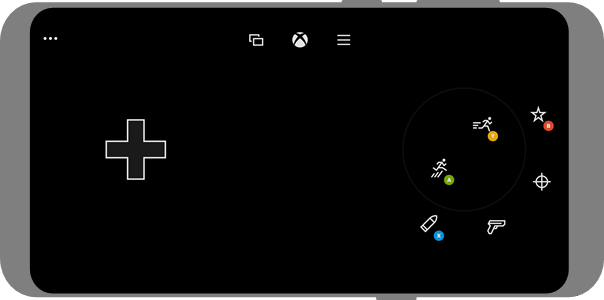
Touch Adaptation Kit レイアウトは、タッチ入力を実際に使用しているユーザーに*のみ*表示されます。コントローラーがアクティブに使用されている場合、タッチ操作は非表示になります。したがって、Touch Adaptation Kit レイアウトを追加し、[Cloud Aware touch adaptation kit APIs](/reference/system/xgamestreaming/xgamestreaming_members#TouchAdaptation) を呼び出すことは、常に安全であり、望ましい方法です。
ゲームには、次のスクリーンショットに示すような、類似のタッチ適応レイアウトを持たせることができます。
 ## ネイティブ タッチのサポート
ネイティブ タッチのサポートは、ゲームでマウスやその他の入力をサポートするのに似ています。タッチ イベントは、値が `GameInputKindTouch` である [GameInputKind](/reference/input/gameinput/enums/gameinputkind) を持つ [IGameInputReading](/reference/input/gameinput/interfaces/igameinputreading/igameinputreading) によって表されます。
ネイティブ タッチを実装するための完全なガイドについては、[IGameInput でゲーム用のネイティブ タッチ インターフェースを構築する](/build/core-features/common/game-streaming/game-streaming-native-touch-igameinput) を参照してください。
## リファレンス API ドキュメント
* [XGameStreaming (API contents)](/reference/system/xgamestreaming/xgamestreaming_members)
## 関連項目
[XBOX Game Streaming の概要](/build/core-features/common/game-streaming/game-streaming-overview)
[タッチ操作を構築するデザイナー ガイド](/build/core-features/common/game-streaming/building-touch-layouts/game-streaming-tak-designers-guide)
[IGameInput でゲーム用のネイティブ タッチ インターフェースを構築する](/build/core-features/common/game-streaming/game-streaming-native-touch-igameinput)
[TAK CLI の入手方法](https://aka.ms/get-takcli)
## Related topics
- [Touch Adaptation Kit Command Line Tool (tak.exe)](/ja-jp/build/core-features/common/game-streaming/tak-command-line-tool/game-streaming-tak-command-line.md)
- [ゲームをストリーミングする](/ja-jp/build/core-features/common/game-streaming/game-streaming-stream-your-game.md)
- [XGameStreaming](/ja-jp/reference/system/xgamestreaming/xgamestreaming_members.md)
- [XBOX Game Streaming 向けにゲームを最適化する](/ja-jp/build/core-features/common/game-streaming/game-streaming-optimizing-your-game.md)
- [XBOX Game Streaming と XBOX Remote Play の比較](/ja-jp/build/core-features/common/game-streaming/game-streaming-project-xcloud-vs-console-streaming.md)
## ネイティブ タッチのサポート
ネイティブ タッチのサポートは、ゲームでマウスやその他の入力をサポートするのに似ています。タッチ イベントは、値が `GameInputKindTouch` である [GameInputKind](/reference/input/gameinput/enums/gameinputkind) を持つ [IGameInputReading](/reference/input/gameinput/interfaces/igameinputreading/igameinputreading) によって表されます。
ネイティブ タッチを実装するための完全なガイドについては、[IGameInput でゲーム用のネイティブ タッチ インターフェースを構築する](/build/core-features/common/game-streaming/game-streaming-native-touch-igameinput) を参照してください。
## リファレンス API ドキュメント
* [XGameStreaming (API contents)](/reference/system/xgamestreaming/xgamestreaming_members)
## 関連項目
[XBOX Game Streaming の概要](/build/core-features/common/game-streaming/game-streaming-overview)
[タッチ操作を構築するデザイナー ガイド](/build/core-features/common/game-streaming/building-touch-layouts/game-streaming-tak-designers-guide)
[IGameInput でゲーム用のネイティブ タッチ インターフェースを構築する](/build/core-features/common/game-streaming/game-streaming-native-touch-igameinput)
[TAK CLI の入手方法](https://aka.ms/get-takcli)
## Related topics
- [Touch Adaptation Kit Command Line Tool (tak.exe)](/ja-jp/build/core-features/common/game-streaming/tak-command-line-tool/game-streaming-tak-command-line.md)
- [ゲームをストリーミングする](/ja-jp/build/core-features/common/game-streaming/game-streaming-stream-your-game.md)
- [XGameStreaming](/ja-jp/reference/system/xgamestreaming/xgamestreaming_members.md)
- [XBOX Game Streaming 向けにゲームを最適化する](/ja-jp/build/core-features/common/game-streaming/game-streaming-optimizing-your-game.md)
- [XBOX Game Streaming と XBOX Remote Play の比較](/ja-jp/build/core-features/common/game-streaming/game-streaming-project-xcloud-vs-console-streaming.md)