> ## Documentation Index
> Fetch the complete documentation index at: https://devdocs.xbox.com/llms.txt
> Use this file to discover all available pages before exploring further.
# Page Performance
> Page Performance
Utilisez la page Performance pour afficher les données de performances en temps réel de votre console, comme illustré dans la capture d'écran suivante.
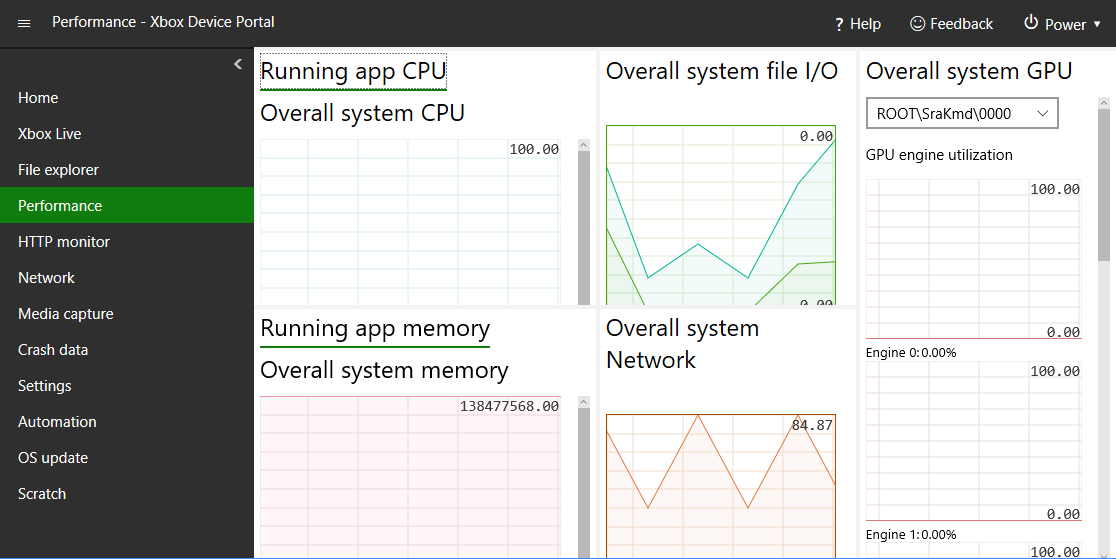 La page Performance comporte les volets suivants.
## Volet Running app CPU
Le volet Running app CPU indique le pourcentage du processeur total disponible.
## Volet Running app memory
Le volet Running app memory indique la mémoire totale, utilisée, disponible validée, paginée et non paginée.
## Volet Overall system GPU
Le volet Overall system GPU indique l'utilisation du moteur GPU et le pourcentage du GPU total disponible.
## Overall system file I/O
Le volet Overall system file I/O indique les lectures et écritures d'E/S.
## Volet Overall system Network
Le volet Overall system Network indique le trafic réseau reçu et envoyé.
## Related topics
- [Developer Home (DevHome) sur les kits de développement XBOX](/fr/tools/tools-console/devhome/index.md)
- [XBOX Device Portal (Windows Device Portal sur XBOX)](/fr/tools/tools-console/wdp/index.md)
- [Developer Home sur la console (Dev Home)](/fr/tools/tools-console/devhome/devhome.md)
- [Répertoire des rubriques NDA : liens actifs vers Microsoft Learn](/fr/nda/nda-topic-directory.md)
- [Bonnes pratiques Insights](/fr/services/playfab/data-analytics/legacy/insights/best-practices.md)
La page Performance comporte les volets suivants.
## Volet Running app CPU
Le volet Running app CPU indique le pourcentage du processeur total disponible.
## Volet Running app memory
Le volet Running app memory indique la mémoire totale, utilisée, disponible validée, paginée et non paginée.
## Volet Overall system GPU
Le volet Overall system GPU indique l'utilisation du moteur GPU et le pourcentage du GPU total disponible.
## Overall system file I/O
Le volet Overall system file I/O indique les lectures et écritures d'E/S.
## Volet Overall system Network
Le volet Overall system Network indique le trafic réseau reçu et envoyé.
## Related topics
- [Developer Home (DevHome) sur les kits de développement XBOX](/fr/tools/tools-console/devhome/index.md)
- [XBOX Device Portal (Windows Device Portal sur XBOX)](/fr/tools/tools-console/wdp/index.md)
- [Developer Home sur la console (Dev Home)](/fr/tools/tools-console/devhome/devhome.md)
- [Répertoire des rubriques NDA : liens actifs vers Microsoft Learn](/fr/nda/nda-topic-directory.md)
- [Bonnes pratiques Insights](/fr/services/playfab/data-analytics/legacy/insights/best-practices.md)