> ## Documentation Index
> Fetch the complete documentation index at: https://devdocs.xbox.com/llms.txt
> Use this file to discover all available pages before exploring further.
# Page File explorer
> Page File explorer
Utilisez la page File explorer pour parcourir le système de fichiers de votre console, comme illustré dans la capture d'écran suivante.
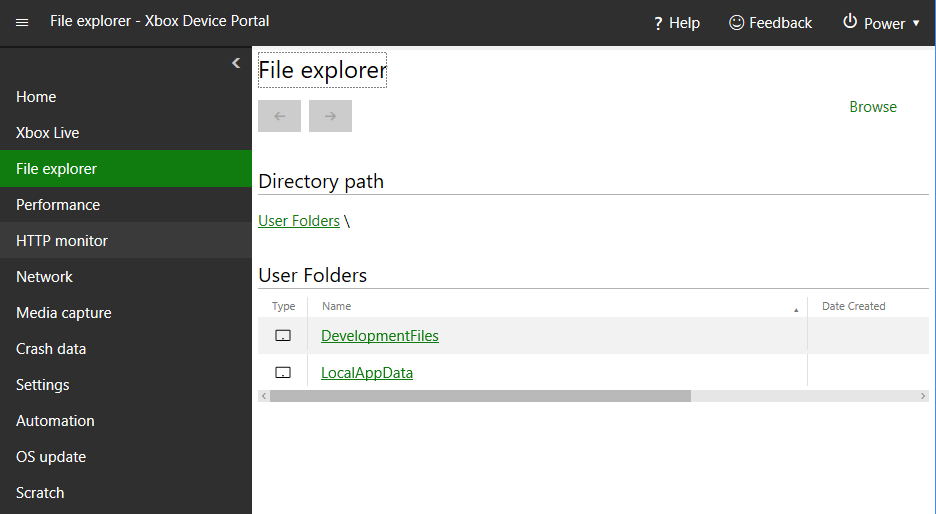 La page File explorer comporte les volets suivants.
## Volet Directory path
Utilisez le volet Directory path pour afficher le chemin du répertoire actuellement affiché.
## Volet Directory contents
Utilisez le volet Directory contents pour afficher le contenu du répertoire actuellement affiché.
## Volet Upload a file to this directory
Utilisez le volet Upload a file to this directory pour téléverser un fichier depuis votre PC de développement vers le répertoire actuellement affiché.
## Related topics
- [XBOX Device Portal (Windows Device Portal sur XBOX)](/fr-CA/tools/tools-console/wdp/index.md)
- [Pratiques exemplaires d'Insights](/fr-CA/services/playfab/data-analytics/legacy/insights/best-practices.md)
- [XBOX Gaming Explorer](/fr-CA/tools/tools-console/visualstudio/xbox-gaming-explorer.md)
- [Démarrage rapide de Data Explorer](/fr-CA/services/playfab/data-analytics/learn-data/data-explorer/quickstart.md)
- [Data Explorer](/fr-CA/services/playfab/data-analytics/learn-data/data-explorer/index.md)
La page File explorer comporte les volets suivants.
## Volet Directory path
Utilisez le volet Directory path pour afficher le chemin du répertoire actuellement affiché.
## Volet Directory contents
Utilisez le volet Directory contents pour afficher le contenu du répertoire actuellement affiché.
## Volet Upload a file to this directory
Utilisez le volet Upload a file to this directory pour téléverser un fichier depuis votre PC de développement vers le répertoire actuellement affiché.
## Related topics
- [XBOX Device Portal (Windows Device Portal sur XBOX)](/fr-CA/tools/tools-console/wdp/index.md)
- [Pratiques exemplaires d'Insights](/fr-CA/services/playfab/data-analytics/legacy/insights/best-practices.md)
- [XBOX Gaming Explorer](/fr-CA/tools/tools-console/visualstudio/xbox-gaming-explorer.md)
- [Démarrage rapide de Data Explorer](/fr-CA/services/playfab/data-analytics/learn-data/data-explorer/quickstart.md)
- [Data Explorer](/fr-CA/services/playfab/data-analytics/learn-data/data-explorer/index.md)