> ## Documentation Index
> Fetch the complete documentation index at: https://devdocs.xbox.com/llms.txt
> Use this file to discover all available pages before exploring further.
# FAQ for PC developers
> Answers to common PC GDK developer questions: sandbox dependencies, gaming services updates, multi-user package uninstall, and local game save locations.
| Question |
| -------------------------------------------------------------------------------------------------------------------------------------------------------------------------------------------- |
| [Why are some of my MicrosoftGame.config dependencies not installed in the developer sandbox?](#why-are-some-of-my-microsoftgame-config-dependencies-not-installed-in-the-developer-sandbox) |
| [Why can't I see sandboxed store content after publishing: Error 194?](#why-can-t-i-see-sandboxed-store-content-after-publishing-error-194) |
| [Why can't I get the latest version of gaming services?](#why-can-t-i-get-the-latest-version-of-gaming-services) |
| [How can I uninstall a package which was installed by another user?](#how-can-i-uninstall-a-package-that-was-installed-by-another-user) |
| [How can I report a problem?](#how-can-i-report-a-problem) |
| [Where should I save local game saves?](#where-should-i-save-local-game-saves) |
### Why are some of my MicrosoftGame.config dependencies not installed in the developer sandbox?
The store is unable to install framework dependencies that are declared in MicrosoftGame.config while in a developer sandbox. These dependencies need to be manually installed on the PC for your title to work.
It's important to ensure that the versions you install are the same as the versions that are specified in MicrosoftGame.config.
For more information, see Framework package dependencies.
### Why can't I see sandboxed store content after publishing: Error 194?
You need to be signed in to XBOX Live on the PC. If you've recently run `wsreset`, you should sign out and sign in again.
### Why can't I get the latest version of gaming services?
You might not be in the RETAIL sandbox. Switch to the RETAIL sandbox, run Windows Update, and then return to your development sandbox.
### How can I uninstall a package that was installed by another user?
To remove a package for all the users on the PC, run the following command in an elevated PowerShell prompt: `Remove-AppXPackage -allusers `.
### How can I report a problem?
After installing the Microsoft Game Development Kit (GDK), there's an **XBOX** item in the Visual Studio menu bar. To open a dialog box through which you can report a problem, select **XBOX** > **XBOX Report-a-Problem**.
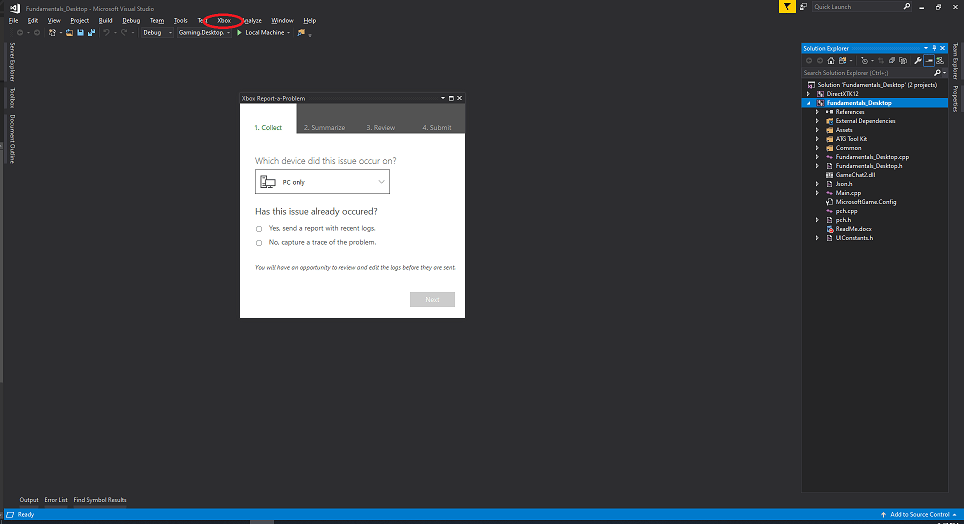 Don't select **Feedback icon** > **Report-a-Problem** to report a problem.
### Where should I save local game saves?
We recommend using [XGameSaveFiles](/build/core-features/common/game-save/xgamesavefiles) for Game Saves. It provides a managed file path that automatically syncs to the cloud. For titles that are porting to PC Game Pass and can't directly use the GDK, use [no-code cloud saves](/build/core-features/common/game-save/game-saves-walkthroughs-and-samples#porting-previous-titles-to-pc-game-saves-with-no-code-cloud-saves) instead. For a full comparison of available APIs, see the [Game Saves developer guide](/build/core-features/common/game-save/game-saves-developer-guide).
If your title doesn't use a GDK Game Saves API and manages save data independently, we recommend saving to the Windows *Saved Games* known folder, using the convention *\\\\* to organize your save data. This folder is located at *%USERPROFILE%\Saved Games* and corresponds to the Windows known folder ID [FOLDERID\_SavedGames](https://learn.microsoft.com/windows/win32/shell/knownfolderid#FOLDERID_SavedGames). To retrieve this path programmatically, call [SHGetKnownFolderPath](https://learn.microsoft.com/windows/win32/api/shlobj_core/nf-shlobj_core-shgetknownfolderpath) as shown in the following example.
```cpp theme={null}
#include
PWSTR savedGamesPath = nullptr;
HRESULT hr = SHGetKnownFolderPath(FOLDERID_SavedGames, 0, nullptr, &savedGamesPath);
if (SUCCEEDED(hr))
{
// Use savedGamesPath, e.g., append "\\"
// ...
CoTaskMemFree(savedGamesPath);
}
```
Don't save game data under the user's *Documents* folder. OneDrive automatically syncs the *Documents* folder, which can cause conflicts with cloud save synchronization and lead to data corruption. The *Saved Games* known folder is not synced by OneDrive by default, making it the safest choice for local game saves.
Ensure that your code creates these folders if they don't exist. This ensures that gamers can discover their saved games and back them up.
For titles that use no-code cloud saves, set the `RelativeTo` attribute of `NoCodePCRoot` to `SavedGames` in your MicrosoftGame.config to use this same folder. For more information, see [Porting previous titles to PC Game Saves with no-code cloud saves](/build/core-features/common/game-save/game-saves-walkthroughs-and-samples#porting-previous-titles-to-pc-game-saves-with-no-code-cloud-saves).
## Related topics
- [XBOX PC Remote Tools FAQ and troubleshooting guide](/tools/tools-pc/xbox-pc-remote-tools/faq.md)
- [PC developer tools for the XBOX GDK](/tools/tools-pc/index.md)
- [Get started packaging PC titles with MSIXVC tools](/build/core-features/common/packaging/overviews/packaging-getting-started-for-PC.md)
- [Multiplayer FAQ and troubleshooting](/services/xbox-services/multiplayer/mpsd/concepts/live-multiplayer-2015-faq.md)
- [XBOX PC Remote Tools quickstart guide](/tools/tools-pc/xbox-pc-remote-tools/quickstart.md)
Don't select **Feedback icon** > **Report-a-Problem** to report a problem.
### Where should I save local game saves?
We recommend using [XGameSaveFiles](/build/core-features/common/game-save/xgamesavefiles) for Game Saves. It provides a managed file path that automatically syncs to the cloud. For titles that are porting to PC Game Pass and can't directly use the GDK, use [no-code cloud saves](/build/core-features/common/game-save/game-saves-walkthroughs-and-samples#porting-previous-titles-to-pc-game-saves-with-no-code-cloud-saves) instead. For a full comparison of available APIs, see the [Game Saves developer guide](/build/core-features/common/game-save/game-saves-developer-guide).
If your title doesn't use a GDK Game Saves API and manages save data independently, we recommend saving to the Windows *Saved Games* known folder, using the convention *\\\\* to organize your save data. This folder is located at *%USERPROFILE%\Saved Games* and corresponds to the Windows known folder ID [FOLDERID\_SavedGames](https://learn.microsoft.com/windows/win32/shell/knownfolderid#FOLDERID_SavedGames). To retrieve this path programmatically, call [SHGetKnownFolderPath](https://learn.microsoft.com/windows/win32/api/shlobj_core/nf-shlobj_core-shgetknownfolderpath) as shown in the following example.
```cpp theme={null}
#include
PWSTR savedGamesPath = nullptr;
HRESULT hr = SHGetKnownFolderPath(FOLDERID_SavedGames, 0, nullptr, &savedGamesPath);
if (SUCCEEDED(hr))
{
// Use savedGamesPath, e.g., append "\\"
// ...
CoTaskMemFree(savedGamesPath);
}
```
Don't save game data under the user's *Documents* folder. OneDrive automatically syncs the *Documents* folder, which can cause conflicts with cloud save synchronization and lead to data corruption. The *Saved Games* known folder is not synced by OneDrive by default, making it the safest choice for local game saves.
Ensure that your code creates these folders if they don't exist. This ensures that gamers can discover their saved games and back them up.
For titles that use no-code cloud saves, set the `RelativeTo` attribute of `NoCodePCRoot` to `SavedGames` in your MicrosoftGame.config to use this same folder. For more information, see [Porting previous titles to PC Game Saves with no-code cloud saves](/build/core-features/common/game-save/game-saves-walkthroughs-and-samples#porting-previous-titles-to-pc-game-saves-with-no-code-cloud-saves).
## Related topics
- [XBOX PC Remote Tools FAQ and troubleshooting guide](/tools/tools-pc/xbox-pc-remote-tools/faq.md)
- [PC developer tools for the XBOX GDK](/tools/tools-pc/index.md)
- [Get started packaging PC titles with MSIXVC tools](/build/core-features/common/packaging/overviews/packaging-getting-started-for-PC.md)
- [Multiplayer FAQ and troubleshooting](/services/xbox-services/multiplayer/mpsd/concepts/live-multiplayer-2015-faq.md)
- [XBOX PC Remote Tools quickstart guide](/tools/tools-pc/xbox-pc-remote-tools/quickstart.md)