> ## Documentation Index
> Fetch the complete documentation index at: https://devdocs.xbox.com/llms.txt
> Use this file to discover all available pages before exploring further.
# Mesh Shader pipeline overview
> How the Mesh Shader pipeline replaces the input assembler with programmable Amplification and Mesh stages for scalable geometry on XBOX Series X|S.
RTX Turing and AMD RDNA 2.0 GPUs introduce a new geometry-processing pipeline. This pipeline consists of two new programmable shader stages - the Amplification Shader and Mesh Shader - and doesn't use the input assembler and tessellator hardware. Both stages are compute-like, exposing threadgroups and using generated thread IDs as the only supplied inputs, but also provide functionality pertinent to submitting geometry processing.
This new paradigm has the effect of offloading the index/vertex fetches to programmable shaders, allowing them to scale with GPU core count and memory bandwidth. This side-steps a growing bottleneck of the input assembler and facilitates launching work into the GPU at an improved and consistent rate. It also provides an interface for early culling of geometry at several granularities, down to the per-primitive level, in a pipelined way with onchip memory.
**Figure 1. The stages of the Mesh Shader pipeline. Green-tinted stages are programmable. Blue-tinted stages are fixed-function.**
 ## Mesh Shaders
Mesh Shaders (MS) are essentially compute shaders featuring stage-specific intrinsics to export vertices, indices, and primitive data to the primitive assembler. All data must be explicitly fetched from constant buffer views (CBVs) and shader resource views (SRVs) in shader code.
This means that developers will need to readjust their view of draw calls to be more in line with the workflow of compute shaders. The shader author determines the threadgroup size and how each thread is used to complete the workload. They'll have access to shader wave intrinsics and groupshared memory to share data and efficiently build a list of primitives for rasterization.
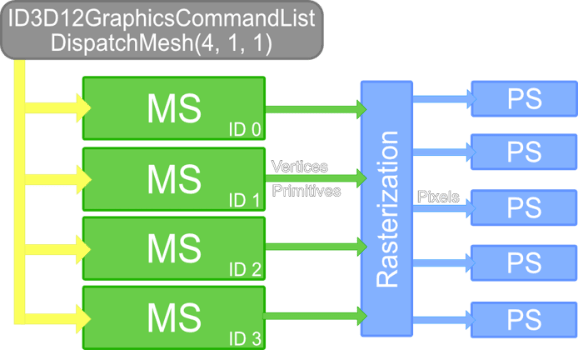
**Figure 2. Visualization of the GPU work dispatched from a DispatchMesh(4, 1, 1) call with a Mesh Shader-only pipeline bound. Like compute shaders, DispatchMesh requires threadgroup counts in the x-, y-, and z-dimensions. This dispatches the specified number of Mesh Shader threadgroups for execution.**
## Mesh Shaders
Mesh Shaders (MS) are essentially compute shaders featuring stage-specific intrinsics to export vertices, indices, and primitive data to the primitive assembler. All data must be explicitly fetched from constant buffer views (CBVs) and shader resource views (SRVs) in shader code.
This means that developers will need to readjust their view of draw calls to be more in line with the workflow of compute shaders. The shader author determines the threadgroup size and how each thread is used to complete the workload. They'll have access to shader wave intrinsics and groupshared memory to share data and efficiently build a list of primitives for rasterization.
**Figure 2. Visualization of the GPU work dispatched from a DispatchMesh(4, 1, 1) call with a Mesh Shader-only pipeline bound. Like compute shaders, DispatchMesh requires threadgroup counts in the x-, y-, and z-dimensions. This dispatches the specified number of Mesh Shader threadgroups for execution.**
 ## Amplification Shaders
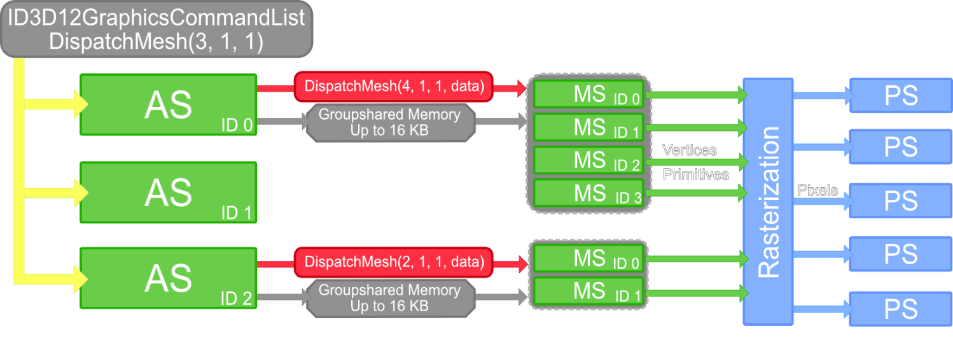
The Amplification Shader (AS) is an optional stage that precedes the Mesh Shader stage. This stage is also compute-like with the ability to dynamically dispatch a cluster of Mesh Shader threadgroups. Each threadgroup computes its own number of Mesh Shader threadgroups to dispatch. Each threadgroup also consists of up to 16 KB of shared, custom payload data to be passed to its spawned Mesh Shader threadgroups. This data may be exported directly from groupshared memory.
The functionality of Amplification Shaders enables shader programs to dynamically reduce or amplify their workload based on custom criteria. This unlocks the possibility of efficient, lower-granularity culling or custom tessellation.
**Figure 3. Visualization of dispatching an AS-MS pipeline state (PS) object. Some AS threadgroups will choose to dispatch MS threadgroups. Others might dispatch none.**
## Amplification Shaders
The Amplification Shader (AS) is an optional stage that precedes the Mesh Shader stage. This stage is also compute-like with the ability to dynamically dispatch a cluster of Mesh Shader threadgroups. Each threadgroup computes its own number of Mesh Shader threadgroups to dispatch. Each threadgroup also consists of up to 16 KB of shared, custom payload data to be passed to its spawned Mesh Shader threadgroups. This data may be exported directly from groupshared memory.
The functionality of Amplification Shaders enables shader programs to dynamically reduce or amplify their workload based on custom criteria. This unlocks the possibility of efficient, lower-granularity culling or custom tessellation.
**Figure 3. Visualization of dispatching an AS-MS pipeline state (PS) object. Some AS threadgroups will choose to dispatch MS threadgroups. Others might dispatch none.**
 ## In this section
## See also
[XBOX Series X|S graphics feature overviews](/build/core-features/graphics/graphics-newfeatures-toc)
[Graphics overview](/build/core-features/graphics/overviews/graphics)
[Graphics](/build/core-features/graphics/gc-graphics-toc)
## Related topics
- [Mesh Shader pipeline API overview](/build/core-features/graphics/newfeatures/ms/ms-api-design.md)
- [Why Mesh Shaders?](/build/core-features/graphics/newfeatures/ms/ms-why.md)
- [Meshlets](/build/core-features/graphics/newfeatures/ms/ms-meshlet-render.md)
- [Meshlet culling example](/build/core-features/graphics/newfeatures/ms/ms-meshlet-culling.md)
- [Mesh shaders and meshlets on XBOX Series X|S](/build/core-features/graphics/newfeatures/ms/index.md)
## In this section
## See also
[XBOX Series X|S graphics feature overviews](/build/core-features/graphics/graphics-newfeatures-toc)
[Graphics overview](/build/core-features/graphics/overviews/graphics)
[Graphics](/build/core-features/graphics/gc-graphics-toc)
## Related topics
- [Mesh Shader pipeline API overview](/build/core-features/graphics/newfeatures/ms/ms-api-design.md)
- [Why Mesh Shaders?](/build/core-features/graphics/newfeatures/ms/ms-why.md)
- [Meshlets](/build/core-features/graphics/newfeatures/ms/ms-meshlet-render.md)
- [Meshlet culling example](/build/core-features/graphics/newfeatures/ms/ms-meshlet-culling.md)
- [Mesh shaders and meshlets on XBOX Series X|S](/build/core-features/graphics/newfeatures/ms/index.md)