> ## Documentation Index
> Fetch the complete documentation index at: https://devdocs.xbox.com/llms.txt
> Use this file to discover all available pages before exploring further.
# Content update best practices
> Content update best practices
**Using MSIXVC2?** The alignment and layout constraints described on this page apply to the original MSIXVC format. MSIXVC2 uses content-based segmentation that eliminates these requirements. For MSIXVC2 content update guidance, see [Content updates with MSIXVC2](/build/core-features/common/packaging/packaging-updates-msixvc2).
## Overview
You can update content packages after release by modifying, adding, or removing data. To initiate an update, upload the complete updated package to Partner Center and publish it. Future digital installations of the content download the updated package directly. The system's content update technology modifies existing installations to mirror the updated package.
Microsoft Game Development Kit (GDK) content is packaged into XVC or MSIXVC packages operating at a subfile granularity.
You can overwrite data in place. You can also insert or remove data from a file in multiples of 4 kibibytes (KiB) (4,096 bytes).
You can't efficiently move data.
When a user installs a game that already has a content update from its original game disc, the installation process pulls data from both the disc and the cloud. The unchanged parts of the package are installed from the disc while the updated data are downloaded from the cloud by streaming installation. This process behaves just like a normal streaming installation in the system UI and to all in-game APIs.
When a console or PC updates previously installed content, the process modifies the installed XVC or MSIXVC package file in-place to accommodate the new or removed data, and then downloads the new data. The game can't run between when the update starts installing and when the update finishes installing.
## Author packages efficiently
Content updates try to stay out of the way of the game development process. No matter what changes you make to the game content, you can update a package correctly. However, the process might not be efficient in download size (which corresponds to time the players can't play the game) or efficient in hard drive space consumed. The following tips help you package a game to ensure the best user experience.
**Simple:**
* If you use pack files to aggregate multiple assets into a single file, ensure the pack file creator aligns the start of each asset to a 4-KiB boundary. This tip is demonstrated in the [Simple alignment example](#AS).
* If you compress assets, ensure the compression is deterministic and each asset is compressed independently.
* Don't change a chunk ID or move a file between chunk IDs.
* Don't reorder chunks within the package, files within a chunk, or assets within a file. Consider ordering assets by their name or other stable identifier.
**Advanced:**
* If you use pack files to aggregate multiple assets into a single file, ensure the pack file creator aligns the start of each asset consistently. This guidance is an advanced version of always aligning to the start of 4 KiB.
Consider an example of an asset that starts at offset `PriorAssetOffset` in the prior package and `AssetOffset` in the package being built with updates. To ensure the pack file creator aligns the start of each asset to a 4-KiB boundary, set `PriorAssetOffset % 4096 == 0` and `AssetOffset % 4096 == 0`. This condition always satisfies `PriorAssetOffset % 4096 == AssetOffset % 4096`. Any other way of ensuring this statement is satisfied works, too. This condition can allow the pack file creator to use less padding.
This tip is demonstrated in the [Stateful alignment example](#AAS).
* If you use nondeterministic compression and the uncompressed asset is unchanged, copy its compressed data from the prior packaging so that the compressed data is also unchanged.
* If assets are ordered automatically to match the expected runtime load order, consider freezing the automatic ordering at first release.
* If a pack file has many tiny assets that change frequently in updates, consider making them adjacent. It's more efficient to modify 400 KiB than to modify 4 KiB 100 times.
## Examples of good and bad alignment in pack files
Some games combine many assets into large files called *pack files*. Subfile content update significantly improves the download size and hard drive size efficiency of downloading updates to such games. To take advantage of this technology, it's important that the game's pack file creation tool preserves 4-KiB alignment of assets within the file. This section shows examples of good and bad ways to align assets within a pack file.
For the sake of illustration, each example is shown as a series of cells with a letter in them. Each cell is 1 KiB in the diagram to simplify the illustration. The solid lines between the cells represent where there are 4-KiB boundaries.
### Data overwrite
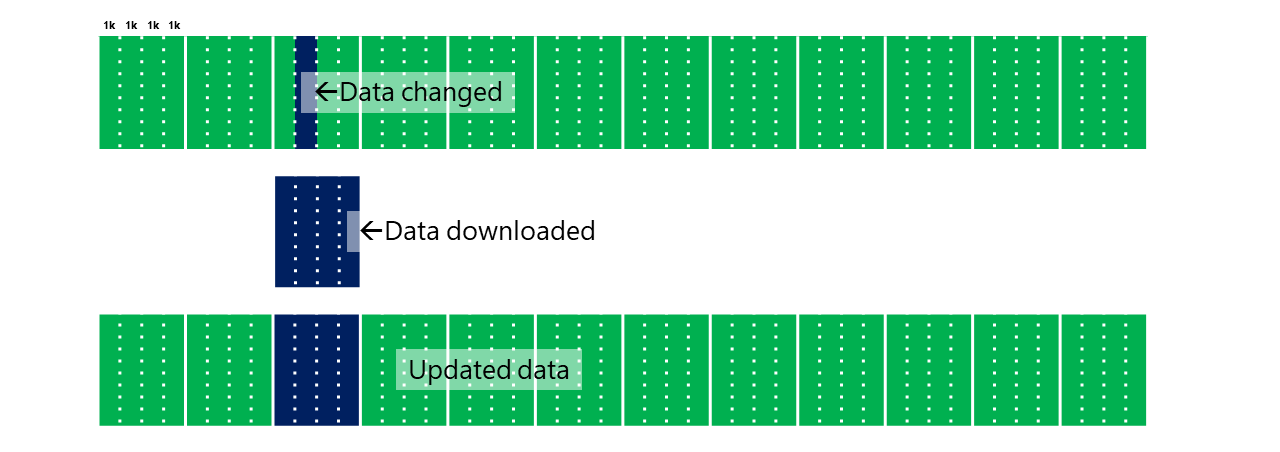
In the following diagram, a single cell is overwritten in the update. The only download is the 4-KiB page containing this cell.
 ### Insert
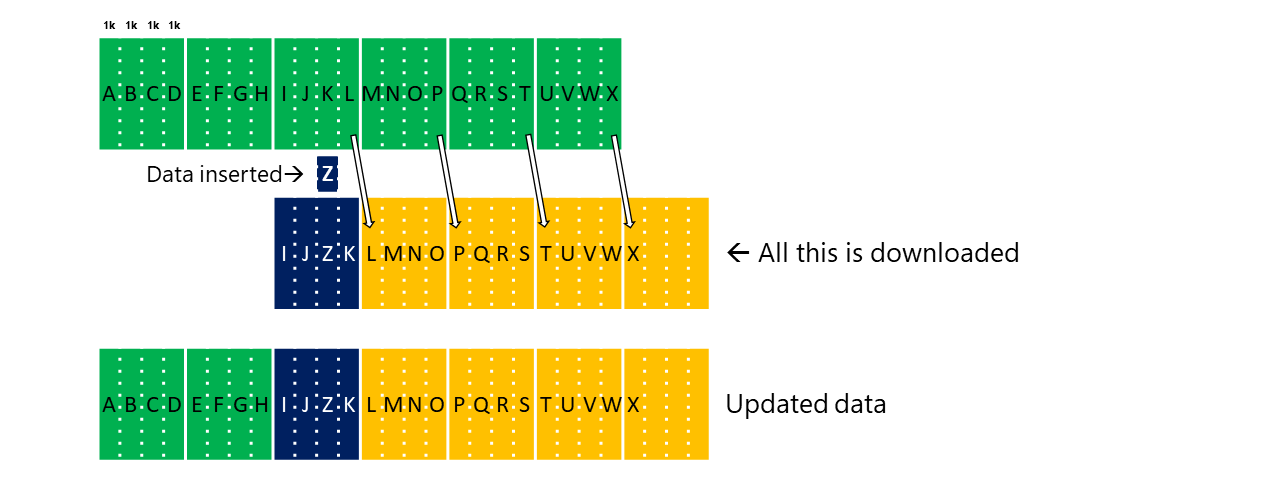
In the following diagram, a single cell is inserted in the update. As a result, every cell after the insert shifts by one. This shift moves the cells across 4-KiB boundaries such that none of the 4-KiB pages are the same in the old and new package after the insertion. Every 4-KiB page after the insertion is downloaded.
### Insert
In the following diagram, a single cell is inserted in the update. As a result, every cell after the insert shifts by one. This shift moves the cells across 4-KiB boundaries such that none of the 4-KiB pages are the same in the old and new package after the insertion. Every 4-KiB page after the insertion is downloaded.
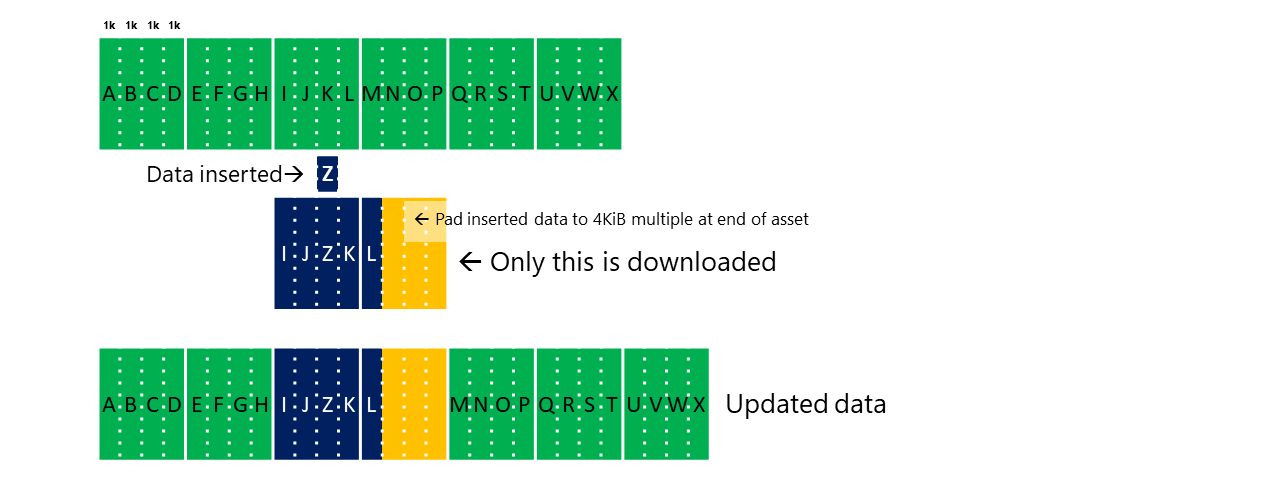
 In the following diagram, a single cell is inserted in the update. In addition, three padding cells are inserted. The four cells together are effectively a 4-KiB insertion, which prevents further cells from shifting across a 4-KiB boundary. Only the 8 KiB containing the insertion and padding is downloaded.
 ### Delete
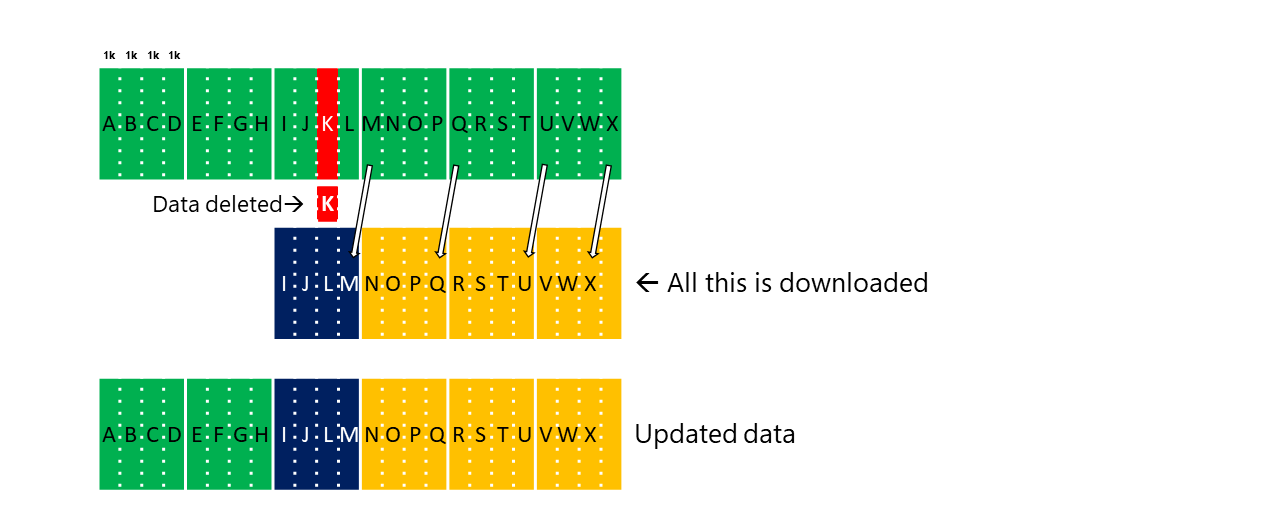
In the following diagram, a single cell is deleted in the update. As a result, every cell after the delete shifts by one. This shift moves the cells across 4-KiB boundaries. Every 4-KiB page after the deletion is downloaded.
### Delete
In the following diagram, a single cell is deleted in the update. As a result, every cell after the delete shifts by one. This shift moves the cells across 4-KiB boundaries. Every 4-KiB page after the deletion is downloaded.
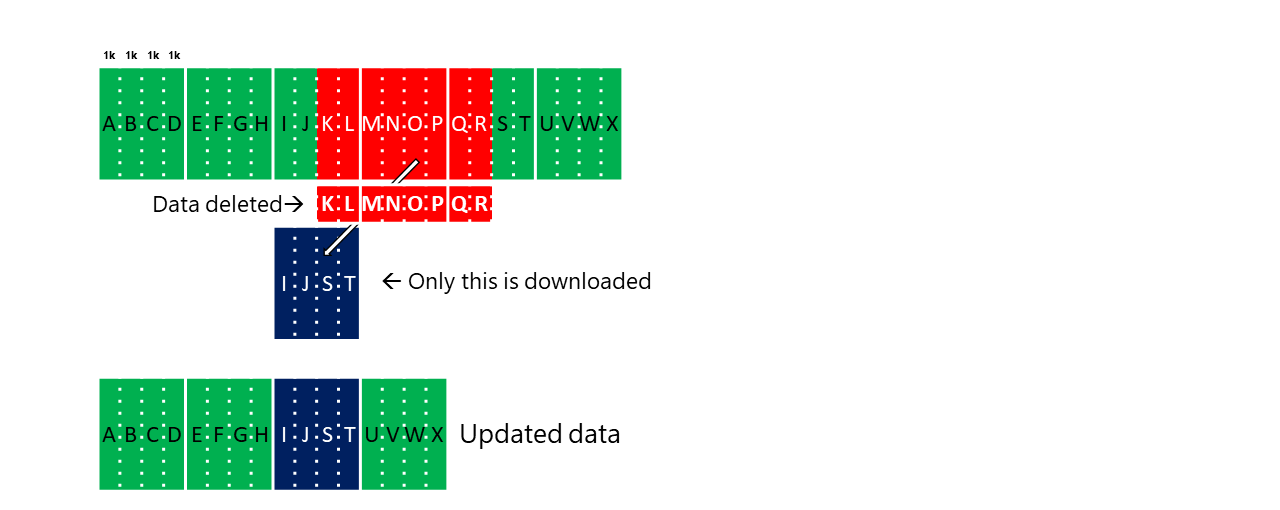
 In the following diagram, eight cells are deleted in the update. Only 4 KiB is downloaded - the cells that were within the starting and ending 4-KiB pages of the deletion.
If the deletion is 4 KiB-aligned and its length is a multiple of 4 KiB, no data download is required.
In the following diagram, eight cells are deleted in the update. Only 4 KiB is downloaded - the cells that were within the starting and ending 4-KiB pages of the deletion.
If the deletion is 4 KiB-aligned and its length is a multiple of 4 KiB, no data download is required.
 ### Alignment: simple
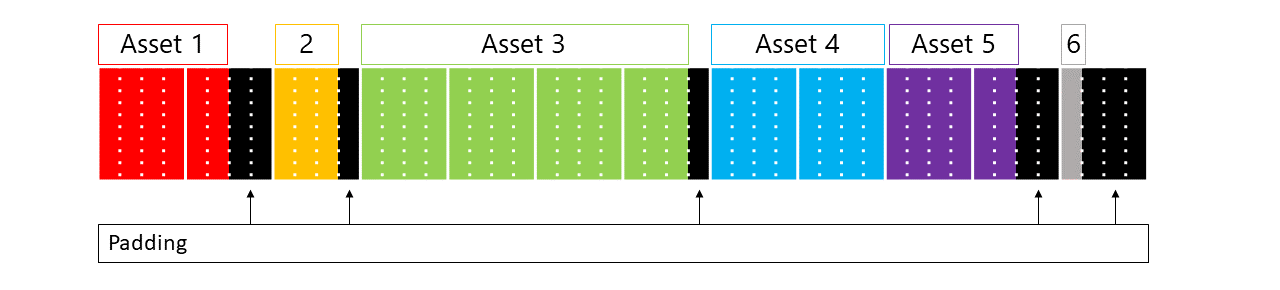
The following diagram shows six assets. Each asset is stored in an arbitrary number of cells. The start of every asset is on a 4-KiB boundary. As a result, you can independently add, change (including an increase or decrease in size), or delete assets.
This alignment is the easiest way to align assets within a pack file.
### Alignment: simple
The following diagram shows six assets. Each asset is stored in an arbitrary number of cells. The start of every asset is on a 4-KiB boundary. As a result, you can independently add, change (including an increase or decrease in size), or delete assets.
This alignment is the easiest way to align assets within a pack file.
 ### Alignment: advanced stateless
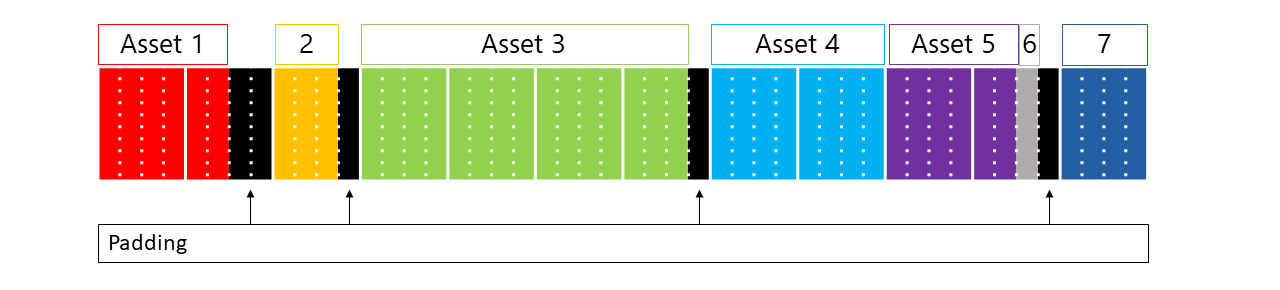
The following diagram shows seven assets. Each asset is stored in an arbitrary number of cells. The start of every large asset is aligned on a 4-KiB boundary, but small assets (Asset 6, in the diagram) are packed contiguously with the previous asset, with no padding. This alignment method offers three benefits:
1. It uses less space for padding.
2. When you change Asset 5, downloading Asset 6 is effectively free.
3. When you change Asset 6, the full 4 KiB is downloaded anyway. It doesn't matter if it was padding or the end of Asset 5.
If an asset can fit into the padding that would be required, pack it without any padding.
### Alignment: advanced stateless
The following diagram shows seven assets. Each asset is stored in an arbitrary number of cells. The start of every large asset is aligned on a 4-KiB boundary, but small assets (Asset 6, in the diagram) are packed contiguously with the previous asset, with no padding. This alignment method offers three benefits:
1. It uses less space for padding.
2. When you change Asset 5, downloading Asset 6 is effectively free.
3. When you change Asset 6, the full 4 KiB is downloaded anyway. It doesn't matter if it was padding or the end of Asset 5.
If an asset can fit into the padding that would be required, pack it without any padding.
 ### Alignment: advanced stateful
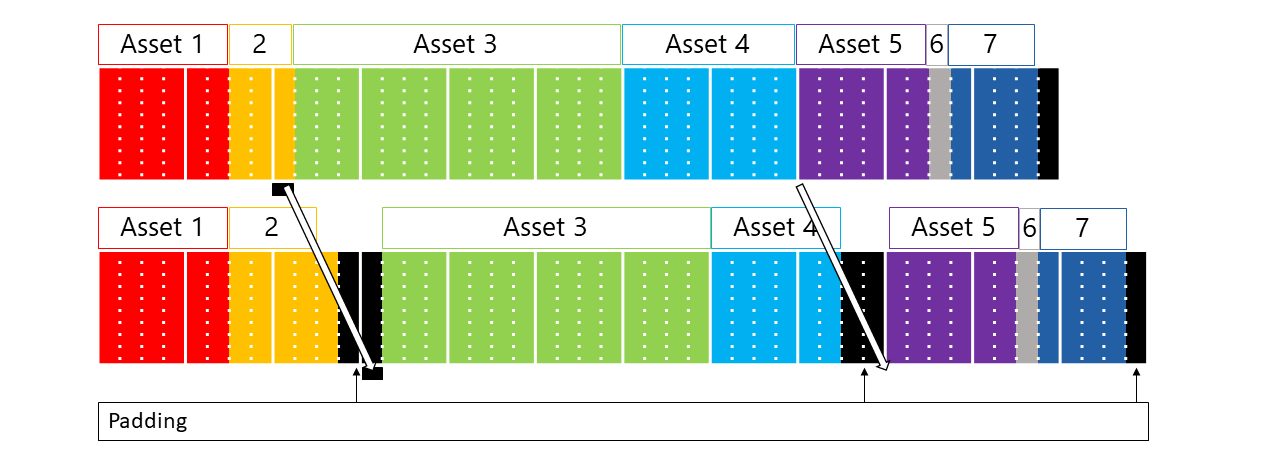
The following diagram shows seven assets. Each asset is stored in an arbitrary number of cells. The start of every asset in the first package is packed with no padding. In the new package, the start of every asset starts at the same offset into a 4-KiB page that it did in the old package.
For example, Asset 3 started one cell into a 4-KiB page in the old package. In the new package, padding was added before Asset 3 so that it also started one cell into a 4-KiB page.
This approach preserves the alignment that content update requires while minimizing the amount of padding. The downside of this approach is that it requires the pack file tool to have knowledge of the old pack file's layout to match its offsets.
### Alignment: advanced stateful
The following diagram shows seven assets. Each asset is stored in an arbitrary number of cells. The start of every asset in the first package is packed with no padding. In the new package, the start of every asset starts at the same offset into a 4-KiB page that it did in the old package.
For example, Asset 3 started one cell into a 4-KiB page in the old package. In the new package, padding was added before Asset 3 so that it also started one cell into a 4-KiB page.
This approach preserves the alignment that content update requires while minimizing the amount of padding. The downside of this approach is that it requires the pack file tool to have knowledge of the old pack file's layout to match its offsets.
 ## Fragmentation
For titles that have a long history of updates, with many changes to existing files over time, and packages that have a significant number of small edits to large files, the Content Update algorithms might produce suboptimal update sizes. You can determine suboptimal update sizes in two ways:
1. Look at the output of `makepkg pack` when run with `/priorpackage`. It displays a warning: "More than # page-level XTS entries. Page-level update efficiency will be compromised for # pages."
2. Look at the comparison reports produced by `makepkg pack` or `packageutil compare`. If these reports show files being 100% redownloaded that you know didn't change, this condition can be a symptom of running out of space in the XVC file format's encryption fragment data structure.
Under guidance from your Microsoft Account Representative, consider using the `/maxencryptionfragments` option to `makepkg pack` to generate a more optimal delta computation. Setting this value too high increases the risk of out of memory errors during game launch or DLC mount.
When you insert data, content update causes fragmentation of the package's data on the physical hard drive. Content update attempts to minimize this effect by performing a partial defragmentation of the package during the update. It guarantees, subject to free hard drive space availability, that the sum of the size of any two adjacent fragments is at least 100 mebibytes (MiB). Content update attempts to make all fragments at least 100 MiB.
Previous iterations of content update for XBOX One ERA didn't perform defragmentation.
## Tool usage
* **`makepkg /contentid GUID`:** The content ID parameter, along with package family name, that identifies a package across versions. To test updating between packages, create both packages by using the same content ID and package family name.
* **`packageutil compare`:** This tool generates an update plan that describes how to update from an old package to a new package. It also generates a report listing the files and ranges within those files that are downloaded to do the update. Use this report to identify unexpected changes.
* **`xbapp update` (PC: `wdapp update`):** This tool updates a package previously installed on a development kit or PC to a new package. It uses the same method as retail consoles so you can use it to test the user experience and IO performance post-update.
## Details
This section describes implementation details about how content update works. These details are subject to change. It's intended for the highly interested developer who wants to understand and fine-tune everything.
**What are update streaming plans?**
Update streaming plans are an evolution of the XBOX FastStart technology. Content Update v3 uses these plans to tell the XBOX console and PCs how to transform an old package into a new package. This approach enables more intensive analysis to be done at publishing time in the cloud than a console or PC could do during the download.
**Why was 4 KiB chosen as the allowed multiple for insert or delete?**
4 KiB is the NTFS cluster size on XBOX and supported PC file systems. To do insertion or deletion on a different multiple than the NTFS cluster size would require significant disk IO to install the update.
Content packages are encrypted and integrity protected in 4-KiB blocks. To do insertion or deletion on a different multiple than the cryptography block size would require data to be re-encrypted to install the update. This requirement prevents background updates in scenarios when a license isn't available because the proper user isn't signed in or the game disc isn't available.
By having this requirement, packages can be updated efficiently and without requiring a time-consuming unpacking step at the end of the update process.
**What happens during makepkg/packageutil versus during publishing?**
The same processing happens on both. During publishing, the package is encrypted by using data from the cloud's best choice for prior package (the equivalent of makepkg /priorpackage). An update streaming plan from many old packages is then generated (the equivalent of packageutil compare).
**Does the /priorpackage specified in makepkg affect the retail package?**
No. The publishing process in the cloud always overrides this specification. The `makepkg` option is only provided to enable local estimation before publishing.
**Is only the updated game data downloaded?**
No. Packages contain significant system data, including cryptographic hashes of all data pages, the Game OS (console-only), and an embedded NTFS file system. They're downloaded where necessary.
Additionally, some unchanged data might be redownloaded to minimize the overhead of HTTP requests. Currently unchanged data less than 64 KiB surrounded by changed data is subject to redownload, but this configuration is subject to change to optimize *download time*.
The report generated by packageutil compare includes the previous information in its estimate.
### See also
[Creating, examining, and testing content updates](/build/core-features/common/packaging/packaging-testing-updates)
[Checking for updates](https://learn.microsoft.com/build/store/commerce/fundamentals/xstore-checking-for-updates)
## Related topics
- [Creating, examining, and testing content updates](/build/core-features/common/packaging/packaging-testing-updates.md)
- [Content updates with MSIXVC2](/build/core-features/common/packaging/packaging-updates-msixvc2.md)
- [Checking for updates](/publishing/xstore-commerce/xstore-checking-updates.md)
- [Title packaging, updates, and streaming-install testing](/build/core-features/common/packaging/title-packaging-streaming-install-testing.md)
- [Streaming Installation and Intelligent Delivery: an overview](/build/core-features/common/packaging/overviews/streaming_install-intelligent_delivery.md)
## Fragmentation
For titles that have a long history of updates, with many changes to existing files over time, and packages that have a significant number of small edits to large files, the Content Update algorithms might produce suboptimal update sizes. You can determine suboptimal update sizes in two ways:
1. Look at the output of `makepkg pack` when run with `/priorpackage`. It displays a warning: "More than # page-level XTS entries. Page-level update efficiency will be compromised for # pages."
2. Look at the comparison reports produced by `makepkg pack` or `packageutil compare`. If these reports show files being 100% redownloaded that you know didn't change, this condition can be a symptom of running out of space in the XVC file format's encryption fragment data structure.
Under guidance from your Microsoft Account Representative, consider using the `/maxencryptionfragments` option to `makepkg pack` to generate a more optimal delta computation. Setting this value too high increases the risk of out of memory errors during game launch or DLC mount.
When you insert data, content update causes fragmentation of the package's data on the physical hard drive. Content update attempts to minimize this effect by performing a partial defragmentation of the package during the update. It guarantees, subject to free hard drive space availability, that the sum of the size of any two adjacent fragments is at least 100 mebibytes (MiB). Content update attempts to make all fragments at least 100 MiB.
Previous iterations of content update for XBOX One ERA didn't perform defragmentation.
## Tool usage
* **`makepkg /contentid GUID`:** The content ID parameter, along with package family name, that identifies a package across versions. To test updating between packages, create both packages by using the same content ID and package family name.
* **`packageutil compare`:** This tool generates an update plan that describes how to update from an old package to a new package. It also generates a report listing the files and ranges within those files that are downloaded to do the update. Use this report to identify unexpected changes.
* **`xbapp update` (PC: `wdapp update`):** This tool updates a package previously installed on a development kit or PC to a new package. It uses the same method as retail consoles so you can use it to test the user experience and IO performance post-update.
## Details
This section describes implementation details about how content update works. These details are subject to change. It's intended for the highly interested developer who wants to understand and fine-tune everything.
**What are update streaming plans?**
Update streaming plans are an evolution of the XBOX FastStart technology. Content Update v3 uses these plans to tell the XBOX console and PCs how to transform an old package into a new package. This approach enables more intensive analysis to be done at publishing time in the cloud than a console or PC could do during the download.
**Why was 4 KiB chosen as the allowed multiple for insert or delete?**
4 KiB is the NTFS cluster size on XBOX and supported PC file systems. To do insertion or deletion on a different multiple than the NTFS cluster size would require significant disk IO to install the update.
Content packages are encrypted and integrity protected in 4-KiB blocks. To do insertion or deletion on a different multiple than the cryptography block size would require data to be re-encrypted to install the update. This requirement prevents background updates in scenarios when a license isn't available because the proper user isn't signed in or the game disc isn't available.
By having this requirement, packages can be updated efficiently and without requiring a time-consuming unpacking step at the end of the update process.
**What happens during makepkg/packageutil versus during publishing?**
The same processing happens on both. During publishing, the package is encrypted by using data from the cloud's best choice for prior package (the equivalent of makepkg /priorpackage). An update streaming plan from many old packages is then generated (the equivalent of packageutil compare).
**Does the /priorpackage specified in makepkg affect the retail package?**
No. The publishing process in the cloud always overrides this specification. The `makepkg` option is only provided to enable local estimation before publishing.
**Is only the updated game data downloaded?**
No. Packages contain significant system data, including cryptographic hashes of all data pages, the Game OS (console-only), and an embedded NTFS file system. They're downloaded where necessary.
Additionally, some unchanged data might be redownloaded to minimize the overhead of HTTP requests. Currently unchanged data less than 64 KiB surrounded by changed data is subject to redownload, but this configuration is subject to change to optimize *download time*.
The report generated by packageutil compare includes the previous information in its estimate.
### See also
[Creating, examining, and testing content updates](/build/core-features/common/packaging/packaging-testing-updates)
[Checking for updates](https://learn.microsoft.com/build/store/commerce/fundamentals/xstore-checking-for-updates)
## Related topics
- [Creating, examining, and testing content updates](/build/core-features/common/packaging/packaging-testing-updates.md)
- [Content updates with MSIXVC2](/build/core-features/common/packaging/packaging-updates-msixvc2.md)
- [Checking for updates](/publishing/xstore-commerce/xstore-checking-updates.md)
- [Title packaging, updates, and streaming-install testing](/build/core-features/common/packaging/title-packaging-streaming-install-testing.md)
- [Streaming Installation and Intelligent Delivery: an overview](/build/core-features/common/packaging/overviews/streaming_install-intelligent_delivery.md)