> ## Documentation Index
> Fetch the complete documentation index at: https://devdocs.xbox.com/llms.txt
> Use this file to discover all available pages before exploring further.
# Deploying your touch control layouts
> Deploying your touch control layouts
## Overview
After you've [built your touch layouts](/build/core-features/common/game-streaming/building-touch-layouts/game-streaming-touch-building-touch-layout), you'll want to interact with them in your game.
## Prerequisites
To deploy and view your layouts, you'll need to have:
* A Windows PC that has the [Touch Adaptation Kit Command Line Tool (tak.exe)](/build/core-features/common/game-streaming/tak-command-line-tool/game-streaming-tak-command-line).
* A device with the [Web Content Test Application](/build/core-features/common/game-streaming/game-streaming-web-content-test-application), [Android Content Test Application (Deprecated)](/build/core-features/common/game-streaming/game-streaming-android-content-test-application), or the [Windows PC Content Test Application (Deprecated)](/build/core-features/common/game-streaming/game-streaming-windows-pc-content-test-application).
* A set of layouts that you would like to deploy and view.
## Deploying your layouts
### 1. Serve the layouts
On the Windows PC that has the [Touch Adaptation Kit Command Line Tool (tak.exe)](/build/core-features/common/game-streaming/tak-command-line-tool/game-streaming-tak-command-line), utilize the [Serve Command](/build/core-features/common/game-streaming/tak-command-line-tool/game-streaming-tak-command-line-serve-command) to make the layouts available to devices that request them.
```pwsh theme={null}
C:\Program Files (x86)\Microsoft GDK\bin>tak serve --layout-path C:\MyGameLayouts
Verifying touch adaptation bundle 'C:\MyGameLayouts '.
Now listening on: http://0.0.0.0:9269
Application started. Press Ctrl+C to shut down.
Hosting environment: Production
Content root path: C:\MyGameLayouts
```
### 2. Configuring the Content Test Application to load
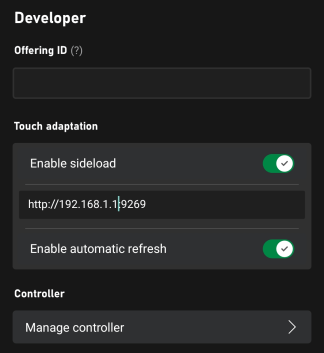
In the settings of your Content Test Application, enter the configuration for the Touch Adaptation Settings (in the Developer section).
* Make sure **Enable sideload** is toggled on.
* Enter the address to the PC (including port) that's serving the layouts.
If you're using the [Web Content Test Application](/build/core-features/common/game-streaming/game-streaming-web-content-test-application) with **Safari** or to connect to a **remote PC** running the serve command, ensure that the sideload address starts with `https` and that the `--certificate-file` option was used. See [Serve Command](/build/core-features/common/game-streaming/tak-command-line-tool/game-streaming-tak-command-line-serve-command) for more information on starting secure (HTTPS) sideload servers.
* Enable autorefresh if you want changes that are made to the layouts to be immediately updated on all connected clients (otherwise, updates will only happen when a new streaming connection is started).
 .
### 3. Stream your game
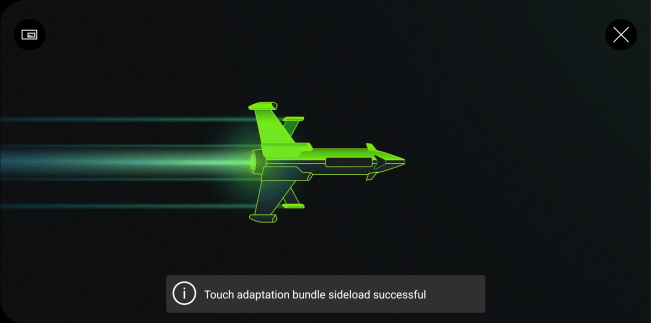
Upon each streaming connection, the CTA will connect to the TAK server and download the latest layouts.
.
### 3. Stream your game
Upon each streaming connection, the CTA will connect to the TAK server and download the latest layouts.
 .
When a layout is requested, you'll see a request and download on the PC that's hosting the `serve` command.
```
C:\Program Files (x86)\Microsoft GDK\bin>tak serve --layout-path C:\MyGame\layouts
Verifying touch adaptation bundle 'C:\MyGame\layouts'.
Now listening on: http://0.0.0.0:9269
Application started. Press Ctrl+C to shut down.
Hosting environment: Production
Content root path: C:\MyGame\layouts
Request starting HTTP/1.1 POST http://192.168.1.1:9269/connection/negotiate?negotiateVersion=1 0
Request finished in 1.6283ms 200 application/json
Request starting HTTP/1.1 GET http://192.168.1.1:9269/connection?id=3u0Xs_Dlwn-J1mREHTcG5w
Request starting HTTP/1.1 GET http://192.168.1.1:9269/v1/tabs/active/download
Request finished in 3.9865ms 200 application/octet-stream
```
### 4. Select your layout
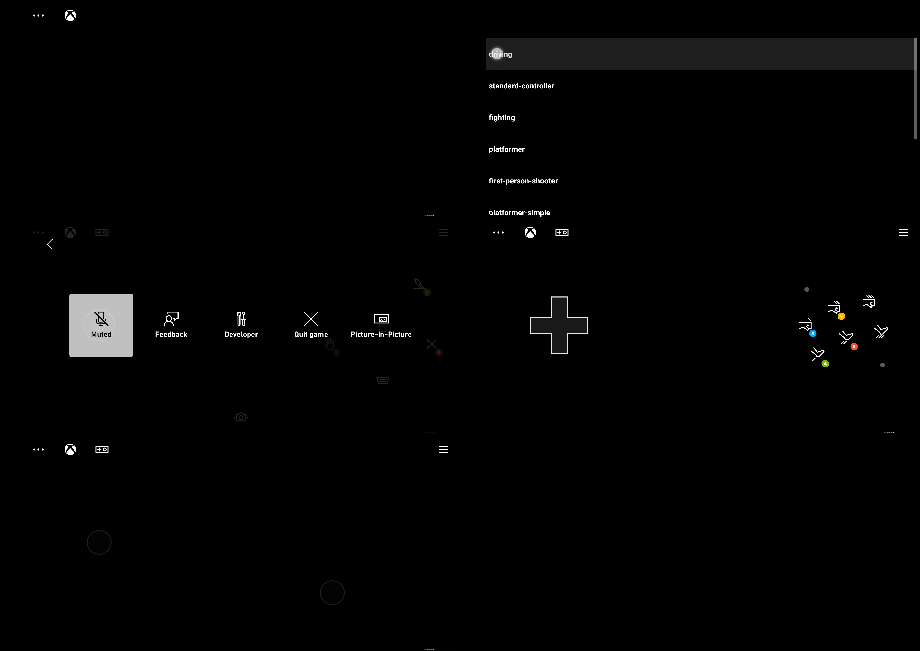
After a streaming session has been started, you can select the touch layout to be utilized by selecting Developer and then TAK from the in-stream overlay by selecting the `...` button at the top-left corner.
.
When a layout is requested, you'll see a request and download on the PC that's hosting the `serve` command.
```
C:\Program Files (x86)\Microsoft GDK\bin>tak serve --layout-path C:\MyGame\layouts
Verifying touch adaptation bundle 'C:\MyGame\layouts'.
Now listening on: http://0.0.0.0:9269
Application started. Press Ctrl+C to shut down.
Hosting environment: Production
Content root path: C:\MyGame\layouts
Request starting HTTP/1.1 POST http://192.168.1.1:9269/connection/negotiate?negotiateVersion=1 0
Request finished in 1.6283ms 200 application/json
Request starting HTTP/1.1 GET http://192.168.1.1:9269/connection?id=3u0Xs_Dlwn-J1mREHTcG5w
Request starting HTTP/1.1 GET http://192.168.1.1:9269/v1/tabs/active/download
Request finished in 3.9865ms 200 application/octet-stream
```
### 4. Select your layout
After a streaming session has been started, you can select the touch layout to be utilized by selecting Developer and then TAK from the in-stream overlay by selecting the `...` button at the top-left corner.
 ## Related topics
- [Building touch control layouts for XBOX game streaming](/build/core-features/common/game-streaming/building-touch-layouts/index.md)
- [Building Touch Control Layouts](/build/core-features/common/game-streaming/building-touch-layouts/game-streaming-touch-building-touch-layout.md)
- [A designer's guide to building touch controls](/build/core-features/common/game-streaming/building-touch-layouts/game-streaming-tak-designers-guide.md)
- [Standard XBOX Controller Touch Control Layout](/build/core-features/common/game-streaming/building-touch-layouts/samples/game-streaming-touch-tak-sample-full-layout.md)
- [XGameStreamingShowTouchControlLayout](/reference/system/xgamestreaming/functions/xgamestreamingshowtouchcontrollayout.md)
## Related topics
- [Building touch control layouts for XBOX game streaming](/build/core-features/common/game-streaming/building-touch-layouts/index.md)
- [Building Touch Control Layouts](/build/core-features/common/game-streaming/building-touch-layouts/game-streaming-touch-building-touch-layout.md)
- [A designer's guide to building touch controls](/build/core-features/common/game-streaming/building-touch-layouts/game-streaming-tak-designers-guide.md)
- [Standard XBOX Controller Touch Control Layout](/build/core-features/common/game-streaming/building-touch-layouts/samples/game-streaming-touch-tak-sample-full-layout.md)
- [XGameStreamingShowTouchControlLayout](/reference/system/xgamestreaming/functions/xgamestreamingshowtouchcontrollayout.md)