> ## Documentation Index
> Fetch the complete documentation index at: https://devdocs.xbox.com/llms.txt
> Use this file to discover all available pages before exploring further.
# SHAPE audio flowgraph construction best practices
> Getting into SHAPE: Best practices for constructing audio flowgraphs
## Introduction
The Scalable Hardware Audio Processing Engine (SHAPE) provides hardware acceleration for a number of the most common building blocks of audio playback and manipulation.
A title is in full control of the configuration and ordering of SHAPE processing blocks, which the Audio Control Processor (ACP) manages. ACP is a hardware component. The title creates defined paths to chain together one or more SHAPE components from input to output. These paths are known as *flowgraphs*. Once created, each flowgraph is submitted as a series of commands for the ACP to process.
This topic discusses the best practices for creating and submitting flowgraphs that successfully implement the runtime scenarios you'll encounter most frequently as well as configurations that you should avoid to maximize performance.
This topic covers the following:
* [SHAPE components and capabilities](#ID4E5B)
* [Non-performant scenarios and pathologic cases](#ID4ETBAC)
* [SHAPE flowgraph planning and review](#ID4EEHAC)
* [Persistent versus non-persistent flowgraphs](#ID4ERIAC)
* [Debugging SHAPE issues](#ID4E3JAC)
## SHAPE components and capabilities
The *command queues* are automatically managed and populated by the ACP when flowgraphs are submitted to the hardware.
The following table shows a consolidated list of components and their instancing capabilities.
| SHAPE component | Description | Maximum concurrent instances | Command queue size | Channels per instance | Comments |
| --------------- | ----------------------------- | ------------------------------------------ | ------------------------ | ----------------------------------------- | ---------------------------------------------------------------------------------------------- |
| XMA | XMA decompression | 512 | Not applicable: parallel | 1 - 2 (interleaved) | Typically routed to SRC. |
| SRC | Sample rate conversion | 512 | 8 | 1 - 2 (interleaved) | Consumes from RAM: XMA block output or Pulse Code Modulation (PCM). |
| FLT/VOL | Filter/volume | 2560 | 8 | 1 | |
| EQ/CMP | Equalization/compressor | 512 | 8 | 1 | |
| MB | Mix buffer | 8192 (128 physical) | Not applicable: parallel | 1 | Required after all other SHAPE components, with the exception of XMA to SRC. |
| DMA | Direct Memory Access (in/out) | Memory bandwidth dependent; less than 4096 | 8 | 1
Up to 32 audio frames per transfer | DMA buffers can be allocated as adjacent to support multichannel DMA transfers to/from memory. |
| | | | | | |
The following table shows a consolidated list of components and their mix buffer routing rules.
\| SHAPE component| Input mix buffers per instance| Output mix buffers per instance|
\| --- | --- | --- | --- | --- | --- | --- | --- | --- |
\| XMA| Not applicable. Reads from memory.| Not applicable. Decodes to memory, typically consumed by SRC.|
\| SRC| 0; reads from memory.| 1 for mono, 2 for stereo.|
\| FLT/VOL| 1.| 1.|
\| EQ/CMP| 1 (or 2, for sidechain configurations).| 1.|
\| MB| Not applicable. Mix buffers can't read directly from other mix buffers.| Not applicable. Mix buffers can't write directly to other mix buffers.|
\| DMA| 1; up to 32 audio frames per transfer.| 1; up to 32 audio frames per transfer.|
For more details about SHAPE's building blocks, see the related Xfest talk [The Sound of XBOX One (Conference Material > Xfest 2012)](https://aka.ms/xgddl) and the white paper [The Sound of the Future (Developer Education Materials > All NDA Whitepapers)](https://aka.ms/xgddl).
### A note on flowgraph use scenarios
Many titles might never implement flowgraphs directly. XAudio2 implicitly implements SHAPE components, and audio middleware might abstract hardware flowgraphs away from title developers. However, constructing flowgraphs enables you to take direct advantage of the audio-acceleration capabilities of the XBOX One console - specifically, if you're developing and implementing your own audio-rendering solution or if you have a custom configuration that's not supported by XAudio2 or middleware.
For all the titles that you develop, you'll find value in understanding the capabilities of SHAPE, which are discussed later in this topic, and in planning out potential flowgraph topologies in advance.
## Non-performant scenarios and pathologic cases
The following sections describe common scenarios that can cause performance issues. The sections also provide recommendations for avoiding these issues.
### Malformed flowgraphs
You might create flowgraphs that construct impossible signal flows or data that's never realized at output. Here are some of the most common errors that occur in the creation of flowgraphs.
* References to SHAPE objects that aren't created or allocated
* Invalid commands or parameters
* Mix buffer input/output reference counting accuracy
* Reallocation of an existing mix buffer virtual ID
* Omission of connecting mix buffers between SHAPE components
* Use of more than a single mix buffer as output for a SHAPE component, with the exception of the SRC block, which can route to two mix buffers when rendering stereo content
In addition to more obvious flowgraph bugs - for example, references to SHAPE objects that aren't allocated or created - the most-common scenarios for malformed flowgraphs include the following:
* Circular references in mix buffers
A mix buffer won't become available until all of its inputs are presented and outputs are consumed. If a circular reference is in a mix buffer, the mix buffer effectively has infinite inputs, never becomes available, and hangs the graph.
* Orphaned mix buffers
A mix buffer without outputs will become available immediately when its last input is processed. A mix buffer intended for rendering to an audio device (for example, speakers or a headset) should be terminated with a DMA output block. This will present the mix buffer to main memory for final mixing.
### Command ordering
The ACP automatically fills command queues for each SHAPE component. When filling the queues, the ACP skips over subsequent commands for a particular component until the component's entries are free.
In general, skipping of commands represents a negligible performance penalty. However, based on command ordering, titles might create a suboptimal ordering of SHAPE components. This would cause one or more of the queues in a non-full state to wait on other queues. This waiting reduces the number of instances that are available per frame.
Figure 1 demonstrates how command ordering could affect performance. As a best practice, issue FLT/VOL commands from top to bottom, as shown in the flowgraph, rather than from left to right, which allows more voices to be completed. This method allows an EQ/CMP, shown at the bottom of the flowgraph, to be processed in parallel.
**Figure 1. A flowgraph that shows how to issue FLT/VOL commands from top to bottom, instead of from left to right, to allow an EQ/CMP to be processed in parallel and improve performance.**
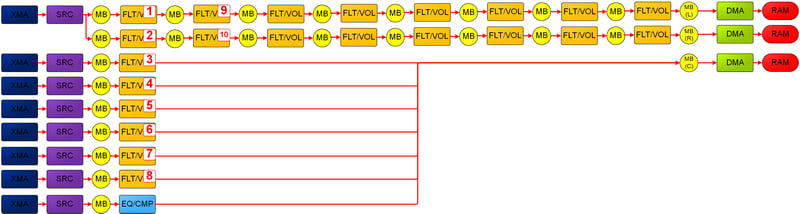 As a best practice for ordering flowgraphs among commands of a particular type, favor depth through a voice's processing path, up to a submix stage or up to reused SHAPE components. Then, favor breadth for voices that share common processing orders.
Figure 1 shows that the optimal (and typical) approach is to create FLT/VOL commands for the leftmost column of FLT/VOLs first, and then to pivot the remaining FLT/VOL commands for the two channels of the top stereo voice.
### Allocation of mix buffer instances
Mix buffers are locked while being written to. No output can be read from them until all inputs have contributed to the mix. From the perspective of implementation, mix buffers use the `numIn` and `numOut` fields to manage this. Therefore, it's possible to construct scenarios that require more than 128 physical mix buffers at the same time.
SHAPE virtualizes mix buffers so that, even for high polyphony, this scenario usually won't cause an issue. However, you can construct flowgraphs that require high numbers of mix buffers to be concurrently accessed. In particular, mix buffers that are submixing or mastering among multiple voices are locked until the last voice is mixed into them and until the last output of the mix buffers is consumed by a subsequent SHAPE block.
In a typical scenario - a single 7.1 mastering voice into which all SHAPE voices are mixed - 8 of the 128 voices are locked throughout the frame. Additional mix buffers could lock for a significant portion of the frame (reducing the capacity for the virtual mix buffers) if there's extensive, multichannel submixing with flowgraph-dependency chains. Alternatively, additional mastering voices are created if, for instance, you were to create both a main speaker and a 7.1 headset-mix that's per-player for a four-player title, which could consume 40 concurrent mix buffers.
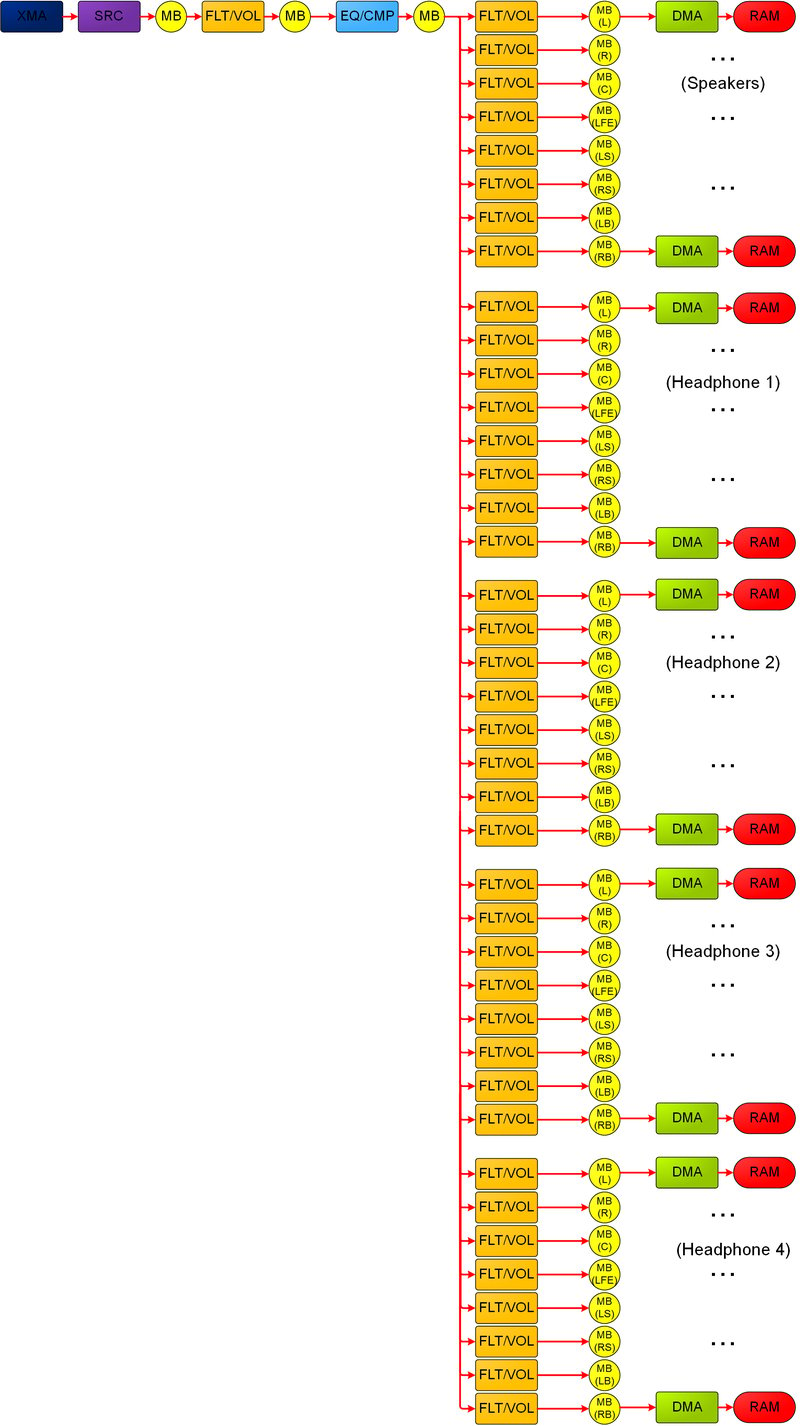
In general, a case that requires more than 128 concurrent physical mix buffers is pathologic. However, mix buffers that are locked unnecessarily, for the entire frame, reduce your title's ability to achieve the potential throughput. Figure 2 represents unnecessary submixing that could reduce the number of mix buffers that are available at a particular time.
Depending on command ordering (figure 2), the 5 separate 7.1 mastering mix buffers could be locked throughout almost the entire frame, which represents 40 of the 128 physical mix buffers. Although this path requires only 2 other mix buffers to be in use at a time - that is, the paired input and output for an FLT/VOL or EQ/CMP - consider first processing all the mix buffers going into speakers. You can then free those mix buffers and process headsets 1, 2, and more.
**Figure 2. A flowgraph that shows unnecessary submixing and locking of allocated mix buffer instances due to poor command ordering.**
As a best practice for ordering flowgraphs among commands of a particular type, favor depth through a voice's processing path, up to a submix stage or up to reused SHAPE components. Then, favor breadth for voices that share common processing orders.
Figure 1 shows that the optimal (and typical) approach is to create FLT/VOL commands for the leftmost column of FLT/VOLs first, and then to pivot the remaining FLT/VOL commands for the two channels of the top stereo voice.
### Allocation of mix buffer instances
Mix buffers are locked while being written to. No output can be read from them until all inputs have contributed to the mix. From the perspective of implementation, mix buffers use the `numIn` and `numOut` fields to manage this. Therefore, it's possible to construct scenarios that require more than 128 physical mix buffers at the same time.
SHAPE virtualizes mix buffers so that, even for high polyphony, this scenario usually won't cause an issue. However, you can construct flowgraphs that require high numbers of mix buffers to be concurrently accessed. In particular, mix buffers that are submixing or mastering among multiple voices are locked until the last voice is mixed into them and until the last output of the mix buffers is consumed by a subsequent SHAPE block.
In a typical scenario - a single 7.1 mastering voice into which all SHAPE voices are mixed - 8 of the 128 voices are locked throughout the frame. Additional mix buffers could lock for a significant portion of the frame (reducing the capacity for the virtual mix buffers) if there's extensive, multichannel submixing with flowgraph-dependency chains. Alternatively, additional mastering voices are created if, for instance, you were to create both a main speaker and a 7.1 headset-mix that's per-player for a four-player title, which could consume 40 concurrent mix buffers.
In general, a case that requires more than 128 concurrent physical mix buffers is pathologic. However, mix buffers that are locked unnecessarily, for the entire frame, reduce your title's ability to achieve the potential throughput. Figure 2 represents unnecessary submixing that could reduce the number of mix buffers that are available at a particular time.
Depending on command ordering (figure 2), the 5 separate 7.1 mastering mix buffers could be locked throughout almost the entire frame, which represents 40 of the 128 physical mix buffers. Although this path requires only 2 other mix buffers to be in use at a time - that is, the paired input and output for an FLT/VOL or EQ/CMP - consider first processing all the mix buffers going into speakers. You can then free those mix buffers and process headsets 1, 2, and more.
**Figure 2. A flowgraph that shows unnecessary submixing and locking of allocated mix buffer instances due to poor command ordering.**
 ### Selection and balancing of SHAPE components (FLT/VOL vs. EQ/CMP)
If you use the same SHAPE components repeatedly in sequence, you can reduce the ability to reach the maximum throughput. By comparison, by alternating different components, you ensure that each SHAPE block is doing meaningful parallel processing.
Figure 3 shows a common example: FLT/VOLs can't all be processed in parallel. Performance might suffer.
**Figure 3. A flowgraph that shows an attempt to process all FLT/VOLs in parallel.**
### Selection and balancing of SHAPE components (FLT/VOL vs. EQ/CMP)
If you use the same SHAPE components repeatedly in sequence, you can reduce the ability to reach the maximum throughput. By comparison, by alternating different components, you ensure that each SHAPE block is doing meaningful parallel processing.
Figure 3 shows a common example: FLT/VOLs can't all be processed in parallel. Performance might suffer.
**Figure 3. A flowgraph that shows an attempt to process all FLT/VOLs in parallel.**
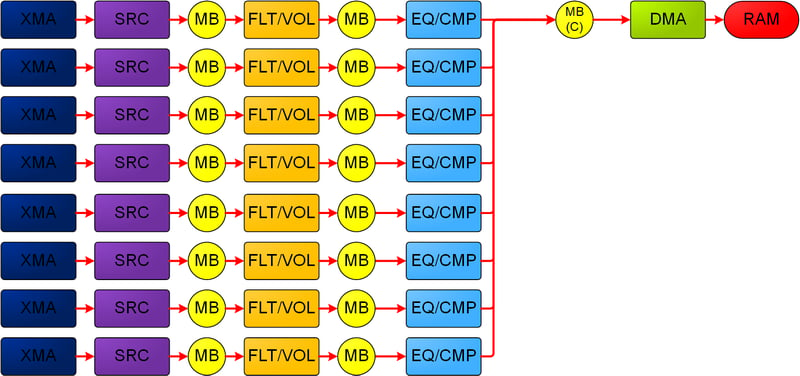
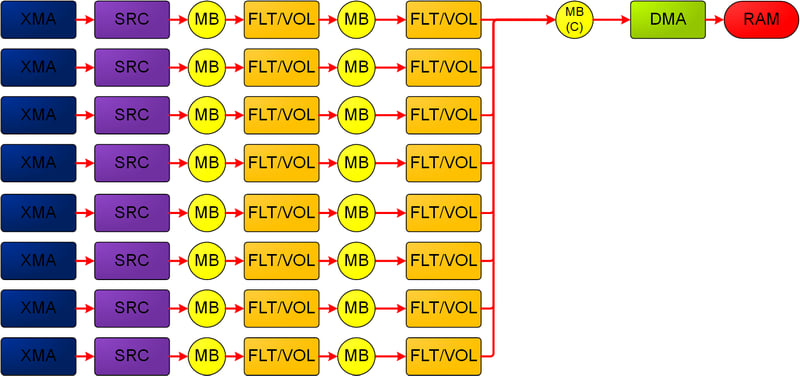 The second set of FLT/VOLs must wait for the first to be completed, potentially while other SHAPE blocks remain unused. If either set were used exclusively for filtering, the EQ/CMP might have represented a better choice for one set, especially if the flowgraph (figure 4) with the same configuration had more voices. This could then begin their FLT/VOL while the first set was processing its EQ/CMP blocks.
Figure 4 shows performance that more closely approaches the ideal SHAPE capabilities. This flowgraph replaces one set of FLT/VOLs, presumed to be used for filtering only (see figure 3), with EQ/CMP, which allows for parallel processing of the two SHAPE components.
**Figure 4. A flowgraph that shows an attempt to process FLT/VOLs and EQ/CMPs in parallel.**
The second set of FLT/VOLs must wait for the first to be completed, potentially while other SHAPE blocks remain unused. If either set were used exclusively for filtering, the EQ/CMP might have represented a better choice for one set, especially if the flowgraph (figure 4) with the same configuration had more voices. This could then begin their FLT/VOL while the first set was processing its EQ/CMP blocks.
Figure 4 shows performance that more closely approaches the ideal SHAPE capabilities. This flowgraph replaces one set of FLT/VOLs, presumed to be used for filtering only (see figure 3), with EQ/CMP, which allows for parallel processing of the two SHAPE components.
**Figure 4. A flowgraph that shows an attempt to process FLT/VOLs and EQ/CMPs in parallel.**
 Balancing of SHAPE components is also relevant when you consider the maximum instancing of the various components. The 2560 FLT/VOL components that can occur within a frame allow the FLT/VOL hardware to run approximately five times more calculations than is possible with the 512 EQ/CMP blocks.
If you run an EQ/CMP block in series with a single FLT/VOL, you'll realize less performance than you would by running multiple FLT/VOL components that are coupled with an EQ/CMP because the former's processing will be gated by the latter's consumption.
### Too many or frequent low-value DMA roundtrips
DMA is bound by the read/write bandwidth available to the SHAPE's bus. If you consume all available bandwidth - though this scenario is usually pathological - DMA blocks will stall and reduce throughput.
As discussed earlier, all processing that occurs after a DMA input block will have to wait until the DMA is completed. Therefore, you can create flowgraphs with much of the flowgraph blocked and waiting for a DMA to be completed before the flowgraph can begin processing.
You should also evaluate DMA roundtrips in relation to the value they present to the audio stream. The minimal addition of latency (which you can control in terms of the number of frames accessed via DMA at multiples of the 2.667 ms size of the audio frame) might not be a concern for most audio playback scenarios. This is because blocks to the right of a DMA will be processing audio data from previous frames. In particular, sending a DMA back into SHAPE just to perform a final mix might be unnecessary when you also plan to send that final mix as DMA back out to memory for presentation to an audio endpoint.
Figure 5 shows an example of a potentially low value, where a voice sent via DMA to memory for CPU/GPU processing is brought back into SHAPE, only to be 7.1-panned into the mastering mix. The voice is then sent via DMA back out to memory. Figure 5 assumes that no filtering is being applied to voices in the FLT/VOL blocks and that the 7.1 mastering mix buffers have additional voices routed to them.
**Figure 5. A flowgraph that shows a potentially low-value routing, involving unnecessary FLT/VOL components and unnecessary DMA roundtrips.**
Balancing of SHAPE components is also relevant when you consider the maximum instancing of the various components. The 2560 FLT/VOL components that can occur within a frame allow the FLT/VOL hardware to run approximately five times more calculations than is possible with the 512 EQ/CMP blocks.
If you run an EQ/CMP block in series with a single FLT/VOL, you'll realize less performance than you would by running multiple FLT/VOL components that are coupled with an EQ/CMP because the former's processing will be gated by the latter's consumption.
### Too many or frequent low-value DMA roundtrips
DMA is bound by the read/write bandwidth available to the SHAPE's bus. If you consume all available bandwidth - though this scenario is usually pathological - DMA blocks will stall and reduce throughput.
As discussed earlier, all processing that occurs after a DMA input block will have to wait until the DMA is completed. Therefore, you can create flowgraphs with much of the flowgraph blocked and waiting for a DMA to be completed before the flowgraph can begin processing.
You should also evaluate DMA roundtrips in relation to the value they present to the audio stream. The minimal addition of latency (which you can control in terms of the number of frames accessed via DMA at multiples of the 2.667 ms size of the audio frame) might not be a concern for most audio playback scenarios. This is because blocks to the right of a DMA will be processing audio data from previous frames. In particular, sending a DMA back into SHAPE just to perform a final mix might be unnecessary when you also plan to send that final mix as DMA back out to memory for presentation to an audio endpoint.
Figure 5 shows an example of a potentially low value, where a voice sent via DMA to memory for CPU/GPU processing is brought back into SHAPE, only to be 7.1-panned into the mastering mix. The voice is then sent via DMA back out to memory. Figure 5 assumes that no filtering is being applied to voices in the FLT/VOL blocks and that the 7.1 mastering mix buffers have additional voices routed to them.
**Figure 5. A flowgraph that shows a potentially low-value routing, involving unnecessary FLT/VOL components and unnecessary DMA roundtrips.**
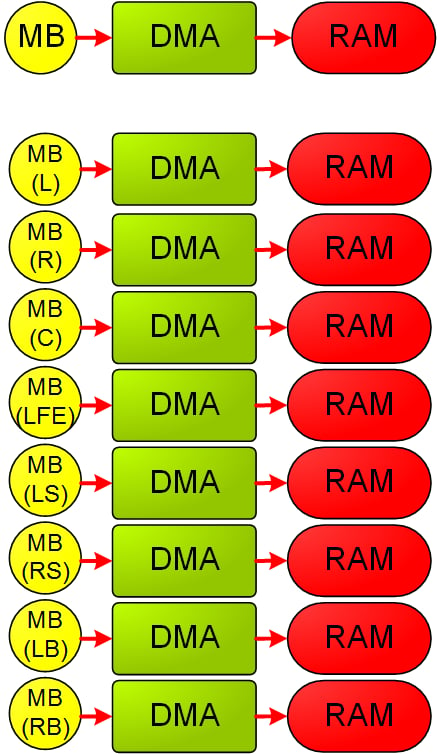
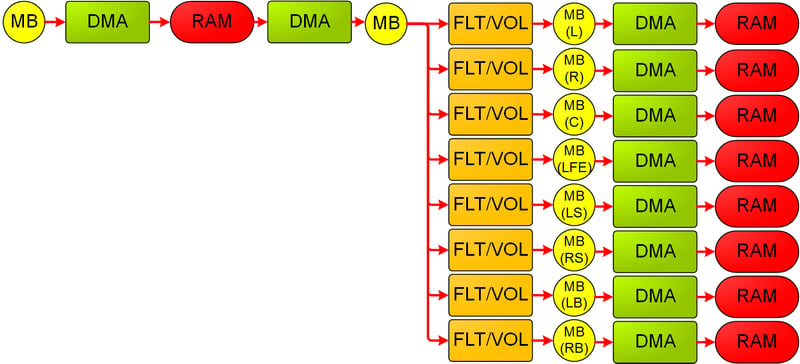 Figure 6 shows potentially more-optimal routing of figure 5's intent. The voice is sent via DMA to memory for CPU/GPU processing. The voice can then be 7.1-panned and combined with the rest of the 7.1 mix on the CPU itself without the overhead of additional DMAs, additional audio frame latency, or the use of seven FLT/VOL components.
**Figure 6. A flowgraph that shows a more optimal routing without additional DMA roundtrips or unnecessary FLT/VOL components.**
Figure 6 shows potentially more-optimal routing of figure 5's intent. The voice is sent via DMA to memory for CPU/GPU processing. The voice can then be 7.1-panned and combined with the rest of the 7.1 mix on the CPU itself without the overhead of additional DMAs, additional audio frame latency, or the use of seven FLT/VOL components.
**Figure 6. A flowgraph that shows a more optimal routing without additional DMA roundtrips or unnecessary FLT/VOL components.**
 When you eliminate DMAs from the process, ensure that you don't eliminate too many. You can justify using roundtrip DMAs if you:
* Intend to perform a significant amount of additional SHAPE processing for a particular voice.
* Want to take advantage of the hardware metering and clip detection afforded by the mix buffers.
## SHAPE flowgraph planning and review
As an exercise, before implementation, create a visual representation of a flowgraph of the voice use that you expect within a frame with the voices categorized and quantified, for example, in terms of the number of sound effects and concurrent streams of music.
Capturing this information visually can help you understand how to avoid some of the performance pitfalls previously discussed. Following are some of the key metrics that you can derive from such a flowgraph.
* The maximum number of each SHAPE component, concurrent and within the overall frame:
* Verify that this flowgraph falls sufficiently below the theoretical peaks.
* Note the underuse and overuse of components. Rebalance the components as necessary.
* Consider restructuring the use of mix buffers if too many must remain locked through most of the flowgraph.
* Planning for implementation of 3D-positioning via SHAPE:
* Will all voices be 7.1-panned, or will the voices be panned between 2 or *n* closest speakers?
* Should all 7.1 panning be done in SHAPE, or are the voices that have already been sent via DMA to the CPU best panned on the CPU itself?
* Number of DMA transitions to and from memory, and whether these transitions are asymmetrical. For example, some voices are written in and out to SHAPE more times than others, which means that they will likely have additional latency.
Flowgraph construction can also inform discussions between audio designers and engine or audio middleware developers to ensure that dynamically or statically created graphs are correctly created and routed as desired.
## Persistent versus non-persistent flowgraphs
You can submit flowgraphs to be processed as persistent or non-persistent.
Persistent flowgraphs process and then remain resident to repeat their processing in the next frame after the read and write pointers have advanced and after other context information is updated. Use persistent flowgraphs for either of the following scenarios.
* **Highly complex flowgraphs:** The flowgraphs that require a significant amount of CPU processing to reassemble each frame
* **Highly static flowgraphs:** The flowgraphs that maintain the same number and configuration of voices for an extended period of time
Use non-persistent flowgraphs for any of the following scenarios.
* Voice topologies are often changing.
* The processing cadence of your title's audio-software engine is detached from the SHAPE hardware; that is, it's not a multiple of 2.667 ms.
* You want to run audio processing in faster-than-real-time scenarios; that is, when you submit graphs to be consumed as quickly as they become available.
## Debugging SHAPE issues
We recommend that when you're developing flowgraphs, you register for messages that would help you debug issues. Specifically, use the `NumMessages` parameter of [IAcpHal::Connect](/reference/audio/acphal/interfaces/IAcpHal/methods/iacphal_connect) method.
The messaging system provides rich feedback on a variety of issues, including invalid flowgraphs (such as [ACP\_FLOWGRAPH\_TERMINATED\_REASON\_INVALID\_GRAPH](/reference/audio/acphal/enums/acp_flowgraph_terminated_reason)), blocked commands, and frame-outs that are caused by attempts to perform more processing than the hardware frame's size of 2.667 ms allows.
This method is helpful for debugging. However, before your title ships, try to do the following:
1. Eliminate all error-indicating messages from runtime scenarios.
2. Verify that flowgraph processing is consistently successful by examining `ACP_MESSAGE_TYPE_FLOWGRAPH_COMPLETED` messages (see the [ACP\_MESSAGE\_TYPE](/reference/audio/acphal/enums/acp_message_type) enumeration) for each submitted flowgraph.
### Missed messages
If you use ACP messages to drive engine state and if you handle a large number of messages, you should examine `ACP_MESSAGE::droppedMessageCount` during development. A non-zero value indicates that the message queue was full, and messages had to be dropped. If this value occurs, consider servicing the queue faster and making it larger.
### Frame-outs
During development, due to over-budgeting, suboptimal flowgraphs, and other reasons, a flowgraph might not be completed before the end of an audio frame (2.667 ms) is encountered. This incomplete flowgraph will result in an `ACP_FLOWGRAPH_TERMINATED_TIME_EXCEEDED` message for persistent flowgraphs. They will be incomplete. By contrast, a non-persistent flowgraph isn't constrained in this manner and will run until it's completed, even across frames.
### Blocked commands
SRC and DMA commands might be reported as blocked (`ACP_MESSAGE_TYPE_SRC_BLOCKED` and `ACP_MESSAGE_TYPE_DMA_BLOCKED` (see the [ACP\_MESSAGE\_TYPE](/reference/audio/acphal/enums/acp_message_type) enumeration)) in several scenarios as shown in the following table.
| Command type | Reports blocked in scenarios | | |
| ------------------------------ | --------------------------------------------------------------------------------------------------------------------------------------------- | ------------------------------------------------------------------------------------------------- | ---------------------------------------------------------------------------------------------------------------------------------- |
| XMA SRC | The associated XMA context has a parser error or no source data (error: `SHAPE_XMA_ERROR_STATUS_READ_BUFFER_INVALID_VALIDBUFFER_CURRBUF_IS_0` | `SHAPE_XMA_ERROR_STATUS_FRAME_CROSSES_BOUNDARY_INTO_INVALID_READ_BUFFER_VALIDBUFFER_CURRBUF_IS_0` | `SHAPE_XMA_ERROR_STATUS_FRAME_CROSSES_BOTH_READ_BUFFER_BOUNDARIES`).
When you eliminate DMAs from the process, ensure that you don't eliminate too many. You can justify using roundtrip DMAs if you:
* Intend to perform a significant amount of additional SHAPE processing for a particular voice.
* Want to take advantage of the hardware metering and clip detection afforded by the mix buffers.
## SHAPE flowgraph planning and review
As an exercise, before implementation, create a visual representation of a flowgraph of the voice use that you expect within a frame with the voices categorized and quantified, for example, in terms of the number of sound effects and concurrent streams of music.
Capturing this information visually can help you understand how to avoid some of the performance pitfalls previously discussed. Following are some of the key metrics that you can derive from such a flowgraph.
* The maximum number of each SHAPE component, concurrent and within the overall frame:
* Verify that this flowgraph falls sufficiently below the theoretical peaks.
* Note the underuse and overuse of components. Rebalance the components as necessary.
* Consider restructuring the use of mix buffers if too many must remain locked through most of the flowgraph.
* Planning for implementation of 3D-positioning via SHAPE:
* Will all voices be 7.1-panned, or will the voices be panned between 2 or *n* closest speakers?
* Should all 7.1 panning be done in SHAPE, or are the voices that have already been sent via DMA to the CPU best panned on the CPU itself?
* Number of DMA transitions to and from memory, and whether these transitions are asymmetrical. For example, some voices are written in and out to SHAPE more times than others, which means that they will likely have additional latency.
Flowgraph construction can also inform discussions between audio designers and engine or audio middleware developers to ensure that dynamically or statically created graphs are correctly created and routed as desired.
## Persistent versus non-persistent flowgraphs
You can submit flowgraphs to be processed as persistent or non-persistent.
Persistent flowgraphs process and then remain resident to repeat their processing in the next frame after the read and write pointers have advanced and after other context information is updated. Use persistent flowgraphs for either of the following scenarios.
* **Highly complex flowgraphs:** The flowgraphs that require a significant amount of CPU processing to reassemble each frame
* **Highly static flowgraphs:** The flowgraphs that maintain the same number and configuration of voices for an extended period of time
Use non-persistent flowgraphs for any of the following scenarios.
* Voice topologies are often changing.
* The processing cadence of your title's audio-software engine is detached from the SHAPE hardware; that is, it's not a multiple of 2.667 ms.
* You want to run audio processing in faster-than-real-time scenarios; that is, when you submit graphs to be consumed as quickly as they become available.
## Debugging SHAPE issues
We recommend that when you're developing flowgraphs, you register for messages that would help you debug issues. Specifically, use the `NumMessages` parameter of [IAcpHal::Connect](/reference/audio/acphal/interfaces/IAcpHal/methods/iacphal_connect) method.
The messaging system provides rich feedback on a variety of issues, including invalid flowgraphs (such as [ACP\_FLOWGRAPH\_TERMINATED\_REASON\_INVALID\_GRAPH](/reference/audio/acphal/enums/acp_flowgraph_terminated_reason)), blocked commands, and frame-outs that are caused by attempts to perform more processing than the hardware frame's size of 2.667 ms allows.
This method is helpful for debugging. However, before your title ships, try to do the following:
1. Eliminate all error-indicating messages from runtime scenarios.
2. Verify that flowgraph processing is consistently successful by examining `ACP_MESSAGE_TYPE_FLOWGRAPH_COMPLETED` messages (see the [ACP\_MESSAGE\_TYPE](/reference/audio/acphal/enums/acp_message_type) enumeration) for each submitted flowgraph.
### Missed messages
If you use ACP messages to drive engine state and if you handle a large number of messages, you should examine `ACP_MESSAGE::droppedMessageCount` during development. A non-zero value indicates that the message queue was full, and messages had to be dropped. If this value occurs, consider servicing the queue faster and making it larger.
### Frame-outs
During development, due to over-budgeting, suboptimal flowgraphs, and other reasons, a flowgraph might not be completed before the end of an audio frame (2.667 ms) is encountered. This incomplete flowgraph will result in an `ACP_FLOWGRAPH_TERMINATED_TIME_EXCEEDED` message for persistent flowgraphs. They will be incomplete. By contrast, a non-persistent flowgraph isn't constrained in this manner and will run until it's completed, even across frames.
### Blocked commands
SRC and DMA commands might be reported as blocked (`ACP_MESSAGE_TYPE_SRC_BLOCKED` and `ACP_MESSAGE_TYPE_DMA_BLOCKED` (see the [ACP\_MESSAGE\_TYPE](/reference/audio/acphal/enums/acp_message_type) enumeration)) in several scenarios as shown in the following table.
| Command type | Reports blocked in scenarios | | |
| ------------------------------ | --------------------------------------------------------------------------------------------------------------------------------------------- | ------------------------------------------------------------------------------------------------- | ---------------------------------------------------------------------------------------------------------------------------------- |
| XMA SRC | The associated XMA context has a parser error or no source data (error: `SHAPE_XMA_ERROR_STATUS_READ_BUFFER_INVALID_VALIDBUFFER_CURRBUF_IS_0` | `SHAPE_XMA_ERROR_STATUS_FRAME_CROSSES_BOUNDARY_INTO_INVALID_READ_BUFFER_VALIDBUFFER_CURRBUF_IS_0` | `SHAPE_XMA_ERROR_STATUS_FRAME_CROSSES_BOTH_READ_BUFFER_BOUNDARIES`).
XMA SRC won't block due to a lack of decoded data. |
| PCM SRC | The associated PCM context is `SHAPE_PCM_MODE_CIRCULAR`, and there's no source data. | | |
| Read (DMA from the mix buffer) | The DMA buffer is full. | | |
| Write (DMA to the mix buffer) | The DMA buffer is empty. | | |
After it's determined that commands are blocked - which might occur both before items are added to a SHAPE queue for processing and at runtime - commands are evicted from the graph. This might lead to dropped audio. During development, use blocked commands as the first place to look for improvements in the handling of flowgraphs. Before shipping, your title should also prevent the blocking of commands.
You can prevent the blocking of DMA commands by ensuring that your audio buffer is sufficiently large and that data is streamed at regular intervals in relation to the buffer size. For example, if you're streaming four hardware frames at a time, ensure that some multiple of those frames - at least double-buffered at eight - are in the buffer to let hardware write ahead of the title's read pointer. Alternatively, you could enforce emptying of the buffer before submitting the next flowgraph by consuming, updating the DMA read pointer, and then submitting the flowgraph.
SRC commands have the following three modes (detailed in *ShapeSrcContext.h*).
* `SHAPE_SRC_COMMAND_TYPE_START`
Use it for nearly all SRC commands in a flowgraph. Process normally, and expect more audio data to follow the current flowgraph.
* `SHAPE_SRC_COMMAND_TYPE_STOP_IMMEDIATE`
Use it to immediately stop processing the source XMA or PCM data. The SRC will output a zeroed buffer for this frame.
* `SHAPE_SRC_COMMAND_TYPE_STOP_END`
Use it to indicate the last packet of a voice. If it isn't submitted with `STOP_END` or `STOP_IMMEDIATE`, the SRC command won't be completed. This will cause the active flowgraph to stall. A persistent flowgraph will terminate at the end of the audio frame, and a non-persistent flowgraph will never be completed.
### Synchronization issues
A number of synchronization issues might arise if you don't respect the SHAPE hardware's consumption practices for contexts and commands. Although your titles retain full access to ACP-allocated memory, take care not to modify a context structure while it's in use. You can submit commands (see [IAcpHal::SubmitCommand](/reference/audio/acphal/interfaces/IAcpHal/methods/iacphal_submitcommand)) to occur at a specific frame, at the beginning of the next frame, or as soon as possible.
For the last scenario (commands that occur as soon as possible), be aware that *as soon as possible* is still asynchronous with any title CPU processing. Some commands might not be completed immediately - for example, if a context is in the middle of a non-interruptible operation. Wait for an [ACP\_MESSAGE\_TYPE\_COMMAND\_COMPLETED](/reference/audio/acphal/enums/acp_message_type) message to verify that a command has been truly processed.
## Related topics
- [Overview of SHAPE](/build/console-features/audio/overviews/shape-overview.md)
- [SHAPE_FLOWGRAPH_COMMAND_TYPE](/reference/audio/shapeflowgraph/enums/shape_flowgraph_command_type.md)
- [Best practices](/services/xbox-services/develop/best-practices/index.md)
- [SHAPE_FLOWGRAPH_COMMAND](/reference/audio/shapeflowgraph/structs/shape_flowgraph_command.md)
- [Insights Best Practices](/services/playfab/data-analytics/legacy/insights/best-practices.md)