> ## Documentation Index
> Fetch the complete documentation index at: https://devdocs.xbox.com/llms.txt
> Use this file to discover all available pages before exploring further.
# ACP overview
> Programming guide for the Audio Control Processor (ACP) and the acphal library that manages SHAPE audio flowgraphs on XBOX One consoles.
This topic provides descriptions and examples of the flowgraphs that are used to direct the Audio Control Processor (ACP).
## Overview of ACP
This section describes the programming interface to the ACP.
The `acphal` library (*acphal.lib*) defines the API set for Scalable Hardware Audio Processing Engine (SHAPE). Also included in the Microsoft Game Development Kit (GDK) is a collection of audio utilities and source code to help you prepare audio data for use with SHAPE. The utility headers define the following:
* The context structures for each supported data format
* A full set of functions that can be used to read and write to these contexts
Define at least one flowgraph in your app to route audio data *through* the SHAPE blocks. The ACP manages the SHAPE blocks and ensures efficiency.
For details about the API set, including the structures and enumerations that are declared in the utility files, see the [AcpHal](/reference/audio/acphal/acphal_members) reference.
For details about the SHAPE architecture, see the [SHAPE overview](/build/console-features/audio/overviews/shape-overview).
In the source files of a title project, be sure to include the *ShapeContext.h* file, not the individual context header files.
In this topic:
* [Flowgraphs](#ID4EVB)
* [DMA utilities](#ID4EZH)
* [EQ compressor utilities](#ID4EIAAC)
* [Filter volume utilities](#ID4EWAAC)
* [PCM utilities](#ID4EEBAC)
* [SRC utilities](#ID4ESBAC)
* [XMA utilities](#ID4EACAC)
* [Target values](#ID4EXEAC)
* [Thread safety](#ID4E3NAC)
* [Guidelines for using SRC for PCM and XMA data](#ID4EUPAC)
* [Pausing and resuming a title](#ID4E5BAE)
### Flowgraphs
To use SHAPE, a title would usually create a SHAPE flowgraph. For a description of an alternative, see the [XMA utilities](#ID4EACAC) section. A SHAPE flowgraph is an array of commands (one per SHAPE block) and accompanying context data that describes the order of operations of the individual blocks and the data on which they operate. The ACP uses the data in the flowgraph to correctly schedule the operations within the SHAPE blocks.
The title is responsible for building the flowgraph and submitting it to the ACP. To build a flowgraph, use [ShapeFlowGraph (flowgraph utility methods)](/reference/audio/shapeflowgraph/shapeflowgraph_members).
In the following figures, the green blocks represent SHAPE components, the cyan blocks are the source material, and the labeled yellow circles are the hardware mix buffers.
* [3D sounds](#ID4EHC)
* [Front end to a software audio engine](#ID4ETC)
* [Rendering audio](#ID4E6C)
* [Flowgraph parsing](#ID4EHF)
* [Updating flowgraphs](#ID4EHG)
* [Multiple flowgraphs](#ID4ELH)
#### 3D sounds
**Figure 1. Two voices, each panned between two outputs, with a send to a common output.**
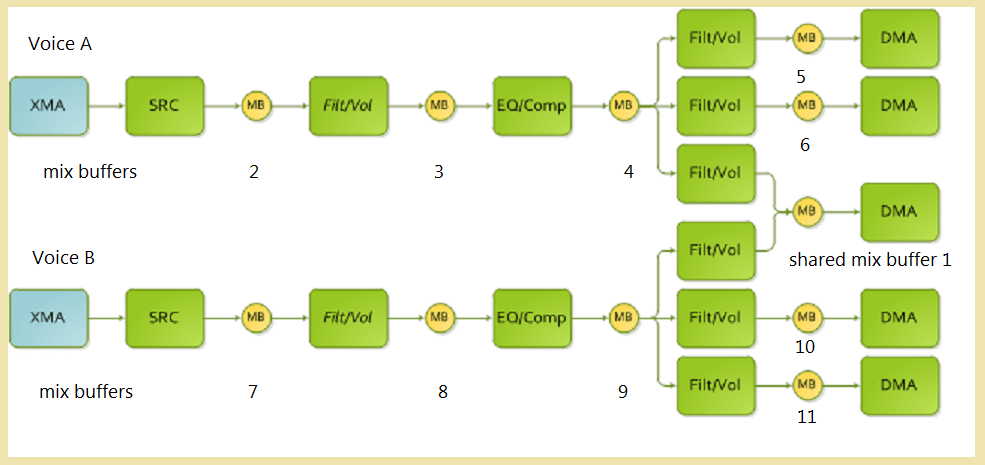 In code, this flowgraph can be represented as follows.
```cpp theme={null}
typedef enum mixBuffers
{
noBuffer = 0,
mixBuffer_1 = 1,
mixBuffer_2 = 2,
mixBuffer_3 = 3,
mixBuffer_4 = 4,
mixBuffer_5 = 5,
mixBuffer_6 = 6,
mixBuffer_7 = 7,
mixBuffer_8 = 8,
mixBuffer_9 = 9,
mixBuffer_10 = 10,
mixBuffer_11 = 11
};
typedef enum DMAcontexts
{
DMAcontext_0 = 0,
DMAcontext_1 = 1,
DMAcontext_2 = 2,
DMAcontext_3 = 3,
DMAcontext_4 = 4,
};
typedef enum FLTVOLcontexts
{
FLTVOLcontext_0 = 0,
FLTVOLcontext_1 = 1,
FLTVOLcontext_2 = 2,
FLTVOLcontext_3 = 3,
FLTVOLcontext_4 = 4,
FLTVOLcontext_5 = 5,
FLTVOLcontext_6 = 6,
FLTVOLcontext_7 = 7,
};
typedef enum EQcontexts
{
EQcontext_0 = 0,
EQcontext_1 = 1,
};
typedef enum SRCcontexts
{
SRCcontext_0 = 0,
SRCcontext_1 = 1,
};
typedef enum XMAcontexts
{
XMAcontext_0 = 0,
XMAcontext_1 = 1,
};
//
// Command structure to be initialized.
//
#define nSHAPE_3Dpan_commands 28
//
SHAPE_FLOWGRAPH_COMMAND cmd[nSHAPE_3Dpan_commands];
//
// Shared mix buffer.
//
// SetShapeAllocMixBufferCommand parameters:
// command, virtualID, numIn, numOut, attenuation
SetShapeAllocMixBufferCommand(&cmd[0], mixBuffer_1, 2, 1, SHAPE_MIXBUFFER_ATTENUATION_0_DB);
//
// Mix buffers for voice A.
//
// SetShapeAllocMixBufferCommand parameters:
// command, virtualID, numIn, numOut, attenuation
SetShapeAllocMixBufferCommand(&cmd[1], mixBuffer_2, 1, 1, SHAPE_MIXBUFFER_ATTENUATION_0_DB);
SetShapeAllocMixBufferCommand(&cmd[2], mixBuffer_3, 1, 1, SHAPE_MIXBUFFER_ATTENUATION_0_DB);
SetShapeAllocMixBufferCommand(&cmd[3], mixBuffer_4, 1, 3, SHAPE_MIXBUFFER_ATTENUATION_0_DB);
SetShapeAllocMixBufferCommand(&cmd[4], mixBuffer_5, 1, 1, SHAPE_MIXBUFFER_ATTENUATION_0_DB);
SetShapeAllocMixBufferCommand(&cmd[5], mixBuffer_6, 1, 1, SHAPE_MIXBUFFER_ATTENUATION_0_DB);
//
// Voice A.
//
// SetShapeSrcXmaCommand parameters:
// command, contextID, XMAContextID, leftorMonoMixBuffer, rightMixBuffer
SetShapeSrcXmaCommand( &cmd[6], SRCcontext_0, XMAcontext_0, mixBuffer_2, noBuffer);
// SetShapeFiltVolCommand parameters:
// command, contextID, inputMixBuffer, outputMixBuffer
SetShapeFiltVolCommand(&cmd[7], FLTVOLcontext_0, mixBuffer_2, mixBuffer_3 );
// SetShapeEqCompCommand parameters:
// command, contextID, inputMixBuffer, sidechainMixBuffer, outputMixBuffer
SetShapeEqCompCommand( &cmd[8], EQcontext0, mixBuffer_3, noBuffer, mixBuffer_4);
// SetShapeFiltVolCommand parameters:
// command, contextID, inputMixBuffer, outputMixBuffer
SetShapeFiltVolCommand(&cmd[9], FLTVOLcontext_1, mixBuffer_4, mixBuffer_5 );
SetShapeFiltVolCommand(&cmd[10], FLTVOLcontext_2, mixBuffer_4, mixBuffer_6 );
SetShapeFiltVolCommand(&cmd[11], FLTVOLcontext_3, mixBuffer_4, mixBuffer_1 );
//
// Mix buffers for voice B.
//
// SetShapeAllocMixBufferCommand parameters:
// command, virtualID, numIn, nmmOut, attenuation
SetShapeAllocMixBufferCommand(&cmd[12], mixBuffer_7, 1, 1, SHAPE_MIXBUFFER_ATTENUATION_0_DB);
SetShapeAllocMixBufferCommand(&cmd[13], mixBuffer_8, 1, 1, SHAPE_MIXBUFFER_ATTENUATION_0_DB);
SetShapeAllocMixBufferCommand(&cmd[14], mixBuffer_9, 1, 3, SHAPE_MIXBUFFER_ATTENUATION_0_DB);
SetShapeAllocMixBufferCommand(&cmd[15], mixBuffer_10, 1, 1, SHAPE_MIXBUFFER_ATTENUATION_0_DB);
SetShapeAllocMixBufferCommand(&cmd[16], mixBuffer_11, 1, 1, SHAPE_MIXBUFFER_ATTENUATION_0_DB);
//
// Voice B.
//
// SetShapeSrcXmaCommand parameters:
// command, contextID, XMAContextID, leftorMonoMixBuffer, rightMixBuffer
SetShapeSrcXmaCommand( &cmd[17], SRCcontext_1, XMAcontext_1, mixBuffer_7, noBuffer);
// SetShapeFiltVolCommand parameters:
// command, contextID, inputMixBuffer, outputMixBuffer
SetShapeFiltVolCommand(&cmd[18], FLTVOLcontext_4, mixBuffer_7, mixBuffer_8 );
// SetShapeEqCompCommand parameters:
// command, contextID, inputMixBuffer, sidechainMixBuffer, outputMixBuffer
SetShapeEqCompCommand( &cmd[19], EQcontext1, mixBuffer_8, noBuffer, mixBuffer_9);
// SetShapeFiltVolCommand parameters:
// command, contextID, inputMixBuffer, outputMixBuffer
SetShapeFiltVolCommand(&cmd[20], FLTVOLcontext_5, mixBuffer_9, mixBuffer_10 );
SetShapeFiltVolCommand(&cmd[21], FLTVOLcontext_6, mixBuffer_9, mixBuffer_11 );
SetShapeFiltVolCommand(&cmd[22], FLTVOLcontext_7, mixBuffer_9, mixBuffer_1 );
//
// DMA all outputs.
//
// SetShapeDmaCommand parameters:
// command, contextID, mixBuffer, write
SetShapeDmaCommand( &cmd[23], DMAcontext_0, mixBuffer_1, true);
SetShapeDmaCommand( &cmd[24], DMAcontext_1, mixBuffer_5, true);
SetShapeDmaCommand( &cmd[25], DMAcontext_2, mixBuffer_6, true);
SetShapeDmaCommand( &cmd[26], DMAcontext_3, mixBuffer_10, true);
SetShapeDmaCommand( &cmd[27], DMAcontext_4, mixBuffer_11, true);
```
#### Front end to a software audio engine
**Figure 2. A basic front end to a software engine. Potentially, all voices that use this model would use the same structure.**
In code, this flowgraph can be represented as follows.
```cpp theme={null}
typedef enum mixBuffers
{
noBuffer = 0,
mixBuffer_1 = 1,
mixBuffer_2 = 2,
mixBuffer_3 = 3,
mixBuffer_4 = 4,
mixBuffer_5 = 5,
mixBuffer_6 = 6,
mixBuffer_7 = 7,
mixBuffer_8 = 8,
mixBuffer_9 = 9,
mixBuffer_10 = 10,
mixBuffer_11 = 11
};
typedef enum DMAcontexts
{
DMAcontext_0 = 0,
DMAcontext_1 = 1,
DMAcontext_2 = 2,
DMAcontext_3 = 3,
DMAcontext_4 = 4,
};
typedef enum FLTVOLcontexts
{
FLTVOLcontext_0 = 0,
FLTVOLcontext_1 = 1,
FLTVOLcontext_2 = 2,
FLTVOLcontext_3 = 3,
FLTVOLcontext_4 = 4,
FLTVOLcontext_5 = 5,
FLTVOLcontext_6 = 6,
FLTVOLcontext_7 = 7,
};
typedef enum EQcontexts
{
EQcontext_0 = 0,
EQcontext_1 = 1,
};
typedef enum SRCcontexts
{
SRCcontext_0 = 0,
SRCcontext_1 = 1,
};
typedef enum XMAcontexts
{
XMAcontext_0 = 0,
XMAcontext_1 = 1,
};
//
// Command structure to be initialized.
//
#define nSHAPE_3Dpan_commands 28
//
SHAPE_FLOWGRAPH_COMMAND cmd[nSHAPE_3Dpan_commands];
//
// Shared mix buffer.
//
// SetShapeAllocMixBufferCommand parameters:
// command, virtualID, numIn, numOut, attenuation
SetShapeAllocMixBufferCommand(&cmd[0], mixBuffer_1, 2, 1, SHAPE_MIXBUFFER_ATTENUATION_0_DB);
//
// Mix buffers for voice A.
//
// SetShapeAllocMixBufferCommand parameters:
// command, virtualID, numIn, numOut, attenuation
SetShapeAllocMixBufferCommand(&cmd[1], mixBuffer_2, 1, 1, SHAPE_MIXBUFFER_ATTENUATION_0_DB);
SetShapeAllocMixBufferCommand(&cmd[2], mixBuffer_3, 1, 1, SHAPE_MIXBUFFER_ATTENUATION_0_DB);
SetShapeAllocMixBufferCommand(&cmd[3], mixBuffer_4, 1, 3, SHAPE_MIXBUFFER_ATTENUATION_0_DB);
SetShapeAllocMixBufferCommand(&cmd[4], mixBuffer_5, 1, 1, SHAPE_MIXBUFFER_ATTENUATION_0_DB);
SetShapeAllocMixBufferCommand(&cmd[5], mixBuffer_6, 1, 1, SHAPE_MIXBUFFER_ATTENUATION_0_DB);
//
// Voice A.
//
// SetShapeSrcXmaCommand parameters:
// command, contextID, XMAContextID, leftorMonoMixBuffer, rightMixBuffer
SetShapeSrcXmaCommand( &cmd[6], SRCcontext_0, XMAcontext_0, mixBuffer_2, noBuffer);
// SetShapeFiltVolCommand parameters:
// command, contextID, inputMixBuffer, outputMixBuffer
SetShapeFiltVolCommand(&cmd[7], FLTVOLcontext_0, mixBuffer_2, mixBuffer_3 );
// SetShapeEqCompCommand parameters:
// command, contextID, inputMixBuffer, sidechainMixBuffer, outputMixBuffer
SetShapeEqCompCommand( &cmd[8], EQcontext0, mixBuffer_3, noBuffer, mixBuffer_4);
// SetShapeFiltVolCommand parameters:
// command, contextID, inputMixBuffer, outputMixBuffer
SetShapeFiltVolCommand(&cmd[9], FLTVOLcontext_1, mixBuffer_4, mixBuffer_5 );
SetShapeFiltVolCommand(&cmd[10], FLTVOLcontext_2, mixBuffer_4, mixBuffer_6 );
SetShapeFiltVolCommand(&cmd[11], FLTVOLcontext_3, mixBuffer_4, mixBuffer_1 );
//
// Mix buffers for voice B.
//
// SetShapeAllocMixBufferCommand parameters:
// command, virtualID, numIn, nmmOut, attenuation
SetShapeAllocMixBufferCommand(&cmd[12], mixBuffer_7, 1, 1, SHAPE_MIXBUFFER_ATTENUATION_0_DB);
SetShapeAllocMixBufferCommand(&cmd[13], mixBuffer_8, 1, 1, SHAPE_MIXBUFFER_ATTENUATION_0_DB);
SetShapeAllocMixBufferCommand(&cmd[14], mixBuffer_9, 1, 3, SHAPE_MIXBUFFER_ATTENUATION_0_DB);
SetShapeAllocMixBufferCommand(&cmd[15], mixBuffer_10, 1, 1, SHAPE_MIXBUFFER_ATTENUATION_0_DB);
SetShapeAllocMixBufferCommand(&cmd[16], mixBuffer_11, 1, 1, SHAPE_MIXBUFFER_ATTENUATION_0_DB);
//
// Voice B.
//
// SetShapeSrcXmaCommand parameters:
// command, contextID, XMAContextID, leftorMonoMixBuffer, rightMixBuffer
SetShapeSrcXmaCommand( &cmd[17], SRCcontext_1, XMAcontext_1, mixBuffer_7, noBuffer);
// SetShapeFiltVolCommand parameters:
// command, contextID, inputMixBuffer, outputMixBuffer
SetShapeFiltVolCommand(&cmd[18], FLTVOLcontext_4, mixBuffer_7, mixBuffer_8 );
// SetShapeEqCompCommand parameters:
// command, contextID, inputMixBuffer, sidechainMixBuffer, outputMixBuffer
SetShapeEqCompCommand( &cmd[19], EQcontext1, mixBuffer_8, noBuffer, mixBuffer_9);
// SetShapeFiltVolCommand parameters:
// command, contextID, inputMixBuffer, outputMixBuffer
SetShapeFiltVolCommand(&cmd[20], FLTVOLcontext_5, mixBuffer_9, mixBuffer_10 );
SetShapeFiltVolCommand(&cmd[21], FLTVOLcontext_6, mixBuffer_9, mixBuffer_11 );
SetShapeFiltVolCommand(&cmd[22], FLTVOLcontext_7, mixBuffer_9, mixBuffer_1 );
//
// DMA all outputs.
//
// SetShapeDmaCommand parameters:
// command, contextID, mixBuffer, write
SetShapeDmaCommand( &cmd[23], DMAcontext_0, mixBuffer_1, true);
SetShapeDmaCommand( &cmd[24], DMAcontext_1, mixBuffer_5, true);
SetShapeDmaCommand( &cmd[25], DMAcontext_2, mixBuffer_6, true);
SetShapeDmaCommand( &cmd[26], DMAcontext_3, mixBuffer_10, true);
SetShapeDmaCommand( &cmd[27], DMAcontext_4, mixBuffer_11, true);
```
#### Front end to a software audio engine
**Figure 2. A basic front end to a software engine. Potentially, all voices that use this model would use the same structure.**
 In code, this flowgraph can be represented as follows.
```cpp theme={null}
typedef enum mixBuffers
{
noBuffer = 0,
mixBuffer_1 = 1,
mixBuffer_2 = 2,
mixBuffer_3 = 3
};
typedef enum DMAcontexts
{
DMAcontext_0 = 0,
};
typedef enum FLTVOLcontexts
{
FLTVOLcontext_0 = 0,
};
typedef enum EQcontexts
{
EQcontext_0 = 0,
};
typedef enum SRCcontexts
{
SRCcontext_0 = 0,
};
typedef enum XMAcontexts
{
XMAcontext_0 = 0,
};
//
// Command structure to be initialized.
//
#define nSHAPE_frontend_commands 7
//
SHAPE_FLOWGRAPH_COMMAND cmd[nSHAPE_frontend_commands];
//
// Mix buffer allocation for the voice.
//
// SetShapeAllocMixBufferCommand parameters:
// command, virtualID, numIn, numOut, attenuation
SetShapeAllocMixBufferCommand(&cmd[0], mixBuffer_1, 1, 1, SHAPE_MIXBUFFER_ATTENUATION_0_DB);
SetShapeAllocMixBufferCommand(&cmd[1], mixBuffer_2, 1, 1, SHAPE_MIXBUFFER_ATTENUATION_0_DB);
SetShapeAllocMixBufferCommand(&cmd[2], mixBuffer_3, 1, 1, SHAPE_MIXBUFFER_ATTENUATION_0_DB);
//
// SHAPE blocks.
//
// SetShapeSrcXmaCommand parameters:
// command, contextID, XMAContextID, leftorMonoMixBuffer, rightMixBuffer
SetShapeSrcXmaCommand( &cmd[3], SRCcontext_0, XMAcontext_0, mixBuffer_1, noBuffer);
// SetShapeEqCompCommand parameters:
// command, contextID, inputMixBuffer, sidechainMixBuffer, outputMixBuffer
SetShapeEqCompCommand( &cmd[4], EQcontext_0, mixBuffer_1, noBuffer, mixBuffer_2);
// SetShapeFiltVolCommand parameters:
// command, contextID, inputMixBuffer, outputMixBuffer
SetShapeFiltVolCommand(&cmd[5], FLTVOLcontext_0, mixBuffer_2, mixBuffer_3 );
// SetShapeDmaCommand parameters:
// command, contextID, mixBuffer, write
SetShapeDmaCommand( &cmd[6], DMAcontext_0, mixBuffer_3, true );
```
#### Rendering audio
To render audio
1. Create a flowgraph like the ones shown in the previous examples and that defines the audio graph to be processed.
2. Create context structures that define how and what the flowgraph will process.
3. Use the [SubmitCommand](/reference/audio/acphal/interfaces/IAcpHal/methods/iacphal_submitcommand) method to submit the flowgraph to the ACP. Based on the parameters to `SubmitCommand`, the flowgraph is processed once and then discarded or processed every audio frame.
4. The title is responsible for updating the context data for each audio frame by using the `ACP_COMMAND_UPDATE_*_CONTEXT` commands or by correctly synchronizing the updates with the flowgraph processing and manually updating the contexts.
* [ACP\_COMMAND\_UPDATE\_DMA\_CONTEXT](/reference/audio/acphal/structs/acp_command_update_dma_context)
* [ACP\_COMMAND\_UPDATE\_EQCOMP\_CONTEXT](/reference/audio/acphal/structs/acp_command_update_eqcomp_context)
* [ACP\_COMMAND\_UPDATE\_FILTVOL\_CONTEXT](/reference/audio/acphal/structs/acp_command_update_filtvol_context)
* [ACP\_COMMAND\_UPDATE\_PCM\_CONTEXT](/reference/audio/acphal/structs/acp_command_update_pcm_context)
* [ACP\_COMMAND\_UPDATE\_SRC\_CONTEXT](/reference/audio/acphal/structs/acp_command_update_src_context)
* [ACP\_COMMAND\_UPDATE\_XMA\_CONTEXT](/reference/audio/acphal/structs/acp_command_update_xma_context)
When you update contexts, note that a flag parameter to [SubmitCommand](/reference/audio/acphal/interfaces/IAcpHal/methods/iacphal_submitcommand) determines whether the update takes place as soon as possible or at the next audio frame.
For details about the method to manually synchronize the update of contexts, refer to the [ACP\_COMMAND\_LOAD\_SHAPE\_FLOWGRAPH](/reference/audio/acphal/structs/acp_command_load_shape_flowgraph) command. In general, use the `ACP_COMMAND_TYPE_UPDATE_*_CONTEXT` commands to update a small number of contexts per audio frame. Using these commands to update a large number of contexts isn't efficient because a large amount of context data must be copied and transmitted to the ACP in addition to processing of the commands. If you want to update a large number of contexts, a title should modify the context data and then submit non-persistent flowgraphs to the ACP or make good use of the `ACP_COMMAND_TYPE_START_FLOWGRAPH` command and the `waitForStart` parameter to the [ACP\_COMMAND\_LOAD\_SHAPE\_FLOWGRAPH](/reference/audio/acphal/structs/acp_command_load_shape_flowgraph) command to hold on processing until the context is updated. When the flowgraph completes processing, the contexts are free to be updated again.
A third alternative to updating contexts is to use a double-buffering process. The title can update the second copy of the contexts while the flowgraph is being processed and swap the contexts at the start of an audio frame.
#### Flowgraph parsing
The ACP terminates persistent flowgraph parsing at the end of the audio frame, which is an ACP audio frame with a 2.667-ms limit. If a title has a flowgraph that takes 75 percent of an audio frame to process but the title doesn't let the processing start until 30 percent of the way through the audio frame, the portions of the flowgraph that weren't parsed are purged. The flowgraph itself isn't altered. When this occurs, the ACP sends the `ACP_MESSAGE_TYPE_FLOWGRAPH_TERMINATED` message if the title has registered to receive messages. To determine which commands didn't get inserted into the internal SHAPE queues, the title would examine the `queued` flag of the flowgraph command.
Non-persistent flowgraphs are usually processed to completion regardless of the time of their submission. One of the exceptions is the blocking of one or more commands due to the unavailability of the source data or poor use of the `disabled` flag. A title can submit a non-persistent flowgraph at any point during an ACP audio frame and be certain (except for the few boundary cases) that it will be completed. The benefit is that a title doesn't have to be perfectly synchronous with the audio clock as long as the title is still servicing the flowgraphs within the ACP audio frame interval of 2.667 ms. The risk is that a title can cause audio dropouts if it doesn't submit their flowgraphs consistently or if the flowgraphs require more than 2.667 ms.
Following is a summary of the lifetime of flowgraphs.
* A persistent flowgraph stays active on the ACP until it's replaced by submitting a new flowgraph or a null flowgraph, which effectively removes it.
* The ACP starts processing a persistent flowgraph at the beginning of an audio frame unless the client instructs the ACP to wait for a start command.
* The ACP stops processing a persistent flowgraph shortly before the end of the audio frame, even if it hasn't been completely processed.
* A non-persistent flowgraph is active only until it's completed, and then it's removed.
* A non-persistent flowgraph remains active between audio frames. It's removed only after it has been completed.
Command processing is not tied to flowgraph parsing. The ACP is constantly scanning for new commands and then processes them as fast as possible while parsing a flowgraph or doing other work.
#### Updating flowgraphs
The options for updating flowgraphs are similar to those for updating contexts as previously described. The basic rule is the same: don't update flowgraphs while they're being processed.
You can use three strategies to update flowgraphs.
1. Use non-persistent flowgraphs, rebuild them as needed, and submit them at the beginning of the audio frame. A title can reuse the same flowgraph as many times as necessary. If the flowgraph doesn't change, the title doesn't need to rebuild it. You can also double-buffer this approach by constructing a new flowgraph while the old one is being processed. When being rebuilt, not only can flowgraphs be constructed from scratch, but their sections can also be stored and linked as needed by appropriately setting the mix buffer IDs.
2. Use persistent flowgraphs and rebuild and replace them only when changes are needed. Double-buffering works here, too. The ACP can be allowed to run free by not using the `waitForStart` parameter to [ACP\_COMMAND\_LOAD\_SHAPE\_FLOWGRAPH](/reference/audio/acphal/structs/acp_command_load_shape_flowgraph). The ACP starts processing the flowgraph as soon as the audio frame starts and right after the commands tagged for that audio frame are processed. Alternatively, the `waitForStart` parameter can be set to prevent the flowgraph from being processed until the `ACP_COMMAND_TYPE_START_FLOWGRAPH` command is sent. This doesn't affect flowgraph updates directly but allows for a slight improvement in synchronization.
3. Use the `disabled` flag on the flowgraph commands to disable portions of a flowgraph. For example, a master flowgraph can be built, but only the required sections are enabled for each run. This must be tied with option 1 or 2 to get the new flowgraph to the ACP. Note that the ACP currently doesn't traverse the flowgraph to look for orphaned blocks. A title must disable complete paths through the flowgraph (not just the first nodes). If this isn't done, the SHAPE commands temporarily stall the hardware. These stalls could be simple, such as a single block that can't be processed and is removed at a small cost. They could also be severe enough to stall an entire voice.
Use the double-buffering technique for a title that has large voice counts or that's making many updates per audio frame.
If a title is using `ACP_MESSAGE_TYPE_FLOWGRAPH_COMPLETED` to manage updates, the ACP can be left idle for an extended period of time between the ACP adding the message to the message queue and the title then calling `PopMessage`. Don't use this approach to manage updates - keep the ACP active.
#### Multiple flowgraphs
A title can process multiple flowgraphs per audio frame if their combined requirements don't exceed the hardware capabilities. The benefit is that a title can run multiple audio engines, both middleware and custom, or break up their parsing into more manageable chunks. The downside is that the SHAPE hardware won't run as efficiently in this mode. To reach the maximum throughput of SHAPE, each SHAPE block must be kept 100 percent busy, which is impossible when multiple flowgraphs are being processed.
Only one flowgraph can be loaded per ACP client. If a new flowgraph is submitted by a client, it replaces the existing one. A title that requires support for multiple flowgraphs either needs to have separate clients for each flowgraph type (each client with its own command and message queues) or needs to wait for a flowgraph to complete before submitting a new one.
Support for multiple flowgraphs is designed to be used by multiple clients - not a single client. This allows a middleware engine to submit its flowgraph and the title to submit a separate flowgraph for additional custom processing. For each ACP client required by the title, create an instance of the `IACPHAL` interface.
Because all ACP and SHAPE resources are shared among all clients (context arrays in particular), the clients must coordinate the allocation and sharing of those resources.
### DMA utilities
Include the Direct Memory Access (DMA) utilities in the *ShapeDMAContext.h* file. The following utilities operate on a [SHAPE\_DMA\_CONTEXT](/reference/audio/shapedmacontext/structs/shape_dma_context) structure. For more information, see [ShapeDmaContext (DMA utility methods)](/reference/audio/shapedmacontext/shapedmacontext_members).
### EQ compressor utilities
Include the EQCOMP utilities in the *ShapeEqCompContext.h* file. These utilities operate on a [SHAPE\_EQCOMP\_CONTEXT](/reference/audio/shapeeqcompcontext/structs/shape_eqcomp_context) structure.
For more information, see [ShapeEqCompContext (EQCOMP utility methods)](/reference/audio/shapeeqcompcontext/shapeeqcompcontext_members).
### Filter volume utilities
Include the filter volume utilities in the *ShapeFiltVolContext.h* file. These utilities operate on a [SHAPE\_FILTVOL\_CONTEXT](/reference/audio/shapefiltvolcontext/structs/shape_filtvol_context) structure.
For more information, see [ShapeFiltVolContext (FLTVOL utility methods)](/reference/audio/shapefiltvolcontext/shapefiltvolcontext_members).
### PCM utilities
Include the Pulse Code Modulation (PCM) utilities in the *ShapePCMContext.h* file. These utilities operate on a [SHAPE\_PCM\_CONTEXT](/reference/audio/shapepcmcontext/structs/shape_pcm_context) structure.
For more information, see [ShapePcmContext (PCM utility methods)](/reference/audio/shapepcmcontext/shapepcmcontext_members).
### SRC utilities
Include the Sample Rate Convertor (SRC) utilities in the *ShapeSRCContext.h* file. These utilities operate on a [SHAPE\_SRC\_CONTEXT](/reference/audio/shapesrccontext/structs/shape_src_context) structure.
For more information, see [ShapeSrcContext (SRC utility methods)](/reference/audio/shapesrccontext/shapesrccontext_members).
### XMA utilities
Include the XMA utilities in the *ShapeXMAContext.h* file. These utilities operate on a [SHAPE\_XMA\_CONTEXT](/reference/audio/shapexmacontext/structs/shape_xma_context) structure.
For more information, see [ShapeXmaContext (XMA utility methods)](/reference/audio/shapexmacontext/shapexmacontext_members).
The XMA decode capabilities of hardware emulation are limited. For details, see the [SHAPE\_XMA\_CONTEXT](/reference/audio/shapexmacontext/structs/shape_xma_context) structure topic.
A title can use XMA data without using flowgraphs, but the data still has to go through the ACP by using the [ACP\_COMMAND\_TYPE](/reference/audio/acphal/enums/acp_command_type) commands as shown in the following table.
| Command | Description |
| --------------------------------------- | ------------------------------------------------------------------------------------------------------------- |
| `ACP_COMMAND_TYPE_ENABLE_XMA_CONTEXT` | Enables a single XMA context, and the ACP starts decoding the buffer that's specified in the context. |
| `ACP_COMMAND_TYPE_ENABLE_XMA_CONTEXTS` | Enables a block of XMA contexts, and the ACP starts decoding buffers that are defined in the contexts. |
| `ACP_COMMAND_TYPE_DISABLE_XMA_CONTEXT` | Disables a single XMA context, and the ACP stops decoding the buffer that's specified in the context. |
| `ACP_COMMAND_TYPE_DISABLE_XMA_CONTEXTS` | Disables a block of XMA contexts, and the ACP stops decoding buffers that are defined in the contexts. |
| `ACP_COMMAND_TYPE_UPDATE_XMA_CONTEXT` | Updates one or more fields in the XMA context. This can be done synchronously, on the ACP, or asynchronously. |
Using these commands, a title can use the XBOX One ACP HAL almost identically to how it uses the XBOX 360 XMA HAL with the following order of operation.
1. Populate the context or contexts with relevant data: buffers, offsets, and more.
2. Enable the contexts.
3. Update the contexts. If the context is disabled, the title is free to directly modify the contents. If the context is enabled, the title can disable it first or use the `ACP_COMMAND_TYPE_UPDATE_XMA_CONTEXT` command, which can be more efficient because the ACP deals with disabling, waiting, and updating.
In general, a title shouldn't use just the XMA component of SHAPE. It's almost trivial to create a "front-end" flowgraph that needs only minor maintenance that gives the title a free, high-quality SRC and other features. Flowgraphs are easy to create and manage, and they will offload the SRC from the main CPU and improve quality.
### Target values
The target values that can be set in the utility functions represent the final values of the parameter at the end of the audio frame. For example, the [SHAPE\_FILTVOL\_CONTEXT](/reference/audio/shapefiltvolcontext/structs/shape_filtvol_context) structure contains values for `gain` and `gainTarget`. While the frame is being processed, the `gain` is calculated by using linear interpolation and the following equation.
```cpp theme={null}
gain = ((gainTarget - gain) / 127) * i + gain
```
Where i goes from 0 to 127.
At the end of the frame, `gain` will equal `gainTarget`.
Target parameters can be set for the ACP as shown in the following table.
| Component | Target | Description |
| --------- | ------------------------- | ---------------------------------------- |
| EQCOMP | `eqAB0Target` | EQ A b0 coefficient target |
| EQCOMP | `eqAB1Target_L` | EQ A b1 coefficient target, low 8 bits |
| EQCOMP | `eqAB1Target_H` | EQ A b1 coefficient target, high 16 bits |
| EQCOMP | `eqAB2Target_L` | EQ A b2 coefficient target, low 16 bits |
| EQCOMP | `eqAB2Target_H` | EQ A b2 coefficient target, high 8 bits |
| EQCOMP | `eqAA1Target` | EQ A a1 coefficient target |
| EQCOMP | `eqAA2Target` | EQ A a2 coefficient target |
| EQCOMP | `eqBB0Target_L` | EQ B b0 coefficient target, low 8 bits |
| EQCOMP | `eqBB0Target_H` | EQ B b0 coefficient target, high 16 bits |
| EQCOMP | `eqBB1Target_L` | EQ B b1 coefficient target, low 16 bits |
| EQCOMP | `eqBB1Target_H` | EQ B b1 coefficient target, high 8 bits |
| EQCOMP | `eqBB2Target` | EQ B b2 coefficient target |
| EQCOMP | `eqBA1Target` | EQ B a1 coefficient target |
| EQCOMP | `eqBA2Target_L` | EQ B a2 coefficient target, low 8 bits |
| EQCOMP | `eqBA2Target_H` | EQ B a2 coefficient target, high 16 bits |
| EQCOMP | `eqCB0Target_L` | EQ C b0 coefficient target, low 16 bits |
| EQCOMP | `eqCB0Target_H` | EQ C b0 coefficient target, high 8 bits |
| EQCOMP | `eqCB1Target` | EQ C b1 coefficient target |
| EQCOMP | `eqCB2Target` | EQ C b2 coefficient target |
| EQCOMP | `eqCA1Target_L` | EQ C a1 coefficient target, low 8 bits |
| EQCOMP | `eqCA1Target_H` | EQ C a1 coefficient target, high 16 bits |
| EQCOMP | `eqCA2Target_L` | EQ C a2 coefficient target, low 16 bits |
| EQCOMP | `eqCA2Target_H` | EQ C a2 coefficient target, high 8 bits |
| EQCOMP | `compGainTarget` | User-settable target for output gain |
| FILTVOL | `gainTarget` | Volume target level |
| FILTVOL | `qRecipTarget` | Target 1-over-Q value |
| FILTVOL | `fcTarget` | Target frequency value |
| SRC | `samplingIncrementTarget` | End value of sampling increment |
### Thread safety
The [IACPHAL interface methods](/reference/audio/acphal/interfaces/IAcpHal/iacphal) and [ACPHAL methods](/reference/audio/acphal/acphal_members) are thread-safe. If the call [ApuCreateHeap](/reference/audio/apu/functions/apucreateheap) is made, the heap is used by all threads.
The following utility functions *aren't* thread-safe. However, the source code is provided for them. If necessary, you can make them thread-safe. The typical way to do this is to use [Critical Section Objects](https://msdn.microsoft.com/library/windows/desktop/ms682530\(v=vs.85\).aspx).
* [ShapeFlowGraph (flowgraph)](/reference/audio/shapeflowgraph/shapeflowgraph_members)
* [ShapeDmaContext (DMA)](/reference/audio/shapedmacontext/shapedmacontext_members)
* [ShapeEqCompContext (EQCOMP)](/reference/audio/shapeeqcompcontext/shapeeqcompcontext_members)
* [ShapeFiltVolContext (FLTVOL)](/reference/audio/shapefiltvolcontext/shapefiltvolcontext_members)
* [ShapePcmContext (PCM)](/reference/audio/shapepcmcontext/shapepcmcontext_members)
* [ShapeSrcContext (SRC)](/reference/audio/shapesrccontext/shapesrccontext_members)
* [ShapeXmaContext (XMA)](/reference/audio/shapexmacontext/shapexmacontext_members)
### Guidelines for using SRC for PCM and XMA data
The following table shows the guidelines for using the SRC block with PCM and XMA data.
| Target | Implementation |
| ------------------------------ | -------------------------------------------------------------------------------------------------------------------------------------------------------------------------------------------------------------------------------------------------------------------------------------------------------------------------------------------------------------------------------------------------------------------------------------------------------------------------------------------------------------------------------------------------------------------------------------------------------------------------------- |
| Non-looping linear PCM | Start the voice by using `SHAPE_SRC_COMMAND_TYPE_START` for the SRC. Let the voice play to the end. Optionally, stop it short of the end by using `SHAPE_SRC_COMMAND_TYPE_STOP_IMMEDIATE`. |
| Infinite looping linear PCM | Set the PCM context loop count (`loopCount`) to `SHAPE_PCM_INFINITE_LOOP_COUNT`. Start the voice by using `SHAPE_SRC_COMMAND_TYPE_START` for the SRC. Zero. Let the voice play until you want to stop at the end of a loop by issuing `SHAPE_SRC_COMMAND_TYPE_STOP_END`, and let the voice play out. Optionally, stop it immediately by issuing `SHAPE_SRC_COMMAND_TYPE_STOP_IMMEDIATE`. |
| Finite looping linear PCM | Set the PCM context loop count (`loopCount`) to \[0, 254]. Start the voice by using `SHAPE_SRC_COMMAND_TYPE_START` for the SRC. Let the voice play to the end. Optionally, stop it at the end of a loop by using `SHAPE_SRC_COMMAND_TYPE_STOP_END` and let the voice play out. Optionally, stop it immediately by issuing `SHAPE_SRC_COMMAND_TYPE_STOP_IMMEDIATE`. |
| Circular PCM | Start the voice by using `SHAPE_SRC_COMMAND_TYPE_START` for the SRC. Keep streaming data and updating the PCM context write pointer until you want to stop. Issue `SHAPE_SRC_COMMAND_TYPE_STOP_END` to let the SRC play to the current PCM write pointer (`loopStartWritePointer`). Optionally, issue `SHAPE_SRC_COMMAND_TYPE_STOP_IMMEDIATE` to stop immediately. |
| Streaming (non-HW-looping) XMA | Start the voice by using `SHAPE_SRC_COMMAND_TYPE_START` for the SRC. When the last XMA input buffer is consumed, issue `SHAPE_SRC_COMMAND_TYPE_STOP_END` to play to the end of the decoded buffer (see the NOTE that follows). Optionally, issue `SHAPE_SRC_COMMAND_TYPE_STOP_IMMEDIATE` to stop immediately. |
| Infinite HW-looping XMA | Set the XMA context loop count (`numLoops`) to `SHAPE_XMA_INFINITE_LOOP_COUNT`. Start the voice by using `SHAPE_SRC_COMMAND_TYPE_START` for the SRC. Let the voice play until you want to stop at the end of a loop by setting the XMA loop count to zero, issuing `SHAPE_SRC_COMMAND_TYPE_STOP_END`, and then let the voice play out. Optionally, stop immediately by issuing `SHAPE_SRC_COMMAND_TYPE_STOP_IMMEDIATE`. |
| Finite HW-looping XMA | Set the XMA context loop count (`numLoops`) to \[0, 254]. Start the voice by using `SHAPE_SRC_COMMAND_TYPE_START` for the SRC. Let the voice play until you want to stop at the end of the looping by watching the loop count. When it's zero, issue `SHAPE_SRC_COMMAND_TYPE_STOP_END` and let the voice play out. Optionally, to stop at the end of the next loop, set the loop count to zero. When the last XMA input buffer is consumed, set the SRC command to `SHAPE_SRC_COMMAND_TYPE_STOP_END` and let the voice play out (see the NOTE that follows). To stop immediately, issue `SHAPE_SRC_COMMAND_TYPE_STOP_IMMEDIATE`. |
When any of these scenarios are completed, the SRC command is `SHAPE_SRC_COMMAND_TYPE_STOP_IMMEDIATE`.
Check the XMA input buffer's valid bits at the same frequency that you use to process SHAPE flowgraphs. If you make this check as part of your streaming logic, which takes place at much longer intervals, it's possible that the XMA output buffer will empty before you instruct the SRC to stop at the end. This can cause the flowgraph to stall.
### Pausing and resuming a title
A title must be able to pause and resume, for example, when the user puts it into Constrained mode. To pause and resume when coding directly to the SHAPE hardware by using `IAcpHal`, have the title simply stop submitting commands. The commands that were already submitted will complete normally and might fill the message queue.
If a title is using persistent flowgraphs, they should load a null flowgraph to stop processing. This differs from the pause and resume process when you code by using `XAudio2`. For more information, see [XAudio2 overview](/build/console-features/audio/overviews/xaudio2-overview).
## Reference API documentation
* [Acphal (API contents)](/reference/audio/acphal/acphal_members)
* Structures
* [ACP\_COMMAND\_UPDATE\_DMA\_CONTEXT](/reference/audio/acphal/structs/acp_command_update_dma_context)
* [ACP\_COMMAND\_UPDATE\_EQCOMP\_CONTEXT](/reference/audio/acphal/structs/acp_command_update_eqcomp_context)
* [ACP\_COMMAND\_UPDATE\_FILTVOL\_CONTEXT](/reference/audio/acphal/structs/acp_command_update_filtvol_context)
* [ACP\_COMMAND\_UPDATE\_PCM\_CONTEXT](/reference/audio/acphal/structs/acp_command_update_pcm_context)
* [ACP\_COMMAND\_UPDATE\_SRC\_CONTEXT](/reference/audio/acphal/structs/acp_command_update_src_context)
* [ACP\_COMMAND\_UPDATE\_XMA\_CONTEXT](/reference/audio/acphal/structs/acp_command_update_xma_context)
* [ACP\_COMMAND\_LOAD\_SHAPE\_FLOWGRAPH](/reference/audio/acphal/structs/acp_command_load_shape_flowgraph)
* [Shapedmacontext (API contents)](/reference/audio/shapedmacontext/shapedmacontext_members)
* Structures
* [SHAPE\_DMA\_CONTEXT](/reference/audio/shapedmacontext/structs/shape_dma_context)
* [Shapeeqcompcontext (API contents)](/reference/audio/shapeeqcompcontext/shapeeqcompcontext_members)
* Structures
* [SHAPE\_EQCOMP\_CONTEXT](/reference/audio/shapeeqcompcontext/structs/shape_eqcomp_context)
* [Shapefiltvolcontext (API contents)](/reference/audio/shapefiltvolcontext/shapefiltvolcontext_members)
* Structures
* [SHAPE\_FILTVOL\_CONTEXT](/reference/audio/shapefiltvolcontext/structs/shape_filtvol_context)
* [Shapeflowgraph (API contents)](/reference/audio/shapeflowgraph/shapeflowgraph_members)
* [Shapepcmcontext (API contents)](/reference/audio/shapepcmcontext/shapepcmcontext_members)
* Structures
* [SHAPE\_PCM\_CONTEXT](/reference/audio/shapepcmcontext/structs/shape_pcm_context)
* [Shapesrccontext (API contents)](/reference/audio/shapesrccontext/shapesrccontext_members)
* Structures
* [SHAPE\_SRC\_CONTEXT](/reference/audio/shapesrccontext/structs/shape_src_context)
* [Shapexmacontext (API contents)](/reference/audio/shapexmacontext/shapexmacontext_members)
* Structures
* [SHAPE\_XMA\_CONTEXT](/reference/audio/shapexmacontext/structs/shape_xma_context)
* [apu (API contents)](/reference/audio/apu/apu_members)
* Functions
* [ApuCreateHeap](/reference/audio/apu/functions/apucreateheap)
## Related topics
- [Overviews](/build/console-features/audio/overviews/index.md)
- [ACP_COMMAND_UPDATE_FILTVOL_CONTEXT](/reference/audio/acphal/structs/acp_command_update_filtvol_context.md)
- [ACP_COMMAND_UPDATE_PCM_CONTEXT](/reference/audio/acphal/structs/acp_command_update_pcm_context.md)
- [ACP_COMMAND_UPDATE_SRC_CONTEXT](/reference/audio/acphal/structs/acp_command_update_src_context.md)
- [ACP_COMMAND_UPDATE_XMA_CONTEXT](/reference/audio/acphal/structs/acp_command_update_xma_context.md)
In code, this flowgraph can be represented as follows.
```cpp theme={null}
typedef enum mixBuffers
{
noBuffer = 0,
mixBuffer_1 = 1,
mixBuffer_2 = 2,
mixBuffer_3 = 3
};
typedef enum DMAcontexts
{
DMAcontext_0 = 0,
};
typedef enum FLTVOLcontexts
{
FLTVOLcontext_0 = 0,
};
typedef enum EQcontexts
{
EQcontext_0 = 0,
};
typedef enum SRCcontexts
{
SRCcontext_0 = 0,
};
typedef enum XMAcontexts
{
XMAcontext_0 = 0,
};
//
// Command structure to be initialized.
//
#define nSHAPE_frontend_commands 7
//
SHAPE_FLOWGRAPH_COMMAND cmd[nSHAPE_frontend_commands];
//
// Mix buffer allocation for the voice.
//
// SetShapeAllocMixBufferCommand parameters:
// command, virtualID, numIn, numOut, attenuation
SetShapeAllocMixBufferCommand(&cmd[0], mixBuffer_1, 1, 1, SHAPE_MIXBUFFER_ATTENUATION_0_DB);
SetShapeAllocMixBufferCommand(&cmd[1], mixBuffer_2, 1, 1, SHAPE_MIXBUFFER_ATTENUATION_0_DB);
SetShapeAllocMixBufferCommand(&cmd[2], mixBuffer_3, 1, 1, SHAPE_MIXBUFFER_ATTENUATION_0_DB);
//
// SHAPE blocks.
//
// SetShapeSrcXmaCommand parameters:
// command, contextID, XMAContextID, leftorMonoMixBuffer, rightMixBuffer
SetShapeSrcXmaCommand( &cmd[3], SRCcontext_0, XMAcontext_0, mixBuffer_1, noBuffer);
// SetShapeEqCompCommand parameters:
// command, contextID, inputMixBuffer, sidechainMixBuffer, outputMixBuffer
SetShapeEqCompCommand( &cmd[4], EQcontext_0, mixBuffer_1, noBuffer, mixBuffer_2);
// SetShapeFiltVolCommand parameters:
// command, contextID, inputMixBuffer, outputMixBuffer
SetShapeFiltVolCommand(&cmd[5], FLTVOLcontext_0, mixBuffer_2, mixBuffer_3 );
// SetShapeDmaCommand parameters:
// command, contextID, mixBuffer, write
SetShapeDmaCommand( &cmd[6], DMAcontext_0, mixBuffer_3, true );
```
#### Rendering audio
To render audio
1. Create a flowgraph like the ones shown in the previous examples and that defines the audio graph to be processed.
2. Create context structures that define how and what the flowgraph will process.
3. Use the [SubmitCommand](/reference/audio/acphal/interfaces/IAcpHal/methods/iacphal_submitcommand) method to submit the flowgraph to the ACP. Based on the parameters to `SubmitCommand`, the flowgraph is processed once and then discarded or processed every audio frame.
4. The title is responsible for updating the context data for each audio frame by using the `ACP_COMMAND_UPDATE_*_CONTEXT` commands or by correctly synchronizing the updates with the flowgraph processing and manually updating the contexts.
* [ACP\_COMMAND\_UPDATE\_DMA\_CONTEXT](/reference/audio/acphal/structs/acp_command_update_dma_context)
* [ACP\_COMMAND\_UPDATE\_EQCOMP\_CONTEXT](/reference/audio/acphal/structs/acp_command_update_eqcomp_context)
* [ACP\_COMMAND\_UPDATE\_FILTVOL\_CONTEXT](/reference/audio/acphal/structs/acp_command_update_filtvol_context)
* [ACP\_COMMAND\_UPDATE\_PCM\_CONTEXT](/reference/audio/acphal/structs/acp_command_update_pcm_context)
* [ACP\_COMMAND\_UPDATE\_SRC\_CONTEXT](/reference/audio/acphal/structs/acp_command_update_src_context)
* [ACP\_COMMAND\_UPDATE\_XMA\_CONTEXT](/reference/audio/acphal/structs/acp_command_update_xma_context)
When you update contexts, note that a flag parameter to [SubmitCommand](/reference/audio/acphal/interfaces/IAcpHal/methods/iacphal_submitcommand) determines whether the update takes place as soon as possible or at the next audio frame.
For details about the method to manually synchronize the update of contexts, refer to the [ACP\_COMMAND\_LOAD\_SHAPE\_FLOWGRAPH](/reference/audio/acphal/structs/acp_command_load_shape_flowgraph) command. In general, use the `ACP_COMMAND_TYPE_UPDATE_*_CONTEXT` commands to update a small number of contexts per audio frame. Using these commands to update a large number of contexts isn't efficient because a large amount of context data must be copied and transmitted to the ACP in addition to processing of the commands. If you want to update a large number of contexts, a title should modify the context data and then submit non-persistent flowgraphs to the ACP or make good use of the `ACP_COMMAND_TYPE_START_FLOWGRAPH` command and the `waitForStart` parameter to the [ACP\_COMMAND\_LOAD\_SHAPE\_FLOWGRAPH](/reference/audio/acphal/structs/acp_command_load_shape_flowgraph) command to hold on processing until the context is updated. When the flowgraph completes processing, the contexts are free to be updated again.
A third alternative to updating contexts is to use a double-buffering process. The title can update the second copy of the contexts while the flowgraph is being processed and swap the contexts at the start of an audio frame.
#### Flowgraph parsing
The ACP terminates persistent flowgraph parsing at the end of the audio frame, which is an ACP audio frame with a 2.667-ms limit. If a title has a flowgraph that takes 75 percent of an audio frame to process but the title doesn't let the processing start until 30 percent of the way through the audio frame, the portions of the flowgraph that weren't parsed are purged. The flowgraph itself isn't altered. When this occurs, the ACP sends the `ACP_MESSAGE_TYPE_FLOWGRAPH_TERMINATED` message if the title has registered to receive messages. To determine which commands didn't get inserted into the internal SHAPE queues, the title would examine the `queued` flag of the flowgraph command.
Non-persistent flowgraphs are usually processed to completion regardless of the time of their submission. One of the exceptions is the blocking of one or more commands due to the unavailability of the source data or poor use of the `disabled` flag. A title can submit a non-persistent flowgraph at any point during an ACP audio frame and be certain (except for the few boundary cases) that it will be completed. The benefit is that a title doesn't have to be perfectly synchronous with the audio clock as long as the title is still servicing the flowgraphs within the ACP audio frame interval of 2.667 ms. The risk is that a title can cause audio dropouts if it doesn't submit their flowgraphs consistently or if the flowgraphs require more than 2.667 ms.
Following is a summary of the lifetime of flowgraphs.
* A persistent flowgraph stays active on the ACP until it's replaced by submitting a new flowgraph or a null flowgraph, which effectively removes it.
* The ACP starts processing a persistent flowgraph at the beginning of an audio frame unless the client instructs the ACP to wait for a start command.
* The ACP stops processing a persistent flowgraph shortly before the end of the audio frame, even if it hasn't been completely processed.
* A non-persistent flowgraph is active only until it's completed, and then it's removed.
* A non-persistent flowgraph remains active between audio frames. It's removed only after it has been completed.
Command processing is not tied to flowgraph parsing. The ACP is constantly scanning for new commands and then processes them as fast as possible while parsing a flowgraph or doing other work.
#### Updating flowgraphs
The options for updating flowgraphs are similar to those for updating contexts as previously described. The basic rule is the same: don't update flowgraphs while they're being processed.
You can use three strategies to update flowgraphs.
1. Use non-persistent flowgraphs, rebuild them as needed, and submit them at the beginning of the audio frame. A title can reuse the same flowgraph as many times as necessary. If the flowgraph doesn't change, the title doesn't need to rebuild it. You can also double-buffer this approach by constructing a new flowgraph while the old one is being processed. When being rebuilt, not only can flowgraphs be constructed from scratch, but their sections can also be stored and linked as needed by appropriately setting the mix buffer IDs.
2. Use persistent flowgraphs and rebuild and replace them only when changes are needed. Double-buffering works here, too. The ACP can be allowed to run free by not using the `waitForStart` parameter to [ACP\_COMMAND\_LOAD\_SHAPE\_FLOWGRAPH](/reference/audio/acphal/structs/acp_command_load_shape_flowgraph). The ACP starts processing the flowgraph as soon as the audio frame starts and right after the commands tagged for that audio frame are processed. Alternatively, the `waitForStart` parameter can be set to prevent the flowgraph from being processed until the `ACP_COMMAND_TYPE_START_FLOWGRAPH` command is sent. This doesn't affect flowgraph updates directly but allows for a slight improvement in synchronization.
3. Use the `disabled` flag on the flowgraph commands to disable portions of a flowgraph. For example, a master flowgraph can be built, but only the required sections are enabled for each run. This must be tied with option 1 or 2 to get the new flowgraph to the ACP. Note that the ACP currently doesn't traverse the flowgraph to look for orphaned blocks. A title must disable complete paths through the flowgraph (not just the first nodes). If this isn't done, the SHAPE commands temporarily stall the hardware. These stalls could be simple, such as a single block that can't be processed and is removed at a small cost. They could also be severe enough to stall an entire voice.
Use the double-buffering technique for a title that has large voice counts or that's making many updates per audio frame.
If a title is using `ACP_MESSAGE_TYPE_FLOWGRAPH_COMPLETED` to manage updates, the ACP can be left idle for an extended period of time between the ACP adding the message to the message queue and the title then calling `PopMessage`. Don't use this approach to manage updates - keep the ACP active.
#### Multiple flowgraphs
A title can process multiple flowgraphs per audio frame if their combined requirements don't exceed the hardware capabilities. The benefit is that a title can run multiple audio engines, both middleware and custom, or break up their parsing into more manageable chunks. The downside is that the SHAPE hardware won't run as efficiently in this mode. To reach the maximum throughput of SHAPE, each SHAPE block must be kept 100 percent busy, which is impossible when multiple flowgraphs are being processed.
Only one flowgraph can be loaded per ACP client. If a new flowgraph is submitted by a client, it replaces the existing one. A title that requires support for multiple flowgraphs either needs to have separate clients for each flowgraph type (each client with its own command and message queues) or needs to wait for a flowgraph to complete before submitting a new one.
Support for multiple flowgraphs is designed to be used by multiple clients - not a single client. This allows a middleware engine to submit its flowgraph and the title to submit a separate flowgraph for additional custom processing. For each ACP client required by the title, create an instance of the `IACPHAL` interface.
Because all ACP and SHAPE resources are shared among all clients (context arrays in particular), the clients must coordinate the allocation and sharing of those resources.
### DMA utilities
Include the Direct Memory Access (DMA) utilities in the *ShapeDMAContext.h* file. The following utilities operate on a [SHAPE\_DMA\_CONTEXT](/reference/audio/shapedmacontext/structs/shape_dma_context) structure. For more information, see [ShapeDmaContext (DMA utility methods)](/reference/audio/shapedmacontext/shapedmacontext_members).
### EQ compressor utilities
Include the EQCOMP utilities in the *ShapeEqCompContext.h* file. These utilities operate on a [SHAPE\_EQCOMP\_CONTEXT](/reference/audio/shapeeqcompcontext/structs/shape_eqcomp_context) structure.
For more information, see [ShapeEqCompContext (EQCOMP utility methods)](/reference/audio/shapeeqcompcontext/shapeeqcompcontext_members).
### Filter volume utilities
Include the filter volume utilities in the *ShapeFiltVolContext.h* file. These utilities operate on a [SHAPE\_FILTVOL\_CONTEXT](/reference/audio/shapefiltvolcontext/structs/shape_filtvol_context) structure.
For more information, see [ShapeFiltVolContext (FLTVOL utility methods)](/reference/audio/shapefiltvolcontext/shapefiltvolcontext_members).
### PCM utilities
Include the Pulse Code Modulation (PCM) utilities in the *ShapePCMContext.h* file. These utilities operate on a [SHAPE\_PCM\_CONTEXT](/reference/audio/shapepcmcontext/structs/shape_pcm_context) structure.
For more information, see [ShapePcmContext (PCM utility methods)](/reference/audio/shapepcmcontext/shapepcmcontext_members).
### SRC utilities
Include the Sample Rate Convertor (SRC) utilities in the *ShapeSRCContext.h* file. These utilities operate on a [SHAPE\_SRC\_CONTEXT](/reference/audio/shapesrccontext/structs/shape_src_context) structure.
For more information, see [ShapeSrcContext (SRC utility methods)](/reference/audio/shapesrccontext/shapesrccontext_members).
### XMA utilities
Include the XMA utilities in the *ShapeXMAContext.h* file. These utilities operate on a [SHAPE\_XMA\_CONTEXT](/reference/audio/shapexmacontext/structs/shape_xma_context) structure.
For more information, see [ShapeXmaContext (XMA utility methods)](/reference/audio/shapexmacontext/shapexmacontext_members).
The XMA decode capabilities of hardware emulation are limited. For details, see the [SHAPE\_XMA\_CONTEXT](/reference/audio/shapexmacontext/structs/shape_xma_context) structure topic.
A title can use XMA data without using flowgraphs, but the data still has to go through the ACP by using the [ACP\_COMMAND\_TYPE](/reference/audio/acphal/enums/acp_command_type) commands as shown in the following table.
| Command | Description |
| --------------------------------------- | ------------------------------------------------------------------------------------------------------------- |
| `ACP_COMMAND_TYPE_ENABLE_XMA_CONTEXT` | Enables a single XMA context, and the ACP starts decoding the buffer that's specified in the context. |
| `ACP_COMMAND_TYPE_ENABLE_XMA_CONTEXTS` | Enables a block of XMA contexts, and the ACP starts decoding buffers that are defined in the contexts. |
| `ACP_COMMAND_TYPE_DISABLE_XMA_CONTEXT` | Disables a single XMA context, and the ACP stops decoding the buffer that's specified in the context. |
| `ACP_COMMAND_TYPE_DISABLE_XMA_CONTEXTS` | Disables a block of XMA contexts, and the ACP stops decoding buffers that are defined in the contexts. |
| `ACP_COMMAND_TYPE_UPDATE_XMA_CONTEXT` | Updates one or more fields in the XMA context. This can be done synchronously, on the ACP, or asynchronously. |
Using these commands, a title can use the XBOX One ACP HAL almost identically to how it uses the XBOX 360 XMA HAL with the following order of operation.
1. Populate the context or contexts with relevant data: buffers, offsets, and more.
2. Enable the contexts.
3. Update the contexts. If the context is disabled, the title is free to directly modify the contents. If the context is enabled, the title can disable it first or use the `ACP_COMMAND_TYPE_UPDATE_XMA_CONTEXT` command, which can be more efficient because the ACP deals with disabling, waiting, and updating.
In general, a title shouldn't use just the XMA component of SHAPE. It's almost trivial to create a "front-end" flowgraph that needs only minor maintenance that gives the title a free, high-quality SRC and other features. Flowgraphs are easy to create and manage, and they will offload the SRC from the main CPU and improve quality.
### Target values
The target values that can be set in the utility functions represent the final values of the parameter at the end of the audio frame. For example, the [SHAPE\_FILTVOL\_CONTEXT](/reference/audio/shapefiltvolcontext/structs/shape_filtvol_context) structure contains values for `gain` and `gainTarget`. While the frame is being processed, the `gain` is calculated by using linear interpolation and the following equation.
```cpp theme={null}
gain = ((gainTarget - gain) / 127) * i + gain
```
Where i goes from 0 to 127.
At the end of the frame, `gain` will equal `gainTarget`.
Target parameters can be set for the ACP as shown in the following table.
| Component | Target | Description |
| --------- | ------------------------- | ---------------------------------------- |
| EQCOMP | `eqAB0Target` | EQ A b0 coefficient target |
| EQCOMP | `eqAB1Target_L` | EQ A b1 coefficient target, low 8 bits |
| EQCOMP | `eqAB1Target_H` | EQ A b1 coefficient target, high 16 bits |
| EQCOMP | `eqAB2Target_L` | EQ A b2 coefficient target, low 16 bits |
| EQCOMP | `eqAB2Target_H` | EQ A b2 coefficient target, high 8 bits |
| EQCOMP | `eqAA1Target` | EQ A a1 coefficient target |
| EQCOMP | `eqAA2Target` | EQ A a2 coefficient target |
| EQCOMP | `eqBB0Target_L` | EQ B b0 coefficient target, low 8 bits |
| EQCOMP | `eqBB0Target_H` | EQ B b0 coefficient target, high 16 bits |
| EQCOMP | `eqBB1Target_L` | EQ B b1 coefficient target, low 16 bits |
| EQCOMP | `eqBB1Target_H` | EQ B b1 coefficient target, high 8 bits |
| EQCOMP | `eqBB2Target` | EQ B b2 coefficient target |
| EQCOMP | `eqBA1Target` | EQ B a1 coefficient target |
| EQCOMP | `eqBA2Target_L` | EQ B a2 coefficient target, low 8 bits |
| EQCOMP | `eqBA2Target_H` | EQ B a2 coefficient target, high 16 bits |
| EQCOMP | `eqCB0Target_L` | EQ C b0 coefficient target, low 16 bits |
| EQCOMP | `eqCB0Target_H` | EQ C b0 coefficient target, high 8 bits |
| EQCOMP | `eqCB1Target` | EQ C b1 coefficient target |
| EQCOMP | `eqCB2Target` | EQ C b2 coefficient target |
| EQCOMP | `eqCA1Target_L` | EQ C a1 coefficient target, low 8 bits |
| EQCOMP | `eqCA1Target_H` | EQ C a1 coefficient target, high 16 bits |
| EQCOMP | `eqCA2Target_L` | EQ C a2 coefficient target, low 16 bits |
| EQCOMP | `eqCA2Target_H` | EQ C a2 coefficient target, high 8 bits |
| EQCOMP | `compGainTarget` | User-settable target for output gain |
| FILTVOL | `gainTarget` | Volume target level |
| FILTVOL | `qRecipTarget` | Target 1-over-Q value |
| FILTVOL | `fcTarget` | Target frequency value |
| SRC | `samplingIncrementTarget` | End value of sampling increment |
### Thread safety
The [IACPHAL interface methods](/reference/audio/acphal/interfaces/IAcpHal/iacphal) and [ACPHAL methods](/reference/audio/acphal/acphal_members) are thread-safe. If the call [ApuCreateHeap](/reference/audio/apu/functions/apucreateheap) is made, the heap is used by all threads.
The following utility functions *aren't* thread-safe. However, the source code is provided for them. If necessary, you can make them thread-safe. The typical way to do this is to use [Critical Section Objects](https://msdn.microsoft.com/library/windows/desktop/ms682530\(v=vs.85\).aspx).
* [ShapeFlowGraph (flowgraph)](/reference/audio/shapeflowgraph/shapeflowgraph_members)
* [ShapeDmaContext (DMA)](/reference/audio/shapedmacontext/shapedmacontext_members)
* [ShapeEqCompContext (EQCOMP)](/reference/audio/shapeeqcompcontext/shapeeqcompcontext_members)
* [ShapeFiltVolContext (FLTVOL)](/reference/audio/shapefiltvolcontext/shapefiltvolcontext_members)
* [ShapePcmContext (PCM)](/reference/audio/shapepcmcontext/shapepcmcontext_members)
* [ShapeSrcContext (SRC)](/reference/audio/shapesrccontext/shapesrccontext_members)
* [ShapeXmaContext (XMA)](/reference/audio/shapexmacontext/shapexmacontext_members)
### Guidelines for using SRC for PCM and XMA data
The following table shows the guidelines for using the SRC block with PCM and XMA data.
| Target | Implementation |
| ------------------------------ | -------------------------------------------------------------------------------------------------------------------------------------------------------------------------------------------------------------------------------------------------------------------------------------------------------------------------------------------------------------------------------------------------------------------------------------------------------------------------------------------------------------------------------------------------------------------------------------------------------------------------------- |
| Non-looping linear PCM | Start the voice by using `SHAPE_SRC_COMMAND_TYPE_START` for the SRC. Let the voice play to the end. Optionally, stop it short of the end by using `SHAPE_SRC_COMMAND_TYPE_STOP_IMMEDIATE`. |
| Infinite looping linear PCM | Set the PCM context loop count (`loopCount`) to `SHAPE_PCM_INFINITE_LOOP_COUNT`. Start the voice by using `SHAPE_SRC_COMMAND_TYPE_START` for the SRC. Zero. Let the voice play until you want to stop at the end of a loop by issuing `SHAPE_SRC_COMMAND_TYPE_STOP_END`, and let the voice play out. Optionally, stop it immediately by issuing `SHAPE_SRC_COMMAND_TYPE_STOP_IMMEDIATE`. |
| Finite looping linear PCM | Set the PCM context loop count (`loopCount`) to \[0, 254]. Start the voice by using `SHAPE_SRC_COMMAND_TYPE_START` for the SRC. Let the voice play to the end. Optionally, stop it at the end of a loop by using `SHAPE_SRC_COMMAND_TYPE_STOP_END` and let the voice play out. Optionally, stop it immediately by issuing `SHAPE_SRC_COMMAND_TYPE_STOP_IMMEDIATE`. |
| Circular PCM | Start the voice by using `SHAPE_SRC_COMMAND_TYPE_START` for the SRC. Keep streaming data and updating the PCM context write pointer until you want to stop. Issue `SHAPE_SRC_COMMAND_TYPE_STOP_END` to let the SRC play to the current PCM write pointer (`loopStartWritePointer`). Optionally, issue `SHAPE_SRC_COMMAND_TYPE_STOP_IMMEDIATE` to stop immediately. |
| Streaming (non-HW-looping) XMA | Start the voice by using `SHAPE_SRC_COMMAND_TYPE_START` for the SRC. When the last XMA input buffer is consumed, issue `SHAPE_SRC_COMMAND_TYPE_STOP_END` to play to the end of the decoded buffer (see the NOTE that follows). Optionally, issue `SHAPE_SRC_COMMAND_TYPE_STOP_IMMEDIATE` to stop immediately. |
| Infinite HW-looping XMA | Set the XMA context loop count (`numLoops`) to `SHAPE_XMA_INFINITE_LOOP_COUNT`. Start the voice by using `SHAPE_SRC_COMMAND_TYPE_START` for the SRC. Let the voice play until you want to stop at the end of a loop by setting the XMA loop count to zero, issuing `SHAPE_SRC_COMMAND_TYPE_STOP_END`, and then let the voice play out. Optionally, stop immediately by issuing `SHAPE_SRC_COMMAND_TYPE_STOP_IMMEDIATE`. |
| Finite HW-looping XMA | Set the XMA context loop count (`numLoops`) to \[0, 254]. Start the voice by using `SHAPE_SRC_COMMAND_TYPE_START` for the SRC. Let the voice play until you want to stop at the end of the looping by watching the loop count. When it's zero, issue `SHAPE_SRC_COMMAND_TYPE_STOP_END` and let the voice play out. Optionally, to stop at the end of the next loop, set the loop count to zero. When the last XMA input buffer is consumed, set the SRC command to `SHAPE_SRC_COMMAND_TYPE_STOP_END` and let the voice play out (see the NOTE that follows). To stop immediately, issue `SHAPE_SRC_COMMAND_TYPE_STOP_IMMEDIATE`. |
When any of these scenarios are completed, the SRC command is `SHAPE_SRC_COMMAND_TYPE_STOP_IMMEDIATE`.
Check the XMA input buffer's valid bits at the same frequency that you use to process SHAPE flowgraphs. If you make this check as part of your streaming logic, which takes place at much longer intervals, it's possible that the XMA output buffer will empty before you instruct the SRC to stop at the end. This can cause the flowgraph to stall.
### Pausing and resuming a title
A title must be able to pause and resume, for example, when the user puts it into Constrained mode. To pause and resume when coding directly to the SHAPE hardware by using `IAcpHal`, have the title simply stop submitting commands. The commands that were already submitted will complete normally and might fill the message queue.
If a title is using persistent flowgraphs, they should load a null flowgraph to stop processing. This differs from the pause and resume process when you code by using `XAudio2`. For more information, see [XAudio2 overview](/build/console-features/audio/overviews/xaudio2-overview).
## Reference API documentation
* [Acphal (API contents)](/reference/audio/acphal/acphal_members)
* Structures
* [ACP\_COMMAND\_UPDATE\_DMA\_CONTEXT](/reference/audio/acphal/structs/acp_command_update_dma_context)
* [ACP\_COMMAND\_UPDATE\_EQCOMP\_CONTEXT](/reference/audio/acphal/structs/acp_command_update_eqcomp_context)
* [ACP\_COMMAND\_UPDATE\_FILTVOL\_CONTEXT](/reference/audio/acphal/structs/acp_command_update_filtvol_context)
* [ACP\_COMMAND\_UPDATE\_PCM\_CONTEXT](/reference/audio/acphal/structs/acp_command_update_pcm_context)
* [ACP\_COMMAND\_UPDATE\_SRC\_CONTEXT](/reference/audio/acphal/structs/acp_command_update_src_context)
* [ACP\_COMMAND\_UPDATE\_XMA\_CONTEXT](/reference/audio/acphal/structs/acp_command_update_xma_context)
* [ACP\_COMMAND\_LOAD\_SHAPE\_FLOWGRAPH](/reference/audio/acphal/structs/acp_command_load_shape_flowgraph)
* [Shapedmacontext (API contents)](/reference/audio/shapedmacontext/shapedmacontext_members)
* Structures
* [SHAPE\_DMA\_CONTEXT](/reference/audio/shapedmacontext/structs/shape_dma_context)
* [Shapeeqcompcontext (API contents)](/reference/audio/shapeeqcompcontext/shapeeqcompcontext_members)
* Structures
* [SHAPE\_EQCOMP\_CONTEXT](/reference/audio/shapeeqcompcontext/structs/shape_eqcomp_context)
* [Shapefiltvolcontext (API contents)](/reference/audio/shapefiltvolcontext/shapefiltvolcontext_members)
* Structures
* [SHAPE\_FILTVOL\_CONTEXT](/reference/audio/shapefiltvolcontext/structs/shape_filtvol_context)
* [Shapeflowgraph (API contents)](/reference/audio/shapeflowgraph/shapeflowgraph_members)
* [Shapepcmcontext (API contents)](/reference/audio/shapepcmcontext/shapepcmcontext_members)
* Structures
* [SHAPE\_PCM\_CONTEXT](/reference/audio/shapepcmcontext/structs/shape_pcm_context)
* [Shapesrccontext (API contents)](/reference/audio/shapesrccontext/shapesrccontext_members)
* Structures
* [SHAPE\_SRC\_CONTEXT](/reference/audio/shapesrccontext/structs/shape_src_context)
* [Shapexmacontext (API contents)](/reference/audio/shapexmacontext/shapexmacontext_members)
* Structures
* [SHAPE\_XMA\_CONTEXT](/reference/audio/shapexmacontext/structs/shape_xma_context)
* [apu (API contents)](/reference/audio/apu/apu_members)
* Functions
* [ApuCreateHeap](/reference/audio/apu/functions/apucreateheap)
## Related topics
- [Overviews](/build/console-features/audio/overviews/index.md)
- [ACP_COMMAND_UPDATE_FILTVOL_CONTEXT](/reference/audio/acphal/structs/acp_command_update_filtvol_context.md)
- [ACP_COMMAND_UPDATE_PCM_CONTEXT](/reference/audio/acphal/structs/acp_command_update_pcm_context.md)
- [ACP_COMMAND_UPDATE_SRC_CONTEXT](/reference/audio/acphal/structs/acp_command_update_src_context.md)
- [ACP_COMMAND_UPDATE_XMA_CONTEXT](/reference/audio/acphal/structs/acp_command_update_xma_context.md)